Overview
Disclaimer
This document is a prelimary version and work-in-progress,
Details discussed in this document will be subject to future modifications.
Nomenclature
"S2T" or "PBX S2T" = SpeechToText server (invoking Whisper). This server communicates solely with Delos servers and perform lookup request against redirect servers and regional connect servers.
"PhoneApp" = application running on the mobile phone. This application communicates with the Delos instance server associated for the user registered on the PhoneApp. PhoneApp is also registered on the "PhoneNotifications" server to get notified when new recorded call can be transcripted and get also a notification when the transcript is ready.
"PhoneNotifications" = application server acting as a gateway to communicate from "Delos" instances to each PhoneApp. Communication between "Delos" instance and "PhoneNotifications" is using HTTP requests. Commnunication between "PhoneNotifications" and "PhoneApp" is using custom notification channel.
"Delos" = backend servers organized as a cluster, the role of Delos is to store the transcript of the phone conversations, to communicate between the PhoneApp and the SpeechToText server (S2T)
Overall cloud architecture
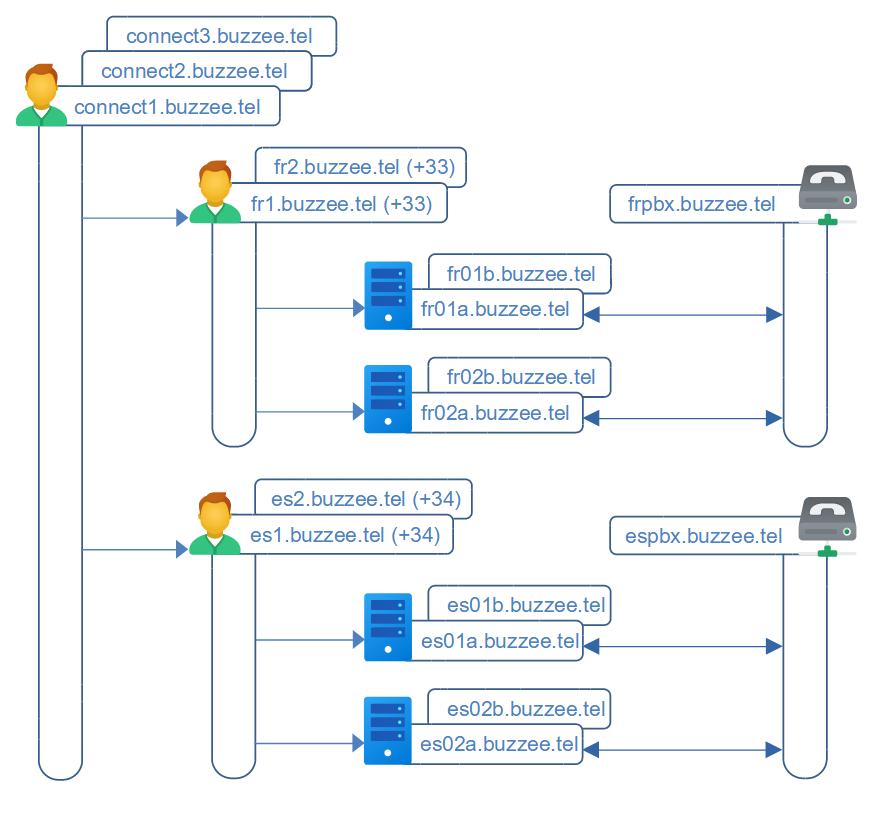
The topology of the infrastructure implies 3 levels :
- The top-level global connect servers (connect1, connect2, connect3, ... ), queueing future users in waiting list per country
- The regional connect servers (per country, fr1.buzzee.tel, fr2.buzzee.tel,...), meant for lookups to locate on which hosting servers are hosted the account of each user.
- The local hosting servers fra01.buzzee.tel (frb01.buzzee.tel), fra02.buzzee.tel (frb02), fra03.buzzee.tel (frb03), store the user accounts.
Top-level global connect servers are in charge to redirect to region server based on the International Prefix of the phone number of the user.
connect1.buzzee.tel will redirect a request for phone number 33612345678 to region fr1.buzzee.tel (fr2, fr3).
The regional server, fr1.buzzee.tel will in turn redirect the user to the server hosting the user account database.
Lookup server hosting the user
Important: Prefer to use the file Regions.json, Regions.xml or Regions.xml provided on the top-level global connect server to perform on your application the lookup to locate the regional connect server associated with the international prefix of the phone number of the user.
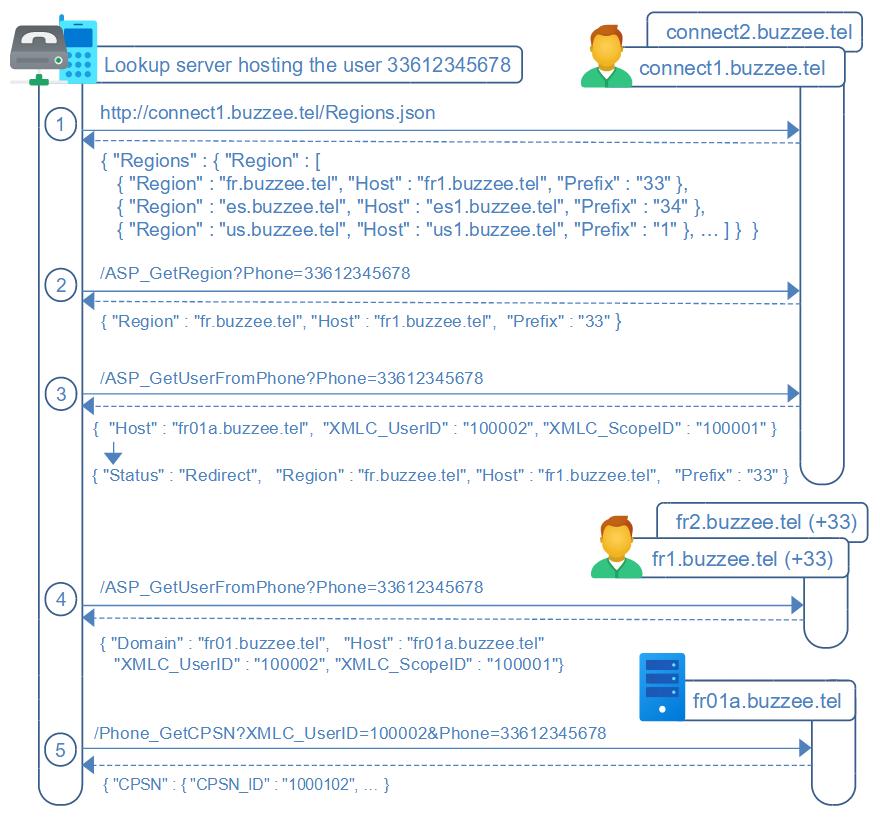
For the time of upgrading existing code base a compatiblity API is provided for ASP_ GetUserFromPhone when requesting on the top-level global connect server connect1.buzzee.tel,
but as soon as possible, adapt your code to lookup the regional server without querying against connect1.buzzee.tel, connect2.buzzee.tel.
1. Download the file https://connect1.buzzee.tel/Regions.json or https://connect1.buzzee.tel/Regions.xml or https://connect1.buzzee.tel/Regions.csv or using basic http, top-level global servers are connect1.buzzee.tel, connect2.buzzee.tel, connect3.buzzee.tel, (get the first one which is responding)
this file contains all the regions per international prefix:
{ "Prefix": "33", "CountryCode": "FR", "Country": "France", "Languages": "fr-FR,frp,br,co,ca,eu,oc",
"Region": "fr.buzzee.tel", "Host": "fr1.buzzee.tel", "Hosts": "fr2.buzzee.tel", "Wait": "1" }
the algorithm consists to search the longest prefix of the phone number,
this algorithm can be implemented as 4 lookups starting with the first 4 digits, then the first 3 digits,
then the first 2 digits, and finally on the very first digit of the phone number,
as soon as one of the Region matches the prefix of the phone number,
select this region and perform lookup /ASP_GetUserFromPhone on the regional connect server.
Example: Lookup server hosting user 33612345678, the first lookup 3361 does not match any prefix, then 336 does not match any prefix either, finally lookup 33 matches prefix of Region fr.buzzee.tel
this provides the regional connect host fr1.buzzee.tel (fr2.buzzee.tel, fr3.buzzee.tel expressed in the field "Hosts")
4. Lookup on the regional server https://fr1.buzzee.tel/JSON/ASP_GetUserFromPhone?Phone=33612345678 to obtain the local server hosting the user account.
Note: ASP_GetRegion on server connect1.buzzee.tel is a temporary service to lookup a region from a phone number. But the preferred method to lookup a region from phone number should be to download the file https://connect1.buzzee.tel/Regions.json and lookup by prefix or country code to locate the regional server managing the list of users.
Workflow of transcription
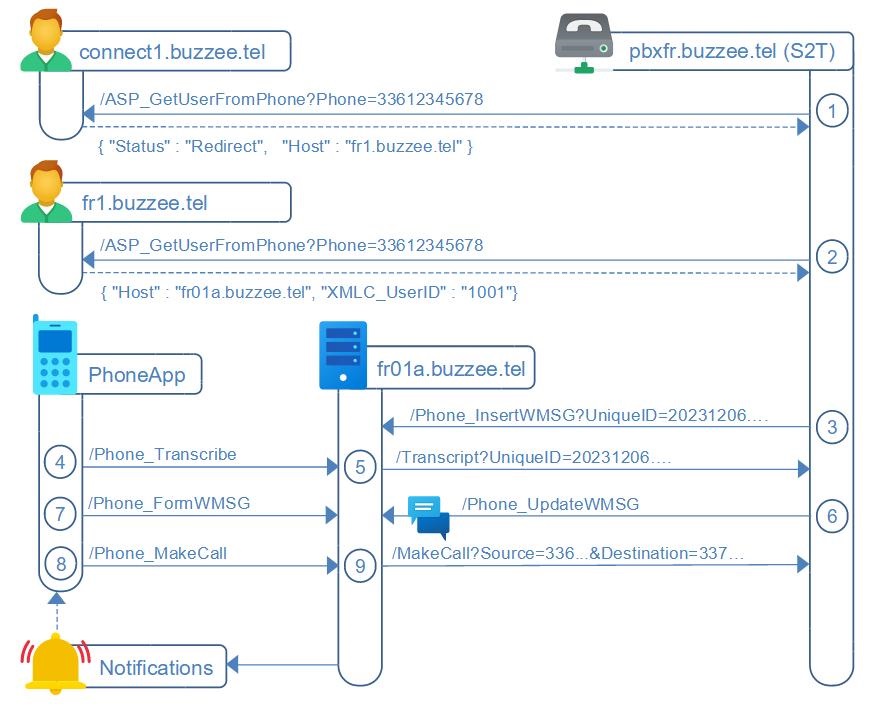
The workflow is summarized as follow (not related to pin number in the schema):
1. Every phone call will be recorded by the VoIP Asterisk PBX (part of the S2T SpeechToText server), and identified with a UniqueID
2. When a call is terminated the S2T servers will lookup in connect.buzzee.tel to get the Delos server hosting the Source or the Destination (each one could be user of buzzee.tel and so workflow applies to each one)
3. S2T sends a Phone_InsertWMSG request to the appropriate Delos Server with the UniqueID of the call
4. Delos will store a WMSG[WMSG_ID] with the information of this call UniqueID
------------------------------------------------------------------------------------------------------
Following steps are optional since custom options for automatic transcript or never transcript may have been setup per contact,
if contact has an option to transcript every time, Delos will trigger immediately a request to S2T to obtain the transcript of the call, and will send a request to PhoneNotifications with parameter WMSG_TRANSCRIPT_STATUS=Queued
if contact has an option to never transcript, Delos will not send a request to PhoneNotifications
5. Delos will send a request to PhoneNotifications server that a new call has been recorded
6. The PhoneNotifications server notifies the appropriate PhoneApp
7. The user of the PhoneApp can trigger the transcription of the call by invoking Delos server Phone_Transcript
(if WMSG_TRANSCRIPT_STATUS is not already in state "Queued")
------------------------------------------------------------------------------------------------------
8. Delos server sends a request to S2T server to start the transcript with the UniqueID, the WMSG_ID and user XMLC_UserID requesting the transcript
9. S2T is invoking Delos server when transcript is completed with the WMSG_ID and XMLC_UserID along the summary and the transcript
10. Delos server stores in WMSG[WMSG_ID] the summary and transcript
11. Delos server notifies PhoneNotifications server that the transcript WMSG[WMSG_ID] is ready for this XMLC_UserID
12. PhoneNotifications relay to the proper PhoneApp
13. PhoneApp invokes Delos server Phone_FormWSMG to retrieve the summary and transcript of the call.
Protocol
All communications are based on the HTTP protocol conforming to HTTP/1.1.
For clarity of this documentation, all parameters of HTTP POST requests MUST BE application/x-www-form-urlencoded
Requests containing file to be uploaded are POST multipart/form-data.
All content encoding are utf-8 : headers, parameters of the request, content of the response.
Each instance can be accessed by primary URL (priority should be given to this URL), and secondary URL (fail-safe).
Example of URL: https://fr01a.buzzee.tel/JSON/Phone_ListWMSG
Authentication to invoke an instance requires 2 parameters XMLC_UserID + XMLC_Session.
These parameters are obtained after initial registration using Email/Phone + PIN code
These authentication parameters can be submitted as Cookies, or in the URL
Example of URL with parameters:
https://fr01a.buzzee.tel/JSON/Phone_ListWMSG?XMLC_UserID=1000001&XMLC_Session=abcdef1234
The authentication can also be submitted as credentials encoded as a prefix in URL:
https://fr01a.buzzee.tel/JSON/1xxx1abcdef/Phone_ListWMSG
the Credentials encoded token can be obtained after initial registration.
Communication server to server do not require XMLC_Credential,
authorization is granted by IP bypass for the restricted and specific services to be invoked per application.
Common parameters to submit are:
- XMLC_Culture=en to obtain date formatted as m/d/yyyy (fr will format date as dd/mm/yyyy)
- XMLC_Language=ENGLISH
In case an error occurs, the status is in the range of 400 or 500, the response is formatted as follow:
{
  "Code": "ERR_INVALID_PARAM",
  "Message": "Parameter UniqueID is missing"
}
h2 implementation simulates HTTP status response code using pseudo header field ":status"
you client implementation will need to decode this pseudo header field like browsers are performing,
or simply prefer HTTP/1.1.