Asterisk WebSockets
Disclaimer
This document is a prelimary version and work-in-progress,
Details discussed in this document will be subject to future modifications.
Asterisk WebSockets
The dedicated Asterisk server managing WebSockets will connect to the server hosting the user a WebSocket Server listening on port 880 (as configured in websocket_clint.conf) for each new incoming call, and stream in/out the audio channel (PCM 16bit 8KHz) through WebSocket binary messages.
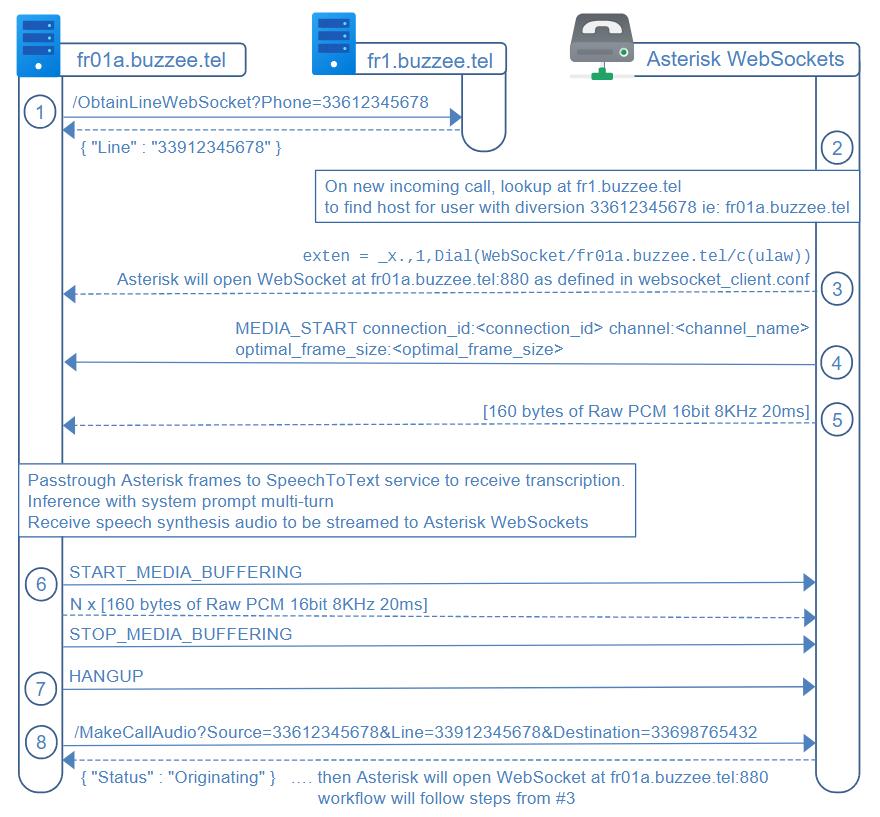
The workflow for Asterisk WebSockets is summarized through the major steps :
1. Delos MAY query the regional server fr1.buzzee.tel to reserve a dedicated line for WebSockets applications /ObtainLineWebSocket. Otherwise the generic line number provided by the PBX (33912345678) will be used to setup redirection.
2. On new incoming call arriving at this Asterisk PBX setup for WebSockets, the PBX will lookup at regional server fr1.buzzee.tel/JSON/ASP_GetUserFromPhone?Phone=33612345678 to get the host server for the user having call forwarded his line.
3. the PBX will use the server name hosting the user to Dial() the WebSocket channel driver. This will use the WebSocket connection parameters as defined in websocket_client.conf on the Asterisk server. Asterisk will connect the WebSocket to the user server (fr01a.buzzee.tel).
4.the initial text command MEDIA_START sent by Asterisk in the WebSocket will contain the connection_id and channel. Cannel info may be used to lookup Asterisk REST Interface /channels/{channelId} to obtain CallerID, CalledID
5. The PBX will stream as binary messages the RTP Raw PCM as ulaw PCM 16bits 8Khz.
6. This is the duty of Delos instance to passthru the MEDIA stream to the SpeechToText service to obtain the transcription. The inference based on system instructions and multi-turn conversation is managed at the level of the Delos instance. Finally Delos instance is in charge to obtain the speech synthesis to be streamed in the Asterisk WebSocket as binary message.
7. Delos may terminate a call by sending a HANGUP command as text message through the Asterisk WebSocket.
8. The endpoint API /MakeCallAudio on the PBX server will originate the call and Asterisk will start the workflow from stage #3.
HTTP Authorization and Protocol
Authorization for communications between PBX and host servers fr01a.buzzee.tel (fr02a.buzzee.tel, ...) will be ByPass per IP.
The WebSockets TCP server hosted on Delos servers will listen on port 880. The Asterisk server will initiate the WebSocket connection as defined in websocket_client.conf.
Asterisk WebSocket Format
As defined in the documentation of the Channel driver WebSocket:
https://docs.asterisk.org/Configuration/Channel-Drivers/WebSocket/
Asterisk Configuration
The PBX should perform a lookup on the Regional server fr1.buzzee.tel/JSON/ASP_GetUserFromPhone?Phone=33612345678 to obtain the server hosting the user before invoking the Dial() application:
exten = _x.,1,Dial(WebSocket/fr01a.buzzee.tel/c(ulaw))
The parameter of Dial(WebSocket/ConnectionName/...) should be replaced with the name of the server returned after lookup at fr1.buzzee.tel/JSON/ASP_GetUserFromPhone?Phone=33612345678
The file websocket_client.conf will contain the list of the Delos WebSockets servers listening for new connections:
[fr01a.buzzee.tel]
type = websocket_client
uri = ws://fr01a.buzzee/tel:880
protocols = media
connection_type = per_call_config
connection_timeout = 500
reconnect_interval = 500
reconnect_attempts = 5
tls_enabled = no

[fr02a.buzzee.tel]
type = websocket_client
uri = ws://fr02a.buzzee/tel:880
protocols = media
connection_type = per_call_config
connection_timeout = 500
reconnect_interval = 500
reconnect_attempts = 5
tls_enabled = no

...
/ObtainLineWebSocket (Delos -> Regional Server)
Delos will forward the request /Phone_ObtainAssistant received by the PhoneApp to the Regional server by invoking /ObtainLineWebSocket
https://fr1.buzzee.tel/Delos/ObtainLineAudio?Phone=33612345678
| Fields | Description |
|---|---|
| Phone | The phone line of the user to be redirected to the Asterisk serving the WebSockets Audio. The Regional server will reserve a number from a pool of available lines and record this Line associated with the user. |
PBX AudioSockets will respond with a XML document (for the purpose of this documentation is is displayed as JSON):
{ "Line": "33987654321" }
The major fields are:
| Fields | Description |
|---|---|
| Line | The line to setup call fowarding. |
The following table summarizes the different error codes:
| Errors | Description |
|---|---|
| ??? | ??? |
/MakeCallAudio (Delos -> PBX)
Delos may need to initiate a call in the context of WebSockets Audio.
Delos will invoke a HTTP GET request to the PBX server
http://frpbx.buzzee.tel/MakeCallAudio?Source=33612345678&Destination=33609876543
| Fields | Description |
|---|---|
| Source | This is the phone number of the user, formatted as 33612345678 |
| Destination | This is the phone number of the contact to call, formatted as 33609876543 |
The PBX server will respond with Status=Originating :
{
  "Status": "Originating"
}
The following table summarizes the different error codes:
| Errors | Description |
|---|---|
| ERR_INVALID_SOURCE | Invalid phone number for the parameter Source |
| ERR_INVALID_DESTINATON | Invalid phone number for the parameter Destination |