Record (R2T)
Disclaimer
This document is a prelimary version and work-in-progress,
Details discussed in this document will be subject to future modifications.
Workflow
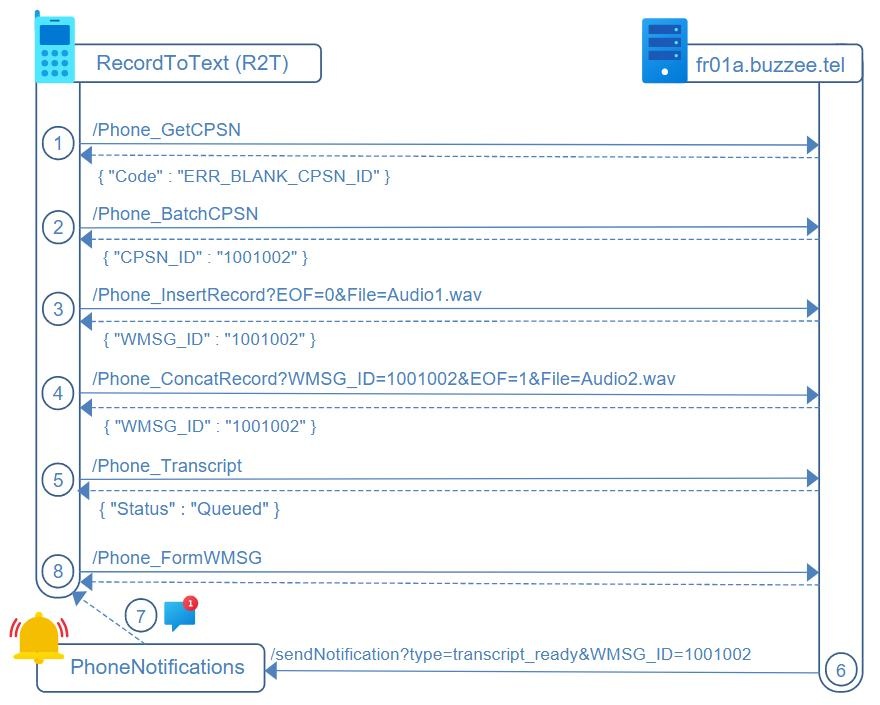
The workflow for RecordToText (R2T) is summarized through the major steps : audio recording, upload, transcript.
The R2T application will initiate the audio recording with a contact, the application will upload the audio recording as multi-parts in background every minute or so, and finally will retrieve the transcription to be displayed to the user.
The workflow of this process is described below:
1. R2T application will query /Phone_GetCPSN on the Delos instance to lookup the contact details based on the phone number of the contact
2. If the contact is unknown or if the details of the contact needs to be updated, the R2T will invoke /Phone_BatchCPSN to update the contact details on the Delos instance. The contact details provide valuable hint to the server in charge of transcript.
3. R2T uploads the audio recording at once, or only the first part by invoking Delos instance using /Phone_InsertRecord
4. R2T uploads the subsequent parts of the audio recording every minute or so using /Phone_ConcatRecord, and set parameter EOF=1 for the last part.
Delos performs the transcription in background for every part, and concatenate the text, preparing while waiting the final part to be uploaded.
5. Optional. R2T may invoke /Phone_Transcript to initiate the transcript of the conversation, even if Delos is now managing the transcription in background for every parts of the audio recording being uploaded.
6. Delos server invokes /sendNotification on PhoneNotifications server to inform the requested transcript is ready for this WMSG[WMSG_ID]
7.The PhoneNotifications will relay the notifications through FCM (FireBase Cloud Messaging) to the R2T mobile app
8. R2T mobile app intercept the notification and request /Phone_FormWMSG on Delos server, to obtain the details of summary and transcript of the conversation
HTTP Authorization and Protocol
Authorization between Phone application RecordToText (R2T) and Delos instance of the user requires XMLC_Credential, a token value encoding XMLC_UserID + XMLC_Session.
All HTTP requests targeting Delos instance from the R2T phone application will be considered in this specification formatted as:
https://fr01a.buzzee.tel/JSON/1xxx1abcdef/Phone_ListWMSG
where 1xxx1abcdef is the XMLC_Credential encoding XMLC_UserID+XMLC_Session
This credential is obtained after initial registration
Audio File Format
SpeechToText server (S2T) request to have WAV file (uncompressed).
The application R2T RecordToText will convert on the client device any MP4, MP3 file, before uploading the file to WAV format.
/Phone_GetCPSN (R2T -> Delos)
The R2T application SHOULD lookup contact details from Delos instance to check if informations are up-to-date.
These data facilitate the process of transcript for the recorded conversation,
R2T sends a HTTP GET request to Delos instance:
https://fr01a.buzzee.tel/JSON/1xxx1abcdef/Phone_GetCPSN?Phone=33609876543
| Fields | Description |
|---|---|
| Phone | The phone number used to lookup CPSN_ID with informations. Use either parameter Phone or CPSN_ID |
Delos instance will respond with a JSON document:
{ "CPSN" :
  { "CPSN_ID" : "1000202", "CPSN_VERSION" : "1000042"
    "CPSN_FIRST_NAME" : "Dave", "CPSN_LAST_NAME" : "THEUGLY",
    "CCOMS" : { "CCOM" :
          [ { "CCOM_ID" : "1001", "CCOMKND_ID" : "-3515", "CCOM_VALUE" : "33609876543" },
            { "CCOM_ID" : "1002", "CCOMKND_ID" : "-3501", "CCOM_VALUE" : "dave@acme.com" },  ….
          ] }
  },
  "CLOC" : { "CLOC_ID" : "10000201", "CLOC_VERSION" : "1000041", "CLOC_NAME" : "ACME" }
}
The major fields are:
| Fields | Description |
|---|---|
| CPSN_LAST_NAME | Last name of the contact |
| CPSN_FIRST_NAME | First name of the contact |
| CLOC_NAME | Name of the organization |
| CLOC_CITY | City of the organization/contact |
The following table summarizes the different error codes:
| Errors | Description |
|---|---|
| ERR_BLANK_CPSN_ID | The Contact cannot be located from the Phone number supplied. |
/Phone_BatchCPSN (R2T -> Delos)
If the PhoneApp detects contact informations are not up-to-date between local version and Delos database,
PhoneApp will POST a request to Delos instance with the content of the body as a JSON document:
https://fr01a.buzzee.tel/JSON/1xxx1abcdef/Phone_BatchCPSN
{ "CPSN" :
  { "CPSN_ID" : "1000202", "CPSN_VERSION" : "1000042"
    "CPSN_FIRST_NAME" : "Dave", "CPSN_LAST_NAME" : "THEUGLY",
    "CCOMS" : { "CCOM" :
          [ { "CCOM_ID" : "1001", "CCOMKND_ID" : "-3515", "CCOM_VALUE" : "33609876543" },
            { "CCOM_ID" : "1002", "CCOMKND_ID" : "-3501", "CCOM_VALUE" : "dave@acme.com" },  ….
          ] }
  },
  "CLOC" : { "CLOC_ID" : "10000201", "CLOC_VERSION" : "1000041", "CLOC_NAME" : "ACME" }
}
The major fields are:
| Fields | Description |
|---|---|
| CPSN_ID | The Contact ID, this is the value WMSGPSN_PSN from the WMSG. |
| CPSN_LAST_NAME | Last name of the contact |
| CPSN_FIRST_NAME | First name of the contact |
| CLOC_ID | ID of the organization |
| CLOC_NAME | Name of the organization |
| CLOC_CITY | City of the organization/contact |
The following table summarizes the different error codes:
| Errors | Description |
|---|---|
| ERR_BLANK_CPSN_ID | The parameter CPSN_ID is missing |
/Phone_InsertRecord (R2T -> Delos)
To upload the recorded conversation as a wav file, the HTTP request will use POST multipart/form-data.
https://fr01a.buzzee.tel/JSON/1xxx1abcdef/Phone_InsertRecord?
CPSN_ID=1001002
WMSG_DATE=2023-12-26 12:34:56
WMSG_DURATION=375
File=Conversation.wav (or Audio1.wav)
| Fields | Description |
|---|---|
| CPSN_ID | Contact ID retrieved from the response of one of the previous request Phone_GetCPSN or Phone_BatchCPSN |
| WMSG_DATE | 2023-12-26 12:34:56 OR needs to be formatted in the regional settings of the user. en: m/d/yyyy fr: dd/mm/yyyy If blank, the current date time of the server will be used. |
| WMSG_DURATION | Duration of the recording in seconds example: 375 means 6'15" |
| WMSG_INFO | Description of the recording. |
| EOF | NEW AS OF 2025-06-26. By default if EOF is not transmitted it will be considered the file is the complete audio recording. EOF=1 the file uploaded will also be considered as a complete audio recording. EOF=0 will explicitely mean that the file content uploaded is the first minute, and subsequent parts will be concatenated by invoking /Phone_ConcatRecord with the WMSG_ID returned by the action /Phone_InsertRecord. |
| File | Filename should include a valid extension: .wav File format should be WAV as PCM not compressed with proper header. As of 2025-06-26 if the file part is partial audio recordingm the filename should be formatted as Audio1.wav. Subsequent file parts will be Audio2.wav, Audio3.wav, ... uploaded using /Phone_ConcatRecord |
Delos instance will respond with the fields WMSG_ID of the newly file attached to the the message:
{
  "WMSG_ID": "1001002"
}
/Phone_ConcatRecord (R2T -> Delos)
NEW AS OF 2025-06-26: This feature is used while the audio recording is in progress to upload every minute or so, partial WAV file.
The HTTP request will use POST multipart/form-data.
http://fr01a.buzzee.tel/JSON/1xxx1abcdef/Phone_ConcatRecord?
WMSG_ID=1001002
File=Audio2.wav
| Fields | Description |
|---|---|
| WMSG_ID | The value returned by the action /Phone_insertRecord |
| EOF | Optional for the parts from Audio2.wav upto the part before the last one. EOF=1 is mandatory for the last part of the audio recording. |
| File | File format should be WAV as PCM not compressed with proper header. Filename should include a valid extension ".wav". Filename should be formatted with the number of the part: Audio2.wav, Audio3.wav considering that the first part Audio1.wav has been uploaded during the initial action /Phone_insertRecord |
Delos instance will respond with Status=OK
{
  "Status": "OK"
}
Delos will queue in async a request to transcribe this Wav file. Upon response, Delos will concatenate the transcription for this UniqueID, until Phone_InsertWMSG will be invoked at the end of the call.
/Phone_Transcript (R2T -> Delos)
R2T may trigger the transcript of the conversation by invoking a HTTP GET request:
https://fr01a.buzzee.tel/JSON/1xxx1abcdef/Phone_Transcript?WMSG_ID=1001002
| Fields | Description |
|---|---|
| WMSG_ID | Message ID of the phone call. |
| CPSN_TRANSCRIPT | Optional. 0=Never. 1=Always. 2=Prompt. CPSN_TRANSCRIPT=1 is a hint for Delos instance to store this parameter associated with this contact, in order for future conversation being uploaded to start transcript without prompting the user. |
Delos instance will respond with the Status Queued, meaning the request has been forwarded to S2T server:
{ "Status" : "Queued" }
Note: PhoneApp MAY invoke Phone_UpdateCPSN_TRANSCRIPT to store for a contact (CPSN_ID) the behavior on new phone call recording. 0=Never. 1=Always. 2=Prompt.
https://fr01a.buzzee.tel/JSON/1xxx1abcdef/Phone_UpdateCPSN_TRANSCRIPT?CPSN_ID=1000202&CPSN_TRANSCRIPT=0
Workflow to transcribe a wav file
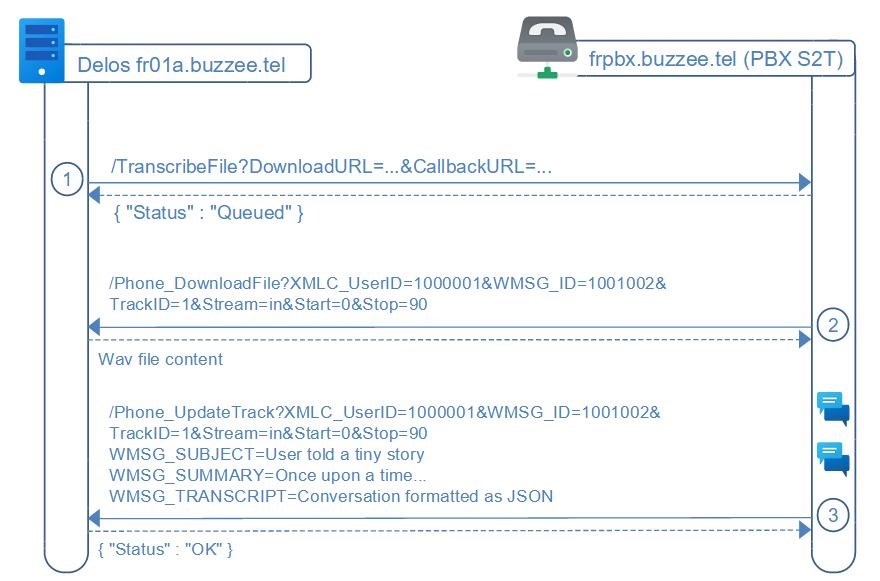
The workflow to transcribe a single WAV file, implies 3 requests:
1. Delos instance will invoke S2T /TranscribeFile to request the transcription of a WAV file by submitting a DownloadURL and a CallbackURL, including a custom prompt, language and model to use for the transcription.
2. When ready to process the transcription, S2T server will download the WAV file (GET) from the Delos instance using the parameter DownloadURL
3. Once the transcription of the WAV file has been completed by S2T, the server S2T POST the transcription to Delos instance to the CallbackURL parameter received from the TranscribeFile request
/TranscribeFile (Delos -> S2T)
Delos instance will use the initial transcript to extract main subjects of the discussion and split both streams of the WAV as tracks.
Delos will send a HTTP POST request to S2T server to initiate the transcription of a custom file URL, with a custom prompt as an initial context,
http://s2t.buzzee.tel/TranscribeFile?
XMLC_UserID=1000001
XMLC_Domain=fr01.buzzee.tel
XMLC_Host=fr01a.buzzee.tel
Language=en (new as of 2024-05-28)
Model=whisper-large
Prompt=This is the record of a contact for a job interview (new as of 2024-05-28)
Summary=1
DownloadURL=http://fr01a.buzzee.tel/JSON/DownloadFile?XMLC_UserID=100001&WMSG_ID=10010027&TrackID=1&Stream=in&Start=0&stop=90
CallbackURL=http://fr01a.buzzee.tel/JSON/PhoneUpdateTrack?XMLC_UserID=100001&WMSG_ID=10010027&TrackID=1&Stream=in&Start=0&stop=90
| Fields | Description |
|---|---|
| XMLC_UserID | Can be used to trace request per user. |
| XMLC_Host | Can be used to trace request per server. |
|
Language |
Hint of the language probably used by the participants in the recorded file. Example: fr (en, es, ...) if the Language is blank or is not a registered Language, S2T will use its default value or simply leave it blank. |
| Model | Possible values: whisper-large if the Model is blank or the Model is not registered, S2T will use its default backend. |
| Prompt | Custom text containing user and contact names, possibly summary of previous conversations. In case of TrackID being present, it may contain the initial transcript of the conversation, reduced to the duration of the track. |
| Summary | Optional parameter. If Summary=1 the respons should contain the summary of the transcription |
| DownloadURL | URL to download the WAV file (PCM not compressed). Example: http://fr01a.buzzee.tel/JSON/DownloadFile?XMLC_UserID=100001&WMSG_ID=10010027&TrackID=1&Stream=in&Start=0&stop=90 |
| CallbackURL | URL to POST the transcription once completed Example: http://fr01a.buzzee.tel/JSON/PhoneUpdateWMSG?XMLC_UserID=100001&WMSG_ID=10010027 or http://fr01a.buzzee.tel/JSON/PhoneUpdateTrack?XMLC_UserID=100001&WMSG_ID=10010027&TrackID=1&Stream=in&Start=0&stop=90 |
S2T server will respond with Status=Queued :
{
  "Status": "Queued"
}
/Phone_DownloadFile (S2T -> Delos)
The SpeechToText server will invoke the DownloadURL provided as a parameter during the request to TranscribeFile,
S2T will download the file by sending a HTTP GET request to Delos instance:
http://fr01a.buzzee.tel/JSON/Phone_DownloadFile?XMLC_UserID=1000001&WMSG_ID=1001001&Stream=in&TrackID=1&Start=0&Stop=30
All the parameters of DownloadURL are provided when invoking /TranscribeFile.
| Fields | Description |
|---|---|
| XMLC_UserID | The UserID parameter provided with action /TranscribeFile |
| WMSG_ID | The Message ID for the conversation to transcribe. |
| Stream | Optional. This parameter may be blank, 'all', 'in' or 'out'. |
| TrackID | Optional. This parameter is used when splitting a larger conversation with multiple subjects in chunks (tracks). This parameter need to be transmitted back when S2T invokes Phone_UpdateTrack. Important: If this parameter is not present, then S2T MUST invoke Phone_UpdateWMSG. This parameter is transmitted when invoking TranscribeFile without WAV File being uploaded. |
| Start/Stop | Optional. This parameter is used to split the WAV file between Start and Stop expressed in seconds. Example: Start=90&Stop=180 means to extract from 1'30" from the beginning up to 3'00" This parameter is transmitted when invoking TranscribeFile without WAV File being uploaded. |
The following table summarizes the different error codes:
| Errors | Description |
|---|---|
| ERR_BLANK_WMSG_ID | The parameter WMSG_ID is missing |
| ERR_FILE_NOT_FOUND | There is no file attached to this message |
/Phone_UpdateWSMG (S2T -> Delos)
Once the transcript has been completed by S2T, the S2T server will invoke the CallbackURL (provided as a parameter in request to TranscribeFile), to update the transcript of the message (optionally the summary to be discussed)
The HTTP request will be POST:
http://fr01a.buzzee.tel/JSON/Phone_UpdateWMSG?XMLC_UserID=1000001&WMSG_ID=1001002
The content of the request will contain the transcript formatted as JSON
WMSG_SUMMARY={"summary": "John doe, and 33609876543 are discussing improving...", "title": "Performance optimization",
WMSG_TRANSCRIPT=JSON document containing the details of the sequences
Most of the parameters of the CallbackURL are provided when invoking /TranscribeFile.
| Fields | Description |
|---|---|
| XMLC_UserID | The UserID |
| WMSG_ID | The MessageID parameter provided |
| Stream | Optional. This parameter may be blank, 'all', 'in' or 'out'. |
| TrackID | New parameter as of 2024-05-28. Optional. This parameter is used when splitting a larger conversation in chunks (tracks). |
| Start/Stop | Optional. These parameters are used to split the WAV file between Start and Stop expressed in seconds. Example: Start=90&Stop=180 means to extract from 1'30" from the beginning up to 3'00" |
| WMSG_SUMMARY | {"summary": "John doe, and 33609876543 are discussing improving...", "title": "Performance optimization", "usage": { "prompt_tokens": 8, "completion_tokens": 16, "total_tokens": 24 }, "importants": [ {"type": "RDV", "date": "18 to 24 march", "description": "Travel to NY"} ] } |
| WMSG_TRANSCRIPT | JSON transcript of the conversation formatted as follow: [ { "user": "1000002", "start":1600, "stop":1900, "message":"Hello Dave" }, { "user": "1000202", "start": 2720, "stop":3440, "message":"Hi Bob" }, ... ] |
Delos instance will respond with the fields WMSG_ID:
{
  "WMSG_ID": "1001002"
}
/Phone_UpdateTrack (S2T -> Delos)
Once the transcript has been completed by S2T, the S2T server will invoke the CallbackURL of Delos instance,
this CallbackURL has been provided during the request to /TranscribeFile,
The HTTP request will be POST
http://fr01a.buzzee.tel/JSON/Phone_UpdateTrack?XMLC_UserID=1000001&WMSG_ID=1001002&TrackID=1&Stream=in&Start=0&Stop=90
The content of the request will contain the transcript formatted as JSON
WMSG_SUMMARY={"summary": "John doe, and 33609876543 are discussing improving...", "title": "Performance optimization",
WMSG_TRANSCRIPT=JSON document containing the details of the sequences
TrackID=1
Most of the parameters of the CallbackURL are provided when invoking /TranscribeFile.
| Fields | Description |
|---|---|
| XMLC_UserID | The XMLC_UserID parameter provided in /TranscribeFile |
| WMSG_ID | The WMSG_ID parameter provided in /TranscribeFile |
| TrackID | The TrackID parameter provided in /TranscribeFile |
| Stream | The Stream parameter provided in /TranscribeFile the values may be blank, 'all, 'in' or 'out' |
| Start/Stop | Optional. These parameters are used to split the WAV file between Start and Stop expressed in seconds. Example: Start=90&Stop=180 means to extract from 1'30" from the beginning up to 3'00" |
| WMSG_SUMMARY | {"summary": "John doe, and 33609876543 are discussing improving...", "title": "Performance optimization", "usage": { "prompt_tokens": 8, "completion_tokens": 16, "total_tokens": 24 }, "importants": [ {"type": "RDV", "date": "18 to 24 march", "description": "Travel to NY"} ] } |
| WMSG_TRANSCRIPT | Raw transcript of the conversation formatted as follow: { [ { "user":"1000002","start":1000,"stop":1200,"message":"Hello Bob. How are you?"}, { "user":"1000202","start":2000,"stop":2200,"message":"Great, and you?"}, ... ] } |
Delos instance will respond with a Status OK
{
  "Status": "OK"
}
/sendNotification [type=transcript_ready] (Delos -> PhoneNotifications)
Once the transcript has been completed by S2T server, Delos instance sends a HTTP GET request to the PhoneNotifications server, with the following parameters:
https://phoneappnotifications.buzzee.tel/sendNotification?
XMLC_UserID=1000001&
XMLC_Credential=1xx1abcdef&
Host=fr01a.buzzee.tel&
Domain=fr01.buzzee.tel&
type=transcript_ready&
Application=Record&
Token=abcdef0123456789&
WMSG_ID=1001002
| Fields | Description |
|---|---|
| XMLC_UserID | Delos internal user ID |
| XMLC_Credential | Credential for the user, it can be used to invoke Delos instance from the PhoneNotifications server in order to invalidate the device registration token of the user http://fr01a.buzzee.tel/JSON/1xx1abcdef/Phone_Register?Application=Record&Token=... |
| Host | Host of the Delos instance where is located the user of the message. This is the host to be used for the URL to invoke Delos instance. |
| Domain | Domain of the user XMLC_Domain + XMLC_UserID is used to lookup the connected PhoneApp at PhoneNotifications server |
| type | transcript_ready in order to have a unique endPoint URL for PhoneNotifications server, the action /sendNotification requires an additional parameter: type=transcript_ready |
| Application | The target application for this notification. "Record" in the case of the mobile application "R2T" |
| Token | This is the device registration token which has been stored using /Phone_Register?Application=Record&Token=abcdef0123456789 |
| WMSG_ID | Message ID of the phone call. This ID will be used to request Phone_FormWMSG |
/Phone_FormWMSG (PhoneApp -> Delos)
At this stage PhoneApp may retrieve the summary and the transcript by invoking a HTTP GET request
https://fr01a.buzzee.tel/JSON/1xxx1abcdef/Phone_FormWMSG?WMSG_ID=1001002
| Fields | Description |
|---|---|
| WMSG_ID | Message ID of the phone call. |
Delos instance will respond with a JSON document corresponding to the message:
{ "WMSG" : {
    "WMSG_ID": "1001002",
    "WMSG_DATE" : "26/12/2023 09:00:00",
    "WMSG_DURATION" : "00:10:00",
    "WMSG_INOUT" : "1",
    "WMSG_MEDIA" : "-3515",
    "WMSG_INFO" : "Once upon a time…",
    "WMSG_SUMMARY" : "Once upon a time…",
    "WMSG_TRANSCRIPT" : { "Sequence" :
      [ { "ID" : "00:00:00.980", "Time" : "09:00:00", From : "1000202", "Message" : "Hello Bob" },
        { "ID" : "00:00:02.140", "Time" : "09:00:02", From : "1000003", "Message" : "Hi Dave" },  ….
      ] }
} }
On real Delos servers the JSON document will return a larger document with a lot more fields, but these are the minimalists to be useful in the context of PhoneApp.
| Fields | Description |
|---|---|
| WMSG_INFO | Summary of the conversation. WMSG_INFO can be edited with custom notes. At this stage WMSG_INFO and WMSG_SUMMARY have the same value. |
| WMSG_SUMMARY | Summary of the conversation |
| WMSG_TRANSCRIPT | Dataset containing the multiple "Sequence" of the conversation |
| Sequence | One line per person speaking |
| ID | Elapsed seconds and milliseconds since the begining of the call. This value can be used to identify a "Sequence" |
| Time | Time of the sequence calculated from WMSG_DATE + elapsed time. This value is rounded to the second. |
| From | The CPSN_ID saying this sequence. It can be either the User or the Contact |
| Message | The text of the transcript for this sequence |
To obtain details of the contact R2T mobile app may request /Phone_GetCPSN?CPSN_ID=1000202
Workflow when opening R2T
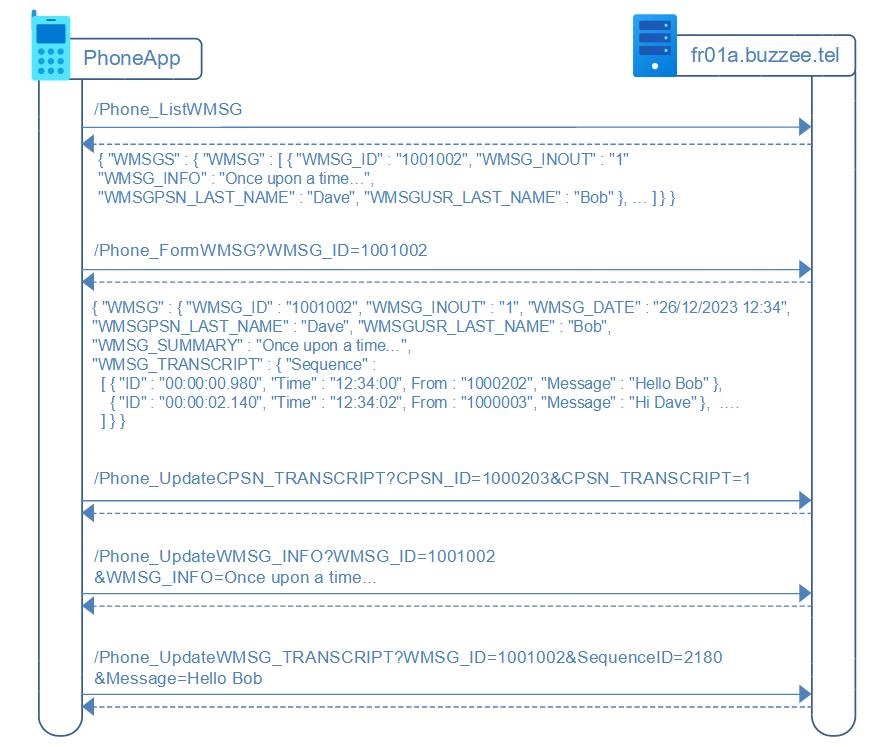
When starting the R2T mobile app, it retrieves the list of messages (of type conversation recorded) by sending a Phone_ListWMSG request to Delos, and may request some details per conversation by invoking /Phone_FormWMSG
/Phone_ListWMSG (R2T -> Delos)
R2T may retrieve the list of recent conversations by invoking as HTTP GET request
https://fr01a.buzzee.tel/JSON/1xxx1abcdef/Phone_ListWMSG?WMSGKND_ID=-3528
Delos instance respond with a JSON document corresponding to the list of messages:
{ "WMSGS" : { "WMSG" : [
   { "WMSG_ID": "1001002", "WMSG_DATE": "12/12/2023 09:20:00", "WMSG_INOUT" : "2",
     "WMSG_INFO" : "Custom summary for confcall #2",
     "WMSG_SUMMARY" : "Once upon a time...",
     "WMSGUSR_PSN" : "1000002", "WMSGUSR_FIRST_NAME" : "Bob", "WMSGUSR_LAST_NAME" : "THEGREAT",
     "WMSGPSN_PSN" : "1000202", "WMSGPSN_FIRST_NAME" : "Dave", "WMSGPSN_LAST_NAME" : "THEUGLY" },
   { "WMSG_ID": "1001004", "WMSG_DATE": "12/12/2023 09:00:00", "WMSG_INOUT" : "1",
     "WMSG_INFO" : "Summary ConfCall #1",
     "WMSG_SUMMARY" : "Once upon a time...",
     "WMSGUSR_PSN" : "1000002", "WMSGUSR_FIRST_NAME" : "Bob", "WMSGUSR_LAST_NAME" : "THEGREAT",
     "WMSGPSN_PSN" : "1000202", "WMSGPSN_FIRST_NAME" : "Dave", "WMSGPSN_LAST_NAME" : "THEUGLY" },
   ...
   ] }
}
On real Delos servers the JSON document will return a larger document with a lot more fields, but these are the minimalists to be useful in the context of PhoneApp to display the recent calls.