Campaign
Disclaimer
This document is a prelimary version and work-in-progress,
Details discussed in this document will be subject to future modifications.
Workflow
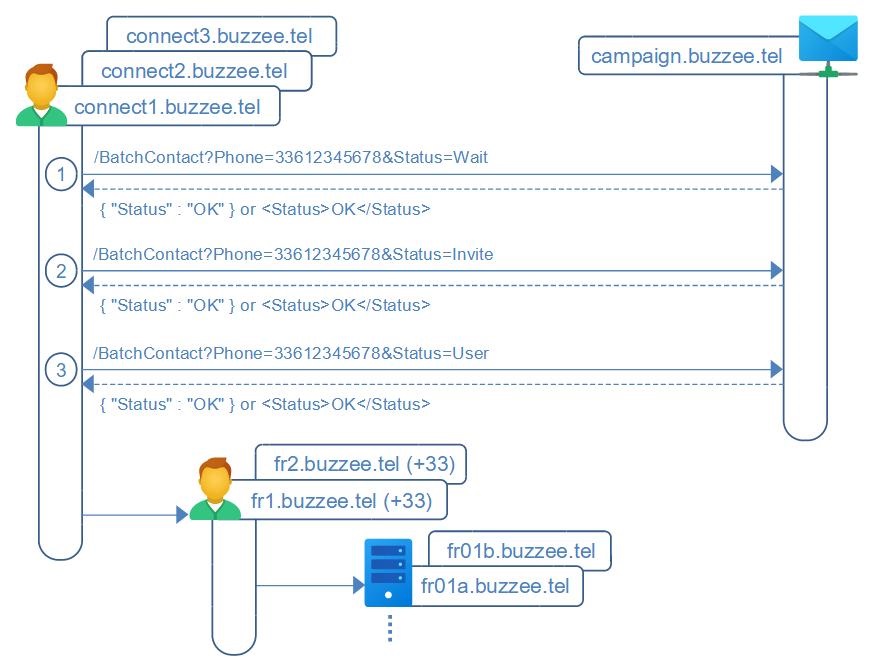
The Global Connect servers managing the waiting list per country will send a POST request for every Status update of a contact.
The major updates will occur when :
1. initially queued on the waiting list, and for every sponsor validating this contact,
2. unlocking invite to proceed to complete registration
3. and finally account created and hosted on a server
HTTP Authorization
Communications server to server do not require credentials,
authorization is granted by IP ByPass for the restricted and specific global connect servers.
HTTP communications do not need to be encrypted over TLS since communicating between identified servers.
/BatchContact (GlobalConnect -> Campaign)
The Global Connect servers will POST a request for every Status update of a contact (or user), with the major infos to the endpoint of the campaign server.
The POST request will be standard HTTP multipart/form-data
http://campaign.buzzee.tel/BatchContact
Phone=33612345678
Email=john.doe@acme.com
Country=FR
Locale=fr
Status=Wait
Created=2024-10-18
Sponsor=2
Sponsors=33712345678,33798765432
| Fields | Description |
|---|---|
| Phone | Required. The phone number of the contact registered in the waiting list. Formatted as "33612345678" for France, "34612345678" for Spain. |
| Optional. Email address of the contact. example: john.doe@acme.com Note: May be provided only at initial subscription on the waiting list. |
|
| Country | Country detected from device locale (fr-FR, fr-CH, fr-CA), or from the international prefix of phone number. example: "CH" for Switzerland, "FR" for France, "CA" for Canada Note: May be provided only at initial subscription on the waiting list. |
| Locale | Language detected from device locale (fr-FR, fr-CH, fr-CA), and from the international prefix of phone number. example: "fr" for FRANCAIS, "es" for SPANISH Note: May be provided only at initial subscription on the waiting list. |
| Status | One of the following value: - VerifyPIN : the contact should have received a PIN code by SMS but has not yet validated his PIN code received. Note: optional and may not be provided during the initial workflow. - VerifyEmail : the contact should have received an email with a PIN code, but has not yet validated his email address. Note: optional and may not be provided during the initial workflow. - Wait : the contact is queued in the waiting list - Invite : the contact has been elected to open account and is invited to proceed the registration. - User : the contact has successfully open his account on a hosting server. - Unregister : the contact has unsubscribed from the waiting list, or closed his user account. |
| Created | Optional. Date of his subscription on the waiting list, formatted as YYYY-MM-DD. If not provided campaign server should consider to be current date when invoked with Status=Wait. example: "2024-10-18" |
| Sponsor | Optional. Number of sponsors. A sponsor is a registered user who has validated this contact waiting to get an invitation. example: "2" |
| Sponsors | Optional. Comma separated list of sponsors phone number. For every new sponsor, a new request with Status=Wait will be sent to the campaign server. example: "33712345678,33798765432" |
| Invited | Optional. Date of the invitation to proceed to complete opening a user accouont, formatted as YYYY-MM-DD example: "2024-10-18". If not provided campaign server should consider to be current date when invoked with Status=Invite. |
| Registered | Optional. Date of the account being created on the hosting server, formatted as YYYY-MM-DD example: "2024-10-18". If not provided campaign server should consider to be current date when invoked with Status=User. |
| Unregistered | Optional. Date of contact unsubscribing from waiting list or date of account closed, formatted as YYYY-MM-DD example: "2024-10-18". If not provided campaign server should consider to be current date when invoked with Status=Unregister. |
| Server | Optional. It is the domain server hosting the user account once registered. example: "fr01.buzzee.tel" |
Campaign server will respond a HTTP status 200 OK, with a HTTP header Content-Type to be defined:
Content-Type: application/xml Content-Length: 20< Status> OK < /Status>
Note: The actual resonse MUST NOT include a space between "<" and the element Status.
or
Content-Type: application/json
Content-Length: 20

{ "Status" : "OK" }
The following table summarizes the different error codes:
| Errors | Description |
|---|---|
| ERR_BLANK_PHONE | The phone number is blank. |