Assistant
Disclaimer
This document is a prelimary version and work-in-progress,
Details discussed in this document will be subject to future modifications.
PBX Speech
The dedicated PBX Speech server managing speech recognition and speech synthesis will invoke the Delos instance hosting the account of the user, the PBX Speech will submit the speech as JSON conversation similar to OpenAI model and it will obtain the response as a JSON conversation similar to OpenAI including the assistant message infered to synthesize speech in the audio stream of the call:
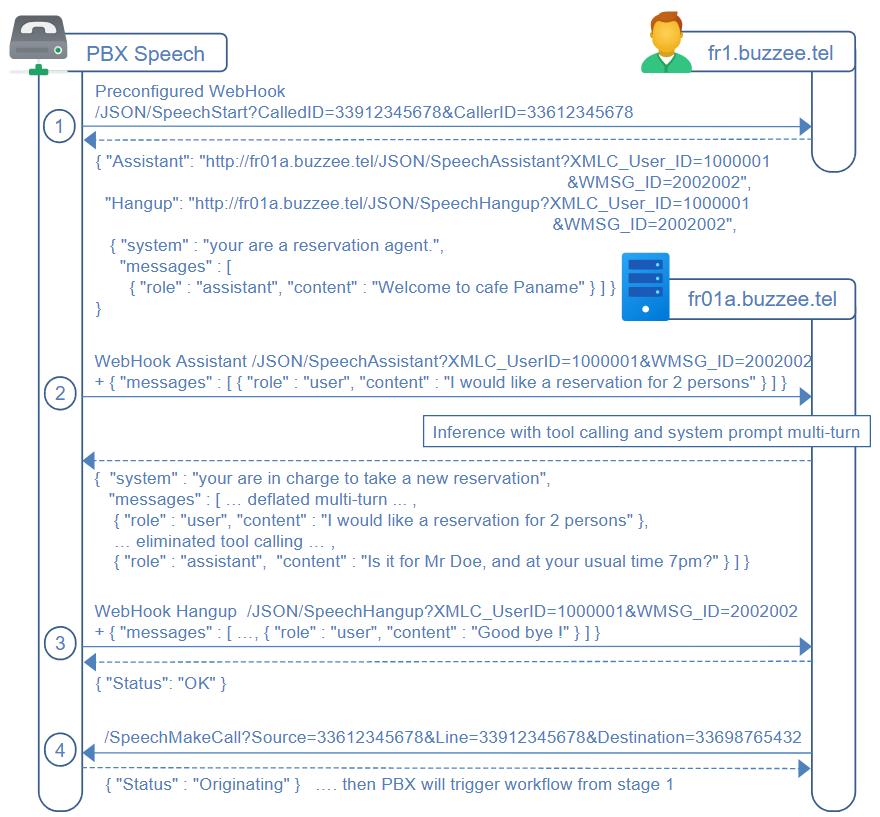
The workflow for PBX Speech is summarized through the major steps :
1. On new incoming call arriving at this PBX Speech, the PBX will invoke the preconfigured WebHook URL /SpeechStart at regional server fr1.buzzee.tel. The response will contain the subsequent WebHook URL to invoke on the host where is located the user (http://fr01a.buzzee.tel/JSON/SpeechAssistant). The initial response will contain the basic instructions and greeting message, the PBX will synthesize speech of the last message of role "assistant".
2. at each turn of the user conversation, the PBX will invoke the WebHook URL /SpeechAssistant obtained in initial response, the PBX will provide the last user message (and possibly the multi-turn conversation as received from previous call to Delos instance).
Delos instance will provide the deflated conversation including the last message as role "assistant" to synthesize speech to the audio channel.
3. When the call is being hangup by the caller, the PBX Speech will invoke the preconfigured WebHook URL /SpeechHangup to terminate the session of the assistant for this WMSG_ID
7. Delos instance may request the PBX Speech to initiate a speech call by invoking /SpeechMakeCall, PBX will originate the call and start the workflow from step #1 /SpeechStart.
HTTP Authorization and Protocol
Authorization for communications between PBX and host servers fr01a.buzzee.tel (fr02a.buzzee.tel, ...) will be ByPass per IP.
The API will be HTTP requests.
/SpeechStart (PBX Speech -> Regional server)
On new incoming call arriving at the PBX Speech server, the PBX will invoke the regional server fr1.buzzee.tel to obtain the main WebHook URLs "Assistant" and "Hangup" to locate the server endpoint hosting the user of this speech line.
TO BE DISCUSSED: This first call may also return the initial system instructions, and greeting to be synthesize to voice by the PBX and played to the user.
The "user" is the vocabulary to name the contact on the phone line.
The PBX Speech server will invoke /SpeechStart when starting a new speech session (a call being answered on the PBX side).
PBX Speech will invoke a HTTP GET request to the regional Delos instance:
http://fr1.buzzee.tel/JSON/SpeechStart?CalledID=33612345678&CallerID=33698765432&CallID=123456_abcdef
| Params | Description |
|---|---|
| CalledID | The phone number of the user being called. Possibly the CalledID may be the LineID in case of custom dedicated line when the user has not redirected his phone number to the generic LineID. In this document: 33612345678 in case of the phone number of the user, or 33912345678 in vase of dedicated line associated for the User having the phone number 33612345678 |
| CallerID | The phone number of the caller. In this document: 33698765432 |
| CallID | This is the UniqueID of the Astersik server, it is an Opaque ID of the call which will be used to identify the session of the assistant for this call. |
The Delos instance will respond with main fields "Assistant" and "Hangup" which are the WebHook URLs to invoke to pursue the speech session. It may also return the initial system instructions, and opening message (greeting) to be synthesize to voice by the PBX and played to the user.
{
  "Assistant": "http://fr01a.buzzee.tel/JSON/SpeechAssistant?XMLC_UserID=100001&WMSG_ID=2002002",
  "Hangup": "http://fr01a.buzzee.tel/JSON/SpeechHangup?XMLC_UserID=100001&WMSG_ID=2002002",
  "Message": "Welcome to Cafe Paname. How can I help?",
  "Language": "fr",
  "Voice": "Joy",
  "Body": {
    "model": "gpt-oss-120b"
    "messages": [
      { "role": "system", "content": "You are a reservation agent." },
      { "role": "assistant", "content": "Welcome to Cafe Paname. How can I help?" }
    ]
  }
}
| Fields | Description |
|---|---|
| Assistant | The WebHook URL to invoke foreach completion of user sentence during the call. The response will contain the deflated multi-turn conversation to pursue. This URL is the endpoint URI of the server where the user is hosted. Example: http://fr01a.buzzee.tel/JSON/SpeechAssistant?XMLC_UserID=100001&WMSG_ID=2002002 |
| Hangup | The WebHook URL to invoke when call is terminated. This URL is the endpoint URI of the server where the user is hosted. Example: http://fr01a.buzzee.tel/JSON/SpeechHangup?XMLC_UserID=100001&WMSG_ID=2002002 |
| Message | The opening message (the greeting), that the PBX Speech should synthesize as voice. Example: "Message": "Welcome to Cafe Paname. How can I help?" Note: This message is also duplicated as the last entry as "role": "assistant" in the multi-turn conversation. The PBX Speech need to locate this last message, since in case of re-call following interruption, the conversation multi-turn will continue from this last message "role": "assistant". Example: "messages": [ { "role": "assistant", "content": "Welcome to Cafe Paname. How can I help?" } ] |
| Language | Optional. Locale code for the language of the message to be synthesize as speech and played to the user. fr = FRANCAIS, en = ENGLISH, es = ESPANOL, de = DEUTSCH, it = ITALIANO If this parameter is not provided, the PBX Speech will synthesize using its default language. |
| Voice | Optional. The voice to be used for synthesize of the message. |
The following table summarizes the different error codes:
| Errors | Description |
|---|---|
| ERR_USER_NOT_FOUND | Cannot find user associated with the CalledID phone number. |
| ERR_INVALID_CALLERID | Invalid phone number for the parameter CallerID |
| ERR_INVALID_CALLEDID | Invalid phone number for the parameter CalledID |
| ERR_BLANK_ASSISTANT | Assistant not found for CalledID. Probably the configuration is not setup properly. PBX Speech should play a message to inform the caller. |
/SpeechAssistant (PBX Speech -> Delos)
After obtaining the main WebHook URLs Assistant, the PBX Speech will invoke this WebHook whenever a sentence is completed by the user during the call, and POST the transcript of this sentence since the last invocation.
The "user" is the vocabulary to name the contact on the phone line.
PBX Speech will invoke a HTTP POST request to the WebHook URL "Assistant" : "/SpeechAssistant" received in the initial call to /SpeechStart
http://fr1.buzzee.tel/JSON/SpeechAssistant?XMLC_UserID=100001&WMSG_ID=2002002
{}
The body of the request content show the latest sentence of the user : "I would like a table for 2 this evening"
Note: the PBX Speech may decide to skip previous messages of the multi-turn converation, and send only the last user message, since the whole session is maintained also on the Delos server.
The 2 parameters of the WebHook URL "Assistant" can be consider as Opaque since they are part of the WebHook:
| Params | Description |
|---|---|
| XMLC_UserID | The ID of the user. It is used to identify the Scope (the database). ie: 100001 |
| WMSG_ID | The ID of the session of the assistant on the Delos side obtained in response to /SpeechStart ie: WMSG_ID=2002002 |
The Delos instance will respond with the multi-turn conversation deflated and augmented of the message to be synthesize to speech as the last message with "role": "assistant":
{ "Language": "fr",
"Voice": "Joy",
"Body": {
"model": "gpt-oss-120b"
"messages": [
{ "role": "system", "content": "You are a reservation agent." },
{ "role": "assistant", "content": "Welcome to Cafe Paname. How can I help?" },
{ "role": "user", "content": "I would like a table for 2 this evening" },
{ "role": "assistant", "content": "At what name would you like the reservation?" }
]
}
}
The response to be synthesize as speech is the last message of "role": "assistant"
"At what name would you like this reservation?"
| Fields | Description |
|---|---|
| Message | The message that the PBX Speech should synthesize as voice. Example: "Message": "At what name would you like this reservation?" Note: This message is also duplicated as the last entry as "role": "assistant" in the multi-turn conversation. The last message "role": "assistant" the PBX Speech should synthesize as voice. This message is the last entry as "role": "assistant" in the multi-turn conversation. Example: "messages": [ { "role": "assistant", "content": "At what name would you like this reservation?" } ] |
| Language | Optional. Locale code for the language of the message to be synthesize as speech and played to the user. fr = FRANCAIS, en = ENGLISH, es = ESPANOL, de = DEUTSCH, it = ITALIANO If this parameter is not provided, the PBX Speech will synthesize using its default language. |
| Voice | Optional. The voice to be used for synthesize of the message. |
The following table summarizes the different error codes:
| Errors | Description |
|---|---|
| ERR_USER_NOT_FOUND | Cannot find user associated with the CalledID phone number. |
| ERR_WMSG_NOT_FOUND | Invalid session number for this call. Cannot locate session of the assistant for this CallID. |
| ERR_BLANK_ASSISTANT | Assistant not defined for this session. Probably the configuration is not setup properly. PBX Speech should play a message to inform the user. |
The following table summarizes the different error codes:
| Errors | Description |
|---|---|
| ERR_USER_NOT_FOUND | XMLC_UserID does not exist at this server |
| ERR_CALLID_NOT_FOUND | Cannot locate session of the assistant for this CallID. Probably /Phone_NewAssistant has not been called. |
/SpeechHangup (PBX Speech -> Delos)
When the call is hangup by the caller or terminated by the PBX, the PBX Speech server will HTTP GET invoke Delos instance with the WebHook URL "Hangup" : "/SpeechHangup"
http://fr01a.buzzee.tel/JSON/SpeechHangup?XMLC_UserID=100001&WMSG_ID=2002002
The 2 parameters of the WebHook URL "Hangup" can be consider as Opaque since they are part of the WebHook:
| Params | Description |
|---|---|
| XMLC_UserID | The ID of the user. It is used to identify the Scope (the database). ie: 100001 |
| WMSG_ID | The ID of the session of the assistant on the Delos side obtained in response to /SpeechStart |
The Delos instance will acknoledge the termination of the call with Status=OK.
Delos instance will terminate this session of the assistant.
{"Status": "OK" }
The following table summarizes the different error codes:
| Errors | Description |
|---|---|
| ERR_USER_NOT_FOUND | XMLC_UserID does not exist at this server |
| ERR_WMSG_NOT_FOUND | Invalid session number for this call. Cannot locate session of the assistant for this CallID. |
/SpeechMakeCall (Delos -> PBX Speech)
Delos may initiate a call to start a new speech assistant session.
Delos will invoke a HTTP GET request to the PBX Speech server
http://frspeech.buzzee.tel/SpeechMakeCall?Source=33612345678&Line=33912345678&Destination=33609876543
| Fields | Description |
|---|---|
| Source | This is the phone number of the user, formatted as 33612345678 |
| Line | Optional: the line to be used to initiate the call, but the caller should appear to be Source. |
| Destination | This is the phone number of the contact to call, formatted as 33609876543 |
The PBX server will respond with Status=Originating :
{
  "Status": "Originating"
}
The following table summarizes the different error codes:
| Errors | Description |
|---|---|
| ERR_INVALID_SOURCE | Invalid phone number for the parameter Source |
| ERR_INVALID_DESTINATON | Invalid phone number for the parameter Destination |
Assistant
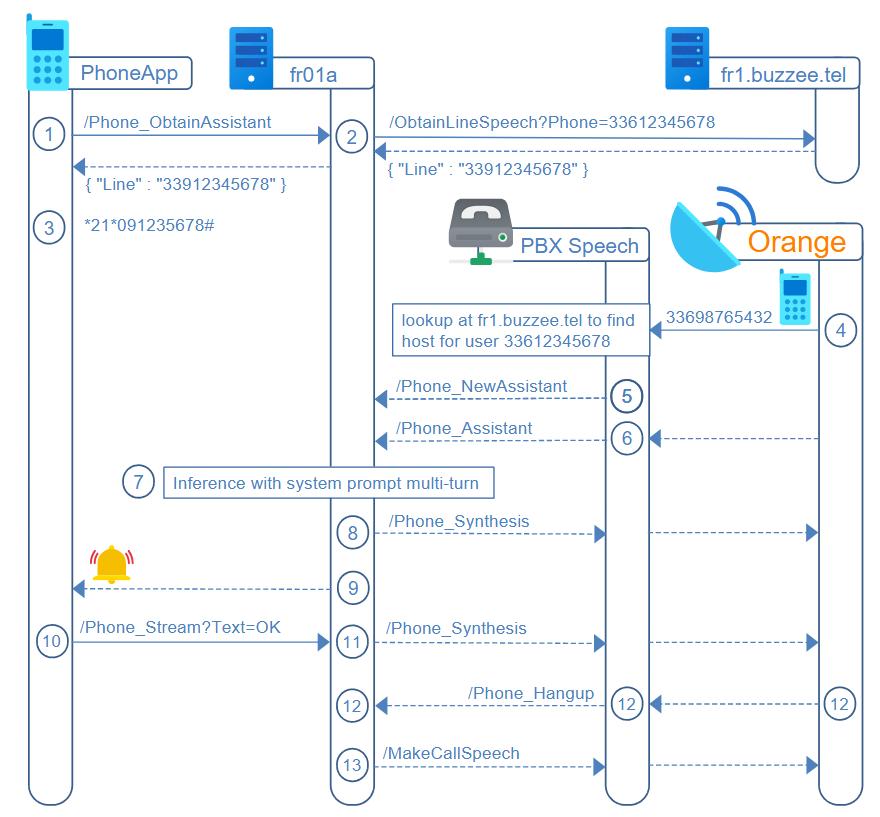
The workflow for Assistant describes the major calls between PhoneApp and Delos instance.
1. PhoneApp will query /Phone_ObtainAssistant on the Delos instance to get the phone number to setup call forwarding
2. Delos will relay this query to the Regional server fr1.buzzee.tel to /ObtainLineSpeech to obtain in response the Line to setup redirection
3. PhoneApp will dial the redirection of all calls to the line of the assistant
4..8 these steps are described in the section PBX Speech
9. During the multi-turn conversation, Delos instance may require a validation from the user, it will trigger a notification to wakeup PhoneApp
10..11 PhoneApp will query the state of the assistant, the user will select a custom answer and invoke /Phone_Stream with the text to be streamed in the audio channel of the ongoing call maintained by the assistant
12. When the call is hangup, the PBX Speech will invoke /Phone_Hangup to Delos instance to terminate the session of the assistant.
13. Delos instance may initiate a new speech session by invoking /MakeCallSpeech, the BX Speech will initiate the call and start over the workflow from step #3 /Phone_NewAssistant
/Phone_ObtainAssistant (PhoneApp -> Delos)
PhoneApp will GET /Phone_ObtainAssistant on the Delos server of the user to get the phone number to setup call forwarding to the assistant phone number:
https://fr01a.buzzee.tel/JSON/1xxx1abcdef/Phone_ObtainAssistant?Phone=33612345678
| Fields | Description |
|---|---|
| Phone | Optional. The line to be redirected to the assistant. It may not be necessarily the user phone number, but a secondary line. If the parameter is not provided, it will be considered that this is the primary phone number of the user that will be configured to be call forwarded. This parameter may be used by the PBX server to pool the redirections of different users. |
Delos instance will forward this request to the Regional server fr1.buzzee.tel, and will respond with a JSON document:
{ "Line" : "33912345678" }
The major fields are:
| Fields | Description |
|---|---|
| Line | The line to setup call fowarding. |
The following table summarizes the different error codes:
| Errors | Description |
|---|---|
| ERR_BLANK_PHONE |
The Phone number cannot be located from the Phone number supplied. |
/ObtainLineSpeech (Delos -> fr1.buzzee.tel)
Delos will forward the request /Phone_ObtainAssistant received by the PhoneApp to the Regional server by invoking /ObtainLineSpeech
https://fr1.buzzee.tel/XML/ObtainLineSpeech?Phone=33612345678
| Fields | Description |
|---|---|
| Phone | The phone line of the user to be redirected to the PBX Speech service. The Regional connect server may use this information to select a Line from a pool to avoid all users being redirected to a single phone number managed by the PBX Speech. It is specifically useful when the user does not want to redirect his phone line, and let the PBX Speech operate the assisstant on a dedicated line. |
Regional connect server fr1.buzzee.tel will respond with a JSON document:
{ "Line" : "33912345678" }
The major fields are:
| Fields | Description |
|---|---|
| Line | The line to setup call fowarding. In this document, it is considered to be 33912345678 |
The following table summarizes the different error codes:
| Errors | Description |
|---|---|
| ERR_POOL_EXCEEDED | The pool of available LineID has been exhausted. No more LineID is available at this time. |