S2T (SpeechToText)
Disclaimer
This document is a prelimary version and work-in-progress,
Details discussed in this document will be subject to future modifications.
Workflow
The user is setting up his primary phone number to be redirected to the central phone number of the PBX server.
Every incoming calls for the user will be routed by the PBX.
The PBX will intercept these incoming calls and originate a new call to the mobile phone of the user on its secondary eSIM.
In order to originate the call, the PBX needs to lookup which "Line" to originate the call, this process is described on the following diagram:
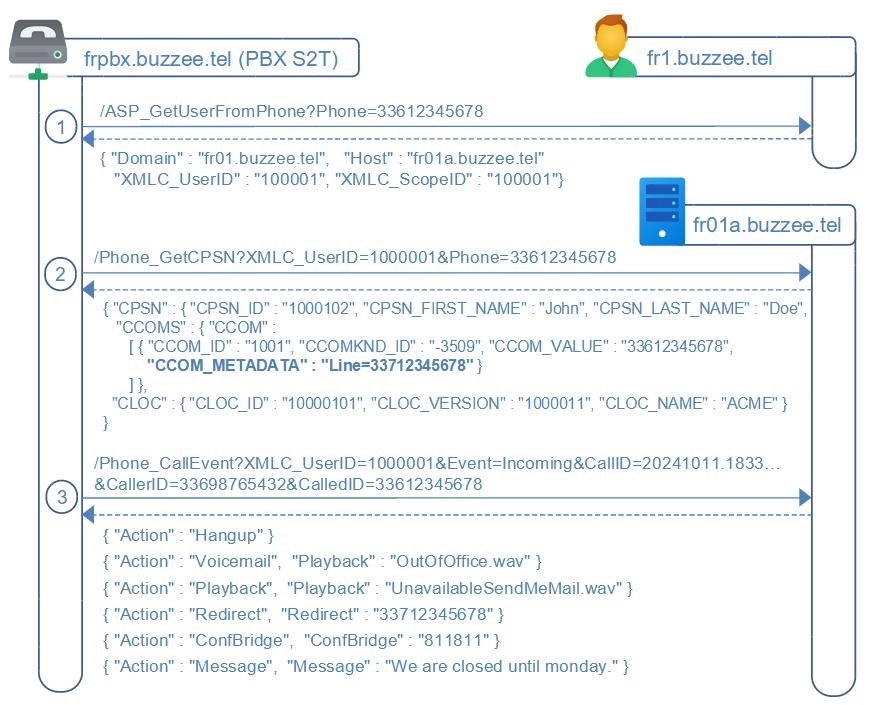
When the PBX receives a call, it is in fact a redirection from the main SIM mobile number of the user (33612345678) to the PBX number (33912345678),
to route the call properly, the PBX needs to originate a call to the secondary eSIM of the mobile of the user, which is called the Line of the user (33712345678),
the PBX needs to lookup the Line from the diversion header containing the mobile phone number redirected on fr1.buzzee.tel:
1. Query ASP_GetUserFromPhone against fr1.buzzee.tel to lookup the instance of Delos hosting the user account database,
this requires a request to fr1.buzzee.tel by providing the phone number extracted from the diversion header Phone=33612345678
which is providing in response the Host fr01a.buzzee.tel and the XMLC_UserID
2. the PBX server will request fr01a.buzzee.tel on the action /Phone_GetCPSN to retrieve the Line to use to contact this user
the parameters provided are Phone=33612345678 and the XMLC_UserID retrieved from previous request
the informations returned will contain in the metadata the Line of the mobile phone to use for this user.
3. the PBX server will query fr01a.buzzee.tel /Phone_CallEvent with parameters Event=Incoming, CallerID and CalledID to retrieve the custom Action to perform.
The PBX will be able to route the call by originating a call to the Line and then connect the initial caller with the user at the PBX level.
Once the call has been completed, the workflow for the transcript of the conversation is described in the following diagram:
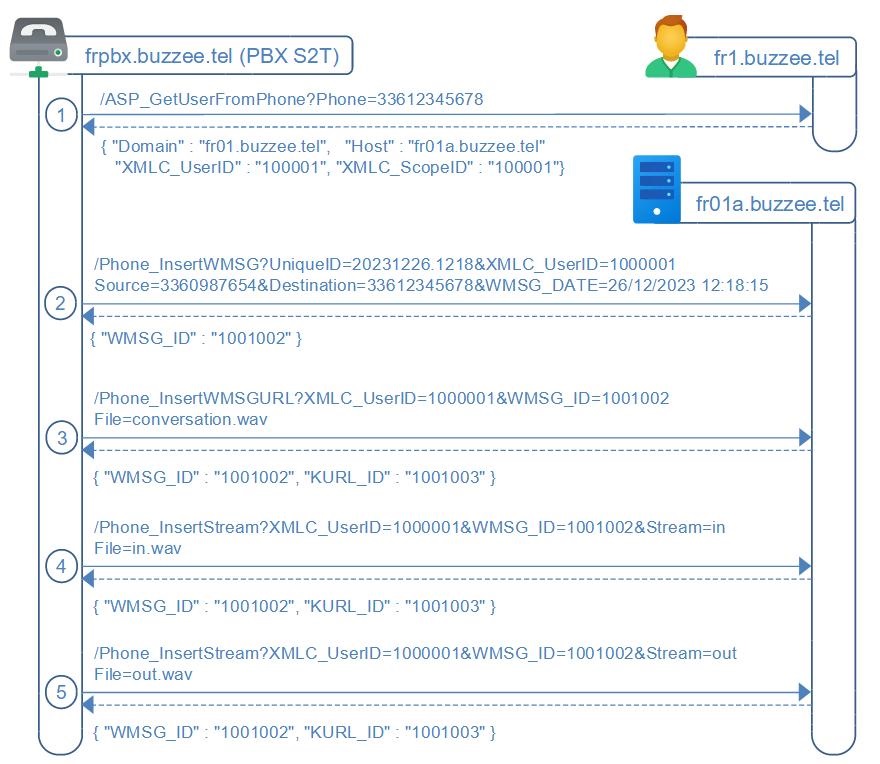
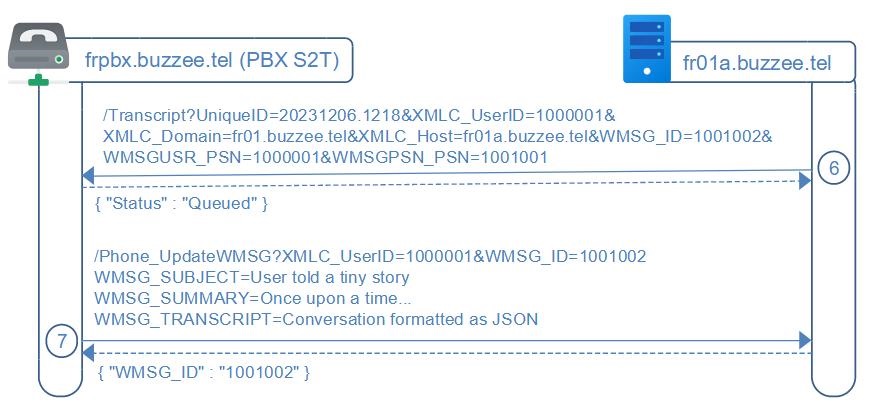
The workflow of transcript is summarized as follow:
0. Every phone call will be recorded by the VoIP Asterisk PBX, and identified with a UniqueID
1. When a call is terminated, the PBX server will lookup on which server are hosted both Source and Destination of the call (each one could be user of buzzee.tel and so the workflow described on this page applies to each participant). This lookup is performed querying /ASP_GetUserFromPhone against fr1.buzzee.tel to lookup the instance of Delos hosting the user account database, which is providing as response the Host fr01a.buzzee.tel and the XMLC_UserID
2. the PBX sends a Phone_InsertWMSG request to the appropriate Delos Server with the UniqueID of the call
Delos will store a WMSG[WMSG_ID] with the information of this call UniqueID
3. the PBX sends a Phone_InsertWMSGURL request to upload the recorded file
4. the PBX sends a Phone_InsertStream request to upload the stream "in.wav"
5. the PBX sends a Phone_InsertStream request to upload the stream "out.wav"
6. Delos sends to the PBX a "/Transcript" request with parameters UniqueID, XMLC_UserID, XMLC_Domain, XMLC_Host, WMSG_ID, WMSGUSR_PSN and WMSGPSN_PSN, and a custom Prompt containing the names of the user and contact, possible summaries of previous conversations
7. Once the transcription has been completed, the PBX sends a Phone_UpdateWMSG request with WMSG_SUBJECT, WMSG_SUMMARY and WMSG_TRANSCRIPT parameters
At the end of this document, there is the description of Delos acting as a relay for the request MakeCall between the PhoneApp and the PBX server transmitting the parameters Line, Source, and Destination
HTTP Authorization
Communications server to server do not require XMLC_Credential,
authorization is granted by IP ByPass for the restricted and specific services to be invoked per application.
/ASP_GetUserFromPhone (PBX -> Delos)
The PBX server need to lookup the Delos instance hosting the user account database.
This lookup requires two successive requests (1) against connect1.buzzee.tel which will redirect to (2) against fr1.buzzee.tel.
If the PBX server assigned to a specific region is setup dedicated to this region, the PBX may query directly the connect server managing this region, ie: fr1.buzzee.tel for the phone numbers formatted as 33612345678.
The PBX server queries the top-level servers whichever responds first connect1.buzzee.tel (connect2.buzzee.tel, ...) providing the phone number of the user to locate:
https://fr1.buzzee.tel/JSON/ASP_GetUserFromPhone?Phone=33612345678
Note: Prefer to check on fr1.buzzee.tel then fr2.buzzee.tel, rather than invoking https://fr.buzzee.tel/ since it may return a 301 Redirect.
| Params | Description |
|---|---|
| Phone | Phone number of the user to lookup. |
The response contains where is hosted the user with the requested Phone number, as well as the XMLC_UserID to identify the user:
{ "Domain": "fr01.buzzee.tel", "Host": "fr01a.buzzee.tel", "Hosts": "fr01b.buzzee.tel",
"XMLC_UserID": "1000001101001
The table below describes the different fields in the response:
| Fields | Description |
|---|---|
| Domain | Domain where the user is registered. This is the cluster of Delos instance (made of multiple hosts). |
| Host | Primary host where the data of the user are stored. This is the primary endpoint URL to use to invoke the instance. Example: fr01a.buzzee.tel |
| Hosts | Comma separated list of secondary hosts to failover when primary Host is not responding. Example: fr01b.buzzee.tel |
| XMLC_UserID | UserID for this user phone number declared at the Host. XMLC_UserID is unique for a host but a similar UserID may exists on a different host. |
| XMLC_ScopeID | Scope of the user at the host. This is the Database ID, the TenantID, it may also be called SandboxID. A scope may contain multiple users from the same organization. A host may contains hundreds of scopes (independant databases). |
If the user is not registered with this phone number the Connect instance will respond with status 404 Not Found
{"Code": "ERR_USER_NOT_FOUND", "Message": "TXMLInstruction.Process - Operation=Assert Name=CheckCPSN_ID"}
The PBX server can then query Phone_GetCPSN on fr01a.buzzee.tel to obtain the Line to originate a call to the user mobile phone.
/Phone_GetCPSN (PBX -> Delos)
To complete the lookup process of the Line to use to originate a call to the user mobile phone.
The PBX server will request fr01a.buzzee.tel on the action /Phone_GetCPSN with parameters Phone=33612345678 and the XMLC_UserID retrieved from previous request.
The PBX sends a HTTP GET request to Delos instance:
http://fr01a.buzzee.tel/JSON/Phone_GetCPSN?XMLC_UserID=100008&Phone=33612345678
| Fields | Description |
|---|---|
| XMLC_UserID | XMLC_UserID field retrieved from ASP_GetUserFromPhone in previous request. |
| CPSN_ID | The Contact ID, this is the value WMSGPSN_PSN from the WMSG. |
Delos instance will respond with a JSON document:
{ "CPSN" : { "CPSN_ID" : "1000102", "CPSN_VERSION" : "1000012"
             "CPSN_FIRST_NAME" : "John", "CPSN_LAST_NAME" : "Doe",
   "CCOMS" : { "CCOM" :
      [ { "CCOM_ID" : "1001", "CCOMKND_ID" : "-3509", "CCOM_VALUE" : "33612345678",
          "CCOM_METADATA" : "Line=33712345678\r\n
                             Filter=0162,0163,0270,0271,0377,0378,0424,0425,0568,0569,0948,0949" },
        { "CCOM_ID" : "1002", "CCOMKND_ID" : "-3501", "CCOM_VALUE" : "john.doe@acme.com" }
      ] },
  "CLOC" : { "CLOC_ID" : "10000101", "CLOC_VERSION" : "1000011", "CLOC_NAME" : "ACME" }
}
It will be necessary to locate in the JSON response, the CCOM record with the Phone number requested (33612345678), then extract from the CCOM_METADATA the field "Line=33712345678" to be used to originate the call toward the user mobile phone:
| Fields | Description |
|---|---|
| CCOM_METADATA | Custom properties stored for a communication item. The format is multi-line with carriage return for every property. ie: Line=33712345678 Filter=0162,0163,0270,0271,0377,0378,0424,0425,0568,0569,0948,0949 |
The following table summarizes the different error codes:
| Errors | Description |
|---|---|
| ERR_BLANK_CPSN_ID | The contact cannot be found from the parameter Phone number provided in the request. |
/Phone_CallEvent (PBX -> Delos)
For each major call event occuring during the workflow of a call, the PBX server will query the server hosting the user with the Event to get the custom action to perform.
The PBX will request fr01a.buzzee.tel on the action /Phone_CallEvent with parameters Event=Incoming, CallID, CallerID, CalledID, and the XMLC_UserID retrieved from ASP_GetUserFromPhone (for the CalledID, aka the user).
The PBX sends a HTTP POST request to Delos instance:
http://fr01a.buzzee.tel/JSON/Phone_CallEvent
XMLC_UserID=1000001
Event=Incoming
CallID=20241011.1833…
CallerID=33698765432
CalledID=33612345678
| Fields | Description |
|---|---|
| XMLC_UserID | XMLC_UserID field retrieved from ASP_GetUserFromPhone from the CalledID (the user phone). |
| Event | The event name. Possible values are "Incoming", "Voicemail", "Hangup" (more to be defined, "DTMF", "User"). |
| CallID | The call identifier. It is encoded as an opaque value for the PBX. |
| CallerID | The caller phone number formatted as 33698765432. |
| CalledID | The called phone number of the user, formatted as 33612345678. |
Delos instance will respond with on of thesse possible JSON document:
{ "Action" : "Hangup" }
{ "Action" : "Voicemail",  "Playback" : "OutOfOffice.wav", "Message" : "If important please say it" }
{ "Action" : "Playback",  "Playback" : "UnavailableSendMeMail.wav", "Hangup": "1" }
{ "Action" : "Redirect",  "Redirect" : "33712345678" }
{ "Action" : "ConfBridge",  "ConfBridge" : "811811" }
{ "Action" : "Message",  "Message" : "We are closed until monday.", "Hangup": "1" }
Following table described the fields and their intent:
| Fields | Description |
|---|---|
| Action | This is the action to be performed by the PBX for this Call. "Hangup" will terminate the call promptly. "Voicemail" will play the optional playback wav, it will record the voicemail. "Playback" will play the wav file and optionally hangup. "Redirect" will redirect the call to the phone number provided. "ConfBridge" will transfer the call to the ConfBridge room provided, and ignore the originate CalledID to connect the call. "Message" will convert the message to voice, stream the wav, and optionally hangup. |
| Playback | Valid for Action=Voicemail, Playback. This parameter contains the wav file to play. |
| Hangup | Optional value for Action=Playback, Message. This parameter terminate the call once the action is completed. |
| Redirect | Optional value for Action=Redirect. This parameter contains the phone number to redirect to formatted as 33712345678. |
| ConfBridge | Optional value for Action=ConfBridge. This parameter contains the room number to connect the caller to the ConfBridge room. |
| Message | Optional value for Action=Voicemail,Message. Textual sentences to be converted as voice and stream to the caller. |
The following table summarizes the different error codes:
| Errors | Description |
|---|---|
| ERR_USER_NOT_FOUND | The user cannot be found from the parameter CalledID provided in the request. |
/Phone_ConcatStream (PBX -> Delos)
NEW AS OF 2024-12-13: This feature is used while the call is in progress to upload chunk by chunk, every minute or so, the recording in progress as a wav file.
The HTTP request will use POST multipart/form-data.
http://fr01a.buzzee.tel/JSON/Phone_ConcatStream?
XMLC_UserID=1000001
UniqueID=202312261218_202312261219
CallerID=33612345678
CalledID=33798765432
Stream=in
File=in.wav
| Fields | Description |
|---|---|
| XMLC_UserID | The value obtained from ASP_GetUserFromPhone. This ID can be maintained in a local cache. |
| UniqueID | This is an opaque ID maintained on the side of the PBX |
| CallerID | formatted as 33612345678 |
| CalledID | formatted as 33798765432 |
| Stream | Possible values: in or out. If the stream is the in.wav then the value is 'in'. If the stream is the out.wav then the value is 'out'. |
| EOF | Optional. EOF=1 if this is the last stream. Parameter EOF=1 will be sent for each stream (in and out) when each stream is terminated. |
| File | File format should be WAV as PCM not compressed with proper header if possible. Filename should be in.wav, out.wav. |
Delos instance will respond with Status=OK
{
  "Status": "OK"
}
Delos will queue in async a request to transcribe this Wav file. Upon response, Delos will concatenate the transcription for this UniqueID, until Phone_InsertWMSG will be invoked at the end of the call.
/Phone_ConcatTranscript (PBX -> Delos)
NEW AS OF 2024-12-13 BUT NOT REQUIRED : This feature is used while the call is in progress to concatenate the transcription by chunk, every minute or so.
The HTTP request will be POST and parameters will be encoded as application/x-www-form-urlencoded :
http://fr01a.buzzee.tel/JSON/Phone_ConcatTranscript?
XMLC_UserID=1000001
UniqueID=202312261218_202312261219
CallerID=33612345678
CalledID=33798765432
WMSG_TRANSCRIPT=Conversation formatted as JSON
| Fields | Description |
|---|---|
| XMLC_UserID | The value obtained from ASP_GetUserFromPhone. This ID can be maintained in a local cache. |
| WMSG_ID | retrieved from the response of the previous request /Phone_InsertWMSG |
| UniqueID | This is an opaque ID maintained on the side of the PBX |
| CallerID | formatted as 33612345678 |
| CalledID | formatted as 33798765432 |
| Stream | Optional. Possible values: in or out. If the stream is the in.wav then the value is 'in'. If the stream is the out.wav then the value is 'out'. |
| WMSG_TRANSCRIPT | Raw transcript of the conversation formatted as follow: { [ { "user":"1000002","start":1000,"stop":1200,"message":"Hello Bob. How are you?"}, { "user":"1000202","start":2000,"stop":2200,"message":"Great, and you?"}, ... ] } |
Delos instance will respond with Status=OK
{
  "Status": "OK"
}
/Phone_InsertWMSG (PBX -> Delos)
Once the call has been completed, the PBX will POST the call infos tp Delos by invoking a HTTP POST request with parameters being encoded as application/x-www-form-urlencoded
http://fr01a.buzzee.tel/JSON/Phone_InsertWMSG?
XMLC_UserID=1000001
Source=33609876543
Destination=33612345678
UniqueID=20231226.1218
WMSG_DATE=2023-12-26 12:18:15
WMSG_MEDIA=-3515
| Fields | Description |
|---|---|
| Source | formatted as 33609876543 |
| Destination | formatted as 33612345678 |
| UniqueID | to be stored as WMSG_UNIQUEID which is different from WMSG_ID |
| WMSG_DATE | format is YYYY-MM-DD HH:NN:SS in UTC this is the DateTime of the call being connected. example: 2023-12-26 12:18:15 |
| WMSG_MEDIA | Optional. By default it will be -3515 for WMSGKND_PHONE -3528 for WMSGKND_VOICEMAIL -3504 for WMSGKND_RECORDING -3506 for WMSGKND_CONFERENCE |
| EOF | Optional. EOF=1 if the call has been hungup quickly, or if the recording is too short. |
Delos instance will respond with the field WMSG_ID of the newly created message:
{
  "WMSG_ID": "1001002",
  "Record": "0"
}
The major fields in the response are:
| Fields | Description |
|---|---|
| WMSG_ID | The ID to use to call Phone_ConcatStream, Phone_ConcatTranscript |
| Record | Optional. If value is "0", recording of the call is not necessary since the user has setup to not record conversation for this contact. If the value is set to "1", the recording of streams should be uploaded with /Phone_ConcatStream by chunk of every minute or so. If field is not provided, it should be considered that the conversation should be recorded. |
/Phone_InsertWMSGURL (PBX -> Delos)
To upload the recorded call as a wav file, the HTTP request will use POST multipart/form-data.
http://fr01a.buzzee.tel/JSON/Phone_InsertWMSGURL?
XMLC_UserID=1000001
WMSG_ID=1001002
WMSG_DURATION=360
File=Conversation.wav
| Fields | Description |
|---|---|
| WMSG_ID | retrieved from the response of the previous request Phone_InsertWMSG |
| WMSG_DURATION | Duration of the call recording in seconds example: 375 means 6'15" |
| File | File format should be WAV as PCM not compressed. Filename should include a valid extension: .wav |
| UniqueID | to be stored as WMSG_MESSAGEID which is different from WMSG_ID |
Delos instance will respond with the fields WMSG_ID and KURL_ID of the newly file attached to the the message:
{
  "WMSG_ID": "1001002",
  "KURL_ID": "1001003"
}
/Phone_InsertStream (PBX -> Delos)
To upload the recorded call as a wav file, the HTTP request will use POST multipart/form-data.
http://fr01a.buzzee.tel/JSON/Phone_InsertStream?
XMLC_UserID=1000001
WMSG_ID=1001002
WMSG_DURATION=360
Stream=in
File=in.wav
| Fields | Description |
|---|---|
| WMSG_ID | retrieved from the response of the previous request Phone_InsertWMSG |
| WMSG_DURATION | Duration of the call recording in seconds example: 375 means 6'15" |
| Stream | Possible values: in or out. If the stream is the in.wav then the value is 'in'. If the stream is the out.wav then the value is 'out'. If the stream is the all.wav then the value is 'all'. |
| File | File format should be WAV as PCM not compressed. Filename should be in.wav, out.wav, all.wav or any name ending with the extension .wav |
Delos instance will respond with the fields WMSG_ID and KURL_ID of the newly file attached to the message:
{
  "WMSG_ID": "1001002",
  "KURL_ID": "1001003"
}
/Transcript (Delos -> PBX)
To request the transcript of a previously recorded call, Delos will send a HTTP GET request to the PBX server
http://s2t.buzzee.tel/Transcript?
UniqueID=20231206.1218
XMLC_UserID=1000001
XMLC_Domain=fr01.buzzee.tel
XMLC_Host=fr01a.buzzee.tel
WMSG_ID=1001002
WMSGUSR_PSN=1000001
WMSGPSN_PSN=1001001
WMSG_INOUT=1
Model=whisper-large
Prompt=A phone call between the user Bob TheGreat and the contact Dave TheUgly.
| Fields | Description |
|---|---|
| UniqueID | The call UniqueID as inserted by request Phone_InsertWMSG |
| XMLC_UserID | to be used in subsequent request /Phone_UpdateWMSG |
| XMLC_Domain | Domain of the user. Prefer to use XMLC_Host parameter as URL to invoke /Phone_UpdateWMSG |
| XMLC_Host | Endpoint server to invoke /Phone_UpdateWMSG |
| WMSG_ID | to be used in subsequent request /Phone_UpdateWMSG |
| WMSGUSR_PSN | The User of the phone conversation. This ID may be used to lookup user details /Phone_GetCPSN?CPSN_ID=[WMSGUSR_PSN]. |
| WMSGPSN_PSN | The Contact of the phone conversation This ID may be used to lookup contact details /Phone_GetCPSN?CPSN_ID=[WMSGPSN_PSN] |
| WMSG_INOUT | 1=Incoming, 2=Ougoing 1= WMSGUSR_PSN is the CalledID, and WMSGPSN is the CallerID 2= WMSGUSR_PSN is the CallerID, and WMSGPSN is the CalledID |
| Model | Possible values: whisper-large if the Model is blank or the Model is not registered, the PBX will use its default backend. |
| Prompt | Custom text which may contain a description of user and contact names, brief summary of pas conversations. This prompt is engineered by Delos instance and may be used to improve accuracy of transcription. |
the PBX server will respond with Status=Queued :
{
  "Status": "Queued"
}
/Phone_UpdateWSMG (PBX -> Delos)
Important: This action is invoked following a request to /Transcript or /TranscribeFile.
Once the transcript has been completed by the PBX, the PBX server will invoke Delos with the parameters provided by /Transcript request, to update the summary and the transcript of the message.
The HTTP request will be POST and parameters will be encoded as application/x-www-form-urlencoded :
http://fr01a.buzzee.tel/JSON/Phone_UpdateWMSG?
XMLC_UserID=1000001
WMSG_ID=1001002
WMSG_SUMMARY={"summary": "John doe, and 33609876543 are discussing improving...", "title": "Performance optimization",
WMSG_TRANSCRIPT=Conversation formatted as JSON
| Fields | Description |
|---|---|
| XMLC_UserID | The XMLC_UserID parameter provided in /Transcript |
| WMSG_ID | The WMSG_ID parameter provided in /Transcript |
| WMSG_SUMMARY | {"summary": "John doe, and 33609876543 are discussing improving...", "title": "Performance optimization", "usage": { "prompt_tokens": 8, "completion_tokens": 16, "total_tokens": 24 }, "importants": [ {"type": "RDV", "date": "18 to 24 march", "description": "Travel to NY"} ] } |
| WMSG_TRANSCRIPT | Raw transcript of the conversation formatted as follow: { [ { "user":"1000002","start":1000,"stop":1200,"message":"Hello Bob. How are you?"}, { "user":"1000202","start":2000,"stop":2200,"message":"Great, and you?"}, ... ] } |
Delos instance will respond with the fields WMSG_ID:
{
  "WMSG_ID": "1001002"
}
/Phone_TranscriptProgress (PBX -> Delos)
For long running process of conversation transcript, the PBX server may notify Delos server about the progress of the transcript every 10 seconds or 30 seconds with a value of percentage,
the PBX server will invoke Delos with the parameters provided by /Transcript request, to update the progress of the transcript.
The HTTP request will be GET :
http://fr01a.buzzee.tel/JSON/Phone_TranscriptProgress?
XMLC_UserID=1000001
WMSG_ID=1001002
Progress=50
| Fields | Description |
|---|---|
| XMLC_UserID | The XMLC_UserID parameter provided in /Transcript |
| WMSG_ID | The WMSG_ID parameter provided in /Transcript |
| Progress | in percent. The final Phone_UpdateWMSG will set the transcript progress to 100%. example: 10 for 10%, 50 for 50%, 99 for 99% completed. |
Delos instance will respond with the fields WMSG_ID:
{
  "WMSG_ID": "1001002"
}
Workflow to transcribe a wav file
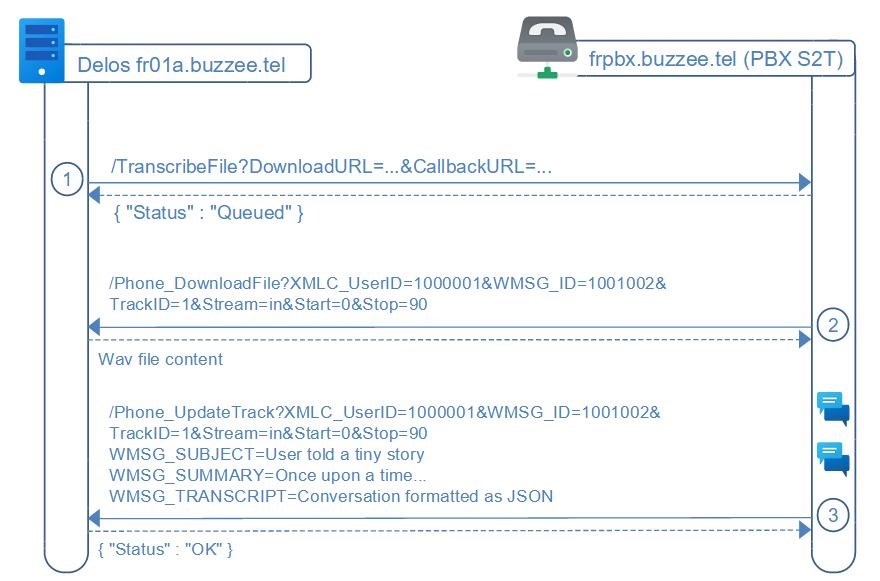
The workflow to transcribe a single WAV file, implies 3 requests:
1. Delos instance will invoke the PBX /TranscribeFile to request the transcription of a WAV file by submitting a DownloadURL and a CallbackURL, including a custom prompt, language and model to use for the transcription.
2. When ready to process the transcription, the PBX server will download the WAV file (GET) from the Delos instance using the parameter DownloadURL
3. Once the transcription of the WAV file has been completed by the PBX, the PBX server POST the transcription to Delos instance to the CallbackURL parameter received from the TranscribeFile request
/TranscribeFile (Delos -> S2T)
Delos instance will use the initial transcript to extract main subjects of the discussion and split both streams of the WAV as tracks.
Delos will send a HTTP POST request to the S2T server to initiate the transcription of a custom file URL, with a custom prompt as an initial context,
http://s2t.buzzee.tel/TranscribeFile?
XMLC_UserID=1000001
XMLC_Domain=fr01.buzzee.tel
XMLC_Host=fr01a.buzzee.tel
Language=en (new as of 2024-05-28)
Model=whisper-large
Prompt=This is the record of a contact for a job interview (new as of 2024-05-28)
Summary=1
DownloadURL=http://fr01a.buzzee.tel/JSON/Phone_DownloadFile?XMLC_UserID=100001&WMSG_ID=10010027&TrackID=1&Stream=in&Start=0&stop=90
CallbackURL=http://fr01a.buzzee.tel/JSON/Phone_UpdateTrack?XMLC_UserID=100001&WMSG_ID=10010027&TrackID=1&Stream=in&Start=0&stop=90
| Fields | Description |
|---|---|
| XMLC_UserID | Can be used to trace per user |
| XMLC_Host | Can be used to trace per server |
|
Language |
Hint of the language probably used by the participants in the recorded file. Example: fr (en, es, ...) if the Language is blank or is not a registered Language, the S2T server will use its default value or simply leave it blank. |
| Model | Possible values: whisper-large if the Model is blank or the Model is not registered, the S2T server will use its default backend. |
| Prompt | Custom text containing user and contact names, possibly summary of previous conversations. In case of TrackID being present, it may contain the initial transcript of the conversation, reduced to the duration of the track. |
| Summary | Optional parameter. If Summary=1 the response should contain the summary of the transcription |
| DownloadURL | URL to download the WAV file (PCM not compressed). Example: http://fr01a.buzzee.tel/JSON/Phone_DownloadFile?XMLC_UserID=100001&WMSG_ID=10010027&TrackID=1&Stream=in&Start=0&stop=90 |
| CallbackURL | URL to POST the transcription once completed Example: http://fr01a.buzzee.tel/JSON/Phone_UpdateTrack?XMLC_UserID=100001&WMSG_ID=10010027&TrackID=1&Stream=in&Start=0&stop=90 |
the S2T server will respond with Status=Queued :
{
  "Status": "Queued"
}
/Phone_DownloadFile (S2T -> Delos)
The SpeechToText server will invoke the DownloadURL provided during the request to TranscribeFile,
the S2T server will download the file by sending a HTTP GET request to Delos instance:
http://fr01a.buzzee.tel/JSON/Phone_DownloadFile?XMLC_UserID=1000001&WMSG_ID=1001001&Stream=in&TrackID=1&Start=0&Stop=30
All the parameters of DownloadURL are provided when invoking /TranscribeFile.
| Fields | Description |
|---|---|
| XMLC_UserID | The UserID |
| WMSG_ID | The Message ID for the conversation to transcribe. |
| Stream | Optional. This parameter may be blank, 'all', 'in' or 'out'. |
| TrackID | Optional. This parameter is used when splitting a larger conversation with multiple subjects in chunks (tracks). |
| Start/Stop | Optional. These parameters are used to split the WAV file between Start and Stop expressed in seconds. Example: Start=90&Stop=180 means to extract from 1'30" from the beginning up to 3'00" |
The following table summarizes the different error codes:
| Errors | Description |
|---|---|
| ERR_BLANK_WMSG_ID | The parameter WMSG_ID is missing |
| ERR_FILE_NOT_FOUND | There is no file attached to this message |
/Phone_UpdateTrack (S2T -> Delos)
Once the transcript has been completed by S2T, the S2T server will invoke the CallbackURL of Delos instance,
this CallbackURL has been provided during the request to /TranscribeFile,
The HTTP request will be POST
http://fr01a.buzzee.tel/JSON/Phone_UpdateTrack?XMLC_UserID=1000001&WMSG_ID=1001002&TrackID=1&Stream=in&Start=0&Stop=90
The content of the request will contain the transcript formatted as JSON
WMSG_SUMMARY={"summary": "John doe, and 33609876543 are discussing improving...", "title": "Performance optimization",
WMSG_TRANSCRIPT=JSON document containing the details of the sequences
{ [ { "user":"1000002","start":1000,"stop":1200,"message":"Hello Bob. How are you?"},
{ "user":"1000202","start":2000,"stop":2200,"message":"Great, and you?"}, ... ] }
Most of the parameters of the CallbackURL are provided when invoking /TranscribeFile.
| Fields | Description |
|---|---|
| XMLC_UserID | The UserID |
| WMSG_ID | The MessageID of the conversation |
| Stream | The Stream ID of the user conversation the values may be blank, 'all, 'in' or 'out' |
| TrackID | The TrackID inside the conversation |
| Start/Stop | Optional. These parameters are used to split the WAV file between Start and Stop expressed in seconds. Example: Start=90&Stop=180 means to extract from 1'30" from the beginning up to 3'00" |
| WMSG_SUMMARY | Optional parameter. Depending if /TranscribeFile contains parameter Summary=1 {"summary": "John doe, and 33609876543 are discussing improving...", "title": "Performance optimization", "usage": { "prompt_tokens": 8, "completion_tokens": 16, "total_tokens": 24 }, "importants": [ {"type": "RDV", "date": "18 to 24 march", "description": "Travel to NY"} ] } |
| WMSG_TRANSCRIPT | Raw transcript of the conversation formatted as follow: { [ { "user":"1000002","start":1000,"stop":1200,"message":"Hello Bob. How are you?"}, { "user":"1000202","start":2000,"stop":2200,"message":"Great, and you?"}, ... ] } |
Delos instance will respond with a Status OK
{
  "Status": "OK"
}
/MakeCall (Delos -> S2T)
Delos may act as a gateway to forward the request for a MakeCall between the PhoneApp and the S2T server.
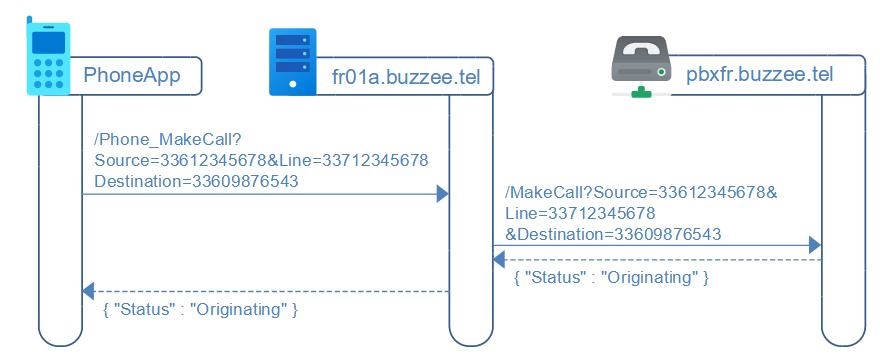
Delos will forward the request as a HTTP GET request to S2T server
http://s2t.buzzee.tel/MakeCall?Source=33612345678&Line=33712345678&Destination=33609876543
| Fields | Description |
|---|---|
| Source | This is the phone number of the user, formatted as 33612345678 |
| Line | This is the line number of the device of the user, also called the secondary eSIM, formatted as 33712345678 |
| Destination | This is the phone number of the contact to call, formatted as 33609876543 |
S2T server will respond with Status=Originating (or whatever status makes sense in the world of VoIP):
{
  "Status": "Originating"
}
/Phone_MakeCall
Les paramètres à fournir sont les suivants :
| Fields | Description |
|---|---|
| Source | This is the phone number of the user, formatted as 33612345678 |
| Line | This is the line number of the device of the user, also called the secondary eSIM, formatted as 33712345678 |
| Destination | This is the phone number of the contact to call, formatted as 33609876543 |
Delos instance will respond with the Status Originating, meaning the request has been forwarded to S2T server:
{ "Status" : "Originating" }
The VoIP centrex should then make ring the mobile phone of the user and the standard phone utility application will take over.
This endpoint may raise an error which is formatted as follow:
{ "Code" : "ERR_SOURCE_IS_NOT_USER", "Message": "Source is not a user" }
The following table summarizes the different error codes:
| Errors | Description |
|---|---|
| ERR_SOURCE_IS_NOT_USER | Cannot lookup user from Source phone/cell number. |
| ERR_SOURCE_IS_NOT_USER_PHONE | Source phone number is not associated with the authenticated user. |
| ERR_SOURCE_IS_NOT_USER_CELL | Source cell number is not associated with the authenticated user. |
/Phone_Trace (S2T -> Delos)
S2T server can append basic messages in the traces of Delos instance to explain the progress
The Phone_Trace action can be invoked as a HTTP POST request with parameters being encoded as application/x-www-form-urlencoded
http://fr01a.buzzee.tel/JSON/Phone_Trace?
XMLC_UserID=1000001
Group=S2T
Level=Info
Message=Starting transcription of conversation between user 33612345678 and contact 33609876543
| Fields | Description |
|---|---|
| XMLC_UserID | optional parameter. This is the UserID for which the Transcript is being processed. |
| Group | optional parameter. If blank, it will be initialized with 'S2T'. |
| Level | optional parameter. If blank, iut will be initialized with 'Info'. Possible values: Error, Warning, Info, Verbose, Debug |
| Message | Content to be added in the trace file of Delos instance |
Delos instance will respond with status code 200 without any content.
/ASP_UsersPhones (PBX -> fr1.buzzee.tel)
The PBX server may query the list of existing users.
The PBX sends a HTTP GET request with the last bookmark received, to query the list of most recently created users
http://fr1.buzzee.tel/JSON/ASP_UsersPhones?Bookmark=1001,1000001
| Fields | Description |
|---|---|
| Bookmark | optional parameter. An opaque string meaningful only for the Delos server. The initial request the value is blank. Subsequent call is using the value returned in the previous response. |
| MaxRecords | optional parameter. The maximum number of records in the response. The response will contain the element EOF=0 if not all the records are fetched, and requires to query with the latest bookmark. |
Delos instance will respond with status code 200 with the list of Users with their phone number associated:
{ "Bookmark": "54697,100000000",
  "EOF": "1",
  "Users": { "User": [
     { "Phone": "33612345678", "VersionID": "1001", "Host": "fr01a.buzzee.tel"},
     { "Phone": "33798765432", "VersionID": "1002", "Host": "fr02a.buzzee.tel"},
     { "Phone": "33788776655", "VersionID": "1003", "Deleted": "1"} ]
  }
}
The major elements are:
| Errors | Description |
|---|---|
| Bookmark | The opaque bookmark to be used for subsequent calls. |
| EOF | End Of File. This element will be set to "1" if the response contain all records up-to-date. If this element is set to "0", then it is necessary to query again the regional connect server to fetch the next list of users. |
| Users | An array of User |
| User | The record of the User. The same record, meaning with the same Phone number, may appear multiple times in the response. The PBX server MUST overwrite existing entry, and should not create duplicates. |
| Phone | The phone number, which MAY BE formatted as 3312345678. |
| VersionID | The internal versioning of the regional connect server. |
| Host | The server hosting the user account. This is the endpoint to invoke /Phone_CallEvent for the major PBX events. |
| Deleted | Optional. When a user has terminated his account, the user is deleted from the regional server directory. |