Registration
Disclaimer
This document is a prelimary version and work-in-progress,
Details discussed in this document will be subject to future modifications.
User flow when lauching the application
The application initially collect the phone number of the user:
1. Retrieve the regional server (@fr1).
2. Retrieve the user on the regional server: /ASP_GetUserFromPhone?Phone=33612345678
If there is a user → proceed to login on the Host server
3. If there is no user (all other cases):
a) Retrieve the local server via FormOpenAccount.
b) Check if the server is invitation-only:
If no → register directly.
If yes → Collect the user's email address and call /ASP_WaitStatus?Email= to manage waiting list status:
- Status=UserNotFound → "Waiting list" screen, then:
Use OAuth2 Email authentication OR
Call /ASP_WaitEmailPIN?Email= followed by /ASP_WaitRegister?Email=
- Status=SessionIdNotFound → "Obtain session ID" screen, then:
Use OAuth2 Email authentication OR
Call /ASP_WaitEmailPIN?Email= followed by /ASP_WaitObtainSession?Email= and then /ASP_WaitStatus?Email=
- Status=Wait → "Pending validation" screen.
- Status=Invite → "Invitation accepted" screen.
- Status=User → displayed error (this case should not happen,
/ASP_GetUserFromPhone has been called at the beginning of the flow).
If the user relaunches the app:
1. If Credentials (Phone+SessionID) are present -> perform /CheckSession
2. If no credential, Retrieve information locally:
- Check if they have already registered on the waiting list
- Retrieve Email, SessionID, Phone, CountryCode
3. We call /ASP_WaitStatus?Email= with the available information:
- Status=Invite → "Invitation accepted" screen.
- Status=Wait → "Pending validation" screen.
- If contact found but no SessionID:
Use OAuth2 Email authentication OR
Call /ASP_WaitEmailPIN?Email= followed by /ASP_WaitObtainSession?Email= and then /ASP_WaitStatus?Email=
- Any other case → We display the first login page that asks for the phone number.
Preflight - Register on waiting list
During the rampup phase, all users will be queued on a waiting list.
This is the duty of the PhoneApp to manage the different steps to register the future user on the waiting list of the global connect servers:
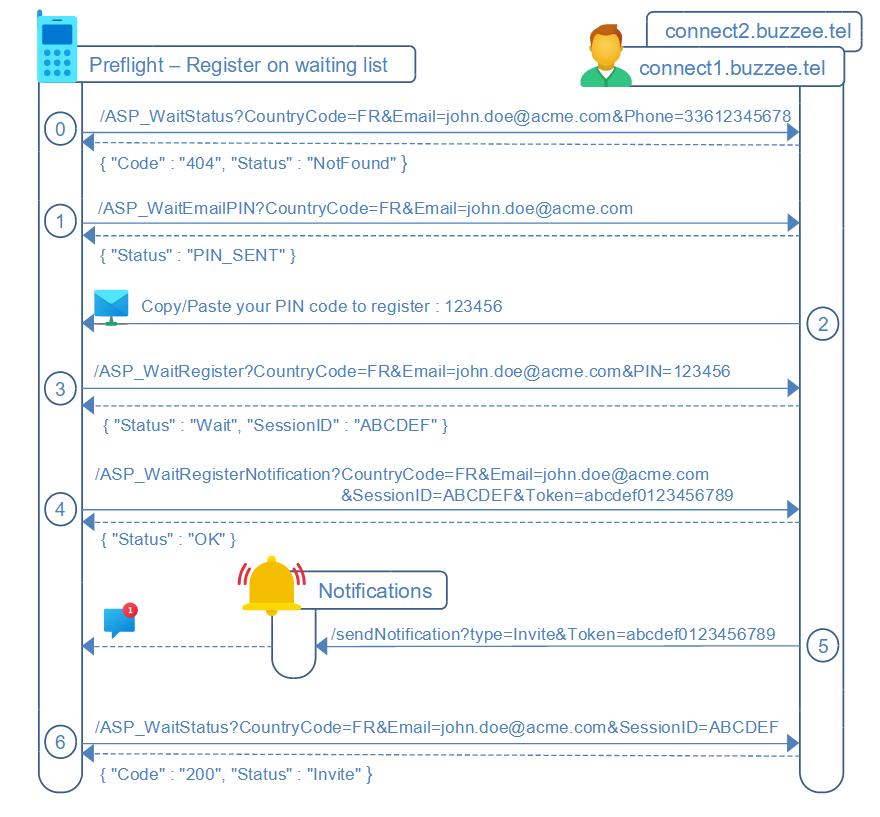
0. The client application needs to query /ASP_WaitStatus on global connect servers to check the user is not already in the waiting list
1. The client application is now ready to proceed to register the candidate on the waiting list (if the region requires Wait=1),
invoke /ASP_WaitEmailPIN on top-level Global connect1.buzzee.tel server.
2. Global connect server will send an email with a PIN code to the email address provided
3. Invoke /ASP_WaitRegister with the main infos CountryCode, Email, PIN code, FirstName, LastName, Phone, to enqueue the candidate on the waiting list for his country (based on the CountryCode selected).
4. Optional. To get notified PhoneApp will request the user to accept notifications, it will collect the FireBase device registration token, and store this token by invoking /ASP_WaitRegisterNotification
5. Optional. When the waiting user will be officially invited to proceed to open his account, a /sendNotification of type "Invite" will be sent to the Notifications server which will relay this notification to the FireBase, which in turns will send the notification to the device.
6. the user will be invited to check from time to time the status of his registration, and wait for an invite, this is done by querying /ASP_WaitStatus
Once the ASP_WaitStatus become { "Status" : "Invite" }, then PhoneApp can proceed to the standard workflow to open account for a new user.
Meanwhile, the future user can gain faster invitation by getting some support from sponsors :
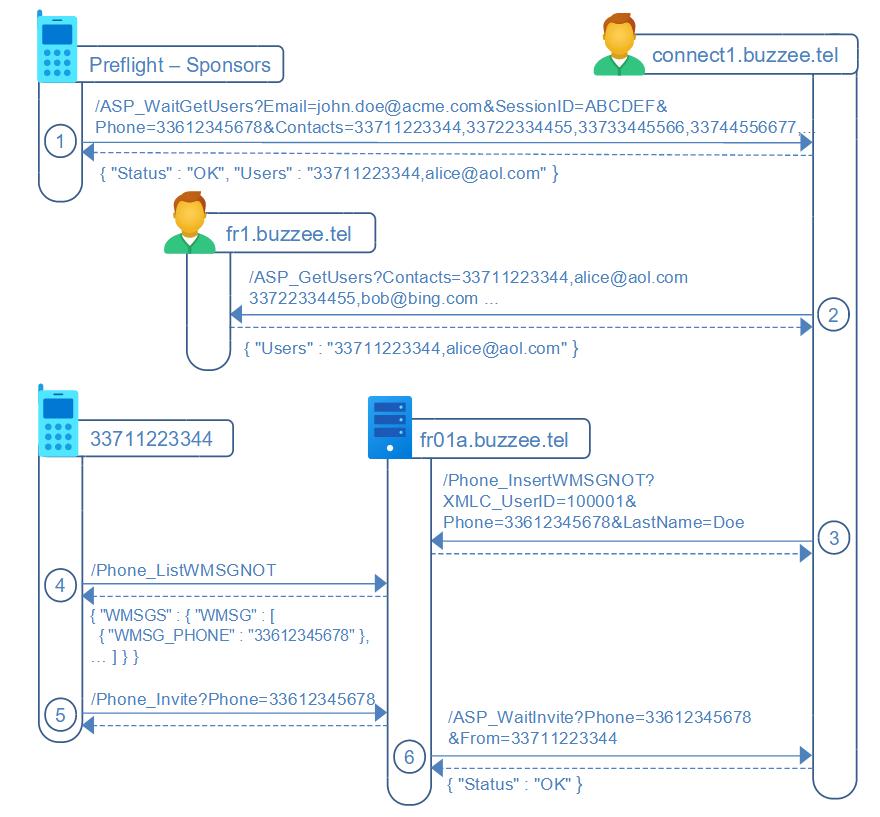
Once queued in the waiting list, in order to accelerate his validation for an invite, the user can search for sponsors.
1. The user is invited to check the contacts listed in his contact manager, to search for existing registered users of the application by invoking /ASP_WaitGetUsers
2. global connect server will collect on the different regional connect servers the existing users matching the list of phone numbers provided by invoking /ASP_GetUsers
3. ForEach existing user, global connect server will invoke /Phone_InsertWMSGNOT to insert a notification in the account of each user to invite them to sponsor the waiting user
3.bis The user may trigger a /ASP_WaitRequestSponsor for a specific contact which a user of BuzzeeTalk
4. /Phone_ListWMSGNOT will display the list of notifications with invitation to sponsor the waiting user
5. Client application can display a one-button "accept and invite" for each message and invoke /Phone_Invite to invite the waiting user,
as well, the client application may provide a form to submit an invite by providing the phone number of a contact requesting an invite.
6. Delos hosting server will invoke /ASP_WaitInvite to passthru the invite from the hosting server to the global connect server, increasing the number of sponsors of the waiting user.
/ASP_WaitStatus (PhoneApp -> Connect)
At initial download of the application, the client invokes ASP_WaitStatus to verify the user does not exists in the waiting list.
At regular time, the client application may request the status in the waiting list, until Status=Invite, in order to proceed to open account on a hosting server.
This query is performed against the global connect servers, connect1.buzzee.tel, connect2, connect3, whichever first server responds.
https://connect1.buzzee.tel/JSON/ASP_WaitStatus?CountryCode=FR&Email=john.doe@acme.com&SessionID=ABCDEF&Phone=33612345678
Note: Prefer to check on connect1.buzzee.tel then connect2.buzzee.tel, rather than invoking https://connect.buzzee.tel/ since it may return a 301 Redirect.
| Parameter | Description |
|---|---|
| CountryCode | Used to locate which database to use for this contact. Example: FR (DatabaseID will be 10033) |
| Email address used to register the contact on the waiting list. | |
| SessionID | Optional. Max 3 attempts per day. SessionID provided once registration on waiting list is completed. If SessionID has been lost, PhoneApp can request a new SessionID through /ASP_WaitEmailPIN and /ASP_WaitObtainSession |
| Phone | Optional. During the standby process on the waiting list. |
Initially, the user does not exists :
{ "Status": "NotFound" }
If the user is queued on the waiting list, Connect instance will respond with following response:
{ "Status": "Wait" }
Once the user is invited to proceed to open an account of a hosting server, the response will be:
{ "Status": "Invite", "Host":"fr1.buzzee.tel", "Hosts", "fr2.buzzee.tel" }
The table below describes the different fields:
| Fields | Description |
|---|---|
| Status | One of the following value: - NotFound : initially the contact is not queued in the waiting list. The client application needs anyway to lookup on the regional connect server managing the international prefix of the phone number. - Wait : the contact is queued in the waiting list - Invite : the contact has been elected to open account and is invited to proceed the registration. - User : the contact has successfully open his account on a hosting server. - Unregister : the contact has unsubscribed from the waiting list, or closed his user account. |
| ScopeID | Optional. Only for diagnosis information. ScopeID is created as Prefix Intl Code E164 (+10000). ScopeID of USA/CANADA (+1) is 10001. FR (+33) is 10033. SXM (+1721) Sint Maarten (Dutch part) ScopeID is 11721. |
| CountryCode | Optional. ISO code of the country extracted from the CLOC_METADATA. (Name of the country can be found in CLOC_INFO of the scope). |
| RegisteredAt | Optional. Date of the registration in the waiting list, extracted from the CPSN_METADATA |
| Sponsors | Optional. Number of sponsors who have validated his registration, extracted from the CPSN_METADATA |
| Position | Optional. Estimated position in the list to receive the invitation. |
| Total | Optional. Estimated number of candidates for this Region. (FastCount CPSN). |
The server may return errors
| Errors | Description |
|---|---|
| ERR_ASP_USER_EXISTS | An existing user is already registered with the same email address. |
| ERR_SESSION_MISMATCH | SessionID submitted does not match the CPSN_SESSION registered for the contact. |
| ERR_MAX_DAILY_ATTEMPTS_PER_IP | Max daily attempts from the same IP |
| ERR_MAX_DAILY_ATTEMPTS_PER_PHONE | Max daily attempts for the same phone number |
| ERR_MAX_DAILY_ATTEMPTS_PER_EMAIL | Max daily attempts for the same email address |
/ASP_GetRegion (PhoneApp -> Connect)
DEPRECATED as-of 2024-11-12. Should be replaced by downloading file https://connect1.buzzee.tel/Regions.json
The topology of the infrastructure relies on 3 levels:
- The global connect servers (connect1, connect2, connect3, ... ), queueing future users in waiting list per country
- The regional connect servers (per country, fr1.buzzee.tel, fr2.buzzee.tel,...), meant for lookups to locate on which hosting servers are hosted the account of each user
- The local hosting servers fr01a.buzzee.tel (frb01.buzzee.tel) store the user accounts
/ASP_GetRegion will provide the regional connect server for the region serving this phone number (based on international prefix).
https://connect1.buzzee.tel/JSON/ASP_GetRegion?Phone=33612345678
Note: Prefer to check on connect1.buzzee.tel then connect2.buzzee.tel, rather than invoking https://connect.buzzee.tel/ since it may return a 301 Redirect.
If there is a user already registered, Connect instance will respond with following response:
{ "Region" : "fr.buzzee.tel", "Invite" : "1", "Country" : "FR",
   "Host" : "fr1.buzzee.tel",  "Hosts" : "fr1.buzzee.tel,fr2.buzzee.tel" }
The table below describes the different fields:
| Fields | Description |
|---|---|
| Region | Domain of the region. Example: fr.buzzee.tel or es.buzzee.tel |
| Invite | Optional. During ramup phase, this value will be set to "1", and means to queue the applicants to a waiting list until they receive an invite to proceed to open an account. "Invite": "1" |
| Country | Optional. It will provide an information about the country code of this region. Example: FR or ES |
| Host | Host to perform the lookup to locate the hosting server of a user based on his phone number. As explained in the topology, this Host is a regional connect server. Example: fr1.buzzee.tel |
| Hosts | Hosts participating in the cluster of this regional connect domain. To be used in order until the first host is responding. Example: fr1.buzzee.tel,fr2.buzzee.tel |
The server may return errors
| Errors | Description |
|---|---|
| ERR_BLANK_PHONE | Parameter Phone is blank. |
/ASP_WaitObtainPIN (PhoneApp -> Connect)
DEPRECATED as-of 2024-11-12.
To validate the Phone number of the user, a PIN code will be sent to the device through SMS.
This PIN code will need to be collected by the PhoneApp or by the user to validate the action /ASP_WaitRegister.
the HTTP request will be GET on the global host, in this example: connect1.buzzee.tel
http://connect1.buzzee.tel/JSON/ASP_WaitObtainPIN?Phone=33612345678&XMLC_Language=FRANCAIS
| Fields | Description |
|---|---|
| Phone | Mobile phone number of the user. SMS containinig the PIN code will be sent to this number. |
| XMLC_Language | Optional. You may define the language used for the SMS to be sent. Possible values: ENGLISH, FRANCAIS, DEUTSCH, ESPANOL, ITALIANO. |
| SMS_Template | Optional. You may request to use a pre-defined template to send the content of the SMS with the PIN code. Example: LOGIN_PINCODE_ANDROID will send the follwoing SMS content: "Your PIN code is 123456" LOGIN_PINCODE_APPLE will send the follwoing SMS content: "Your PIN code is 123456" |
| SMS_AppID | Optional. For Android application, you may set value to "Phone_AndroidHashString" |
| Optional. Email of the user. This email will be used to locate existing user already registered or queued on the waiting list. |
Delos instance will return in case of success a simple response:
{ "Status": "PIN_SENT" }
In case of error, expect a 500 Internal Server Error response:
{ "Code": "ERR_SEND_SMS" }
The server may return errors
| Errors | Description |
|---|---|
| ERR_BLANK_PHONE | Parameter phone number is blank. |
| ERR_INVALID_PHONE | Invalid phone number. Maybe wrong format. |
| ERR_SEND_SMS | Cannot invoke the SMS provider to send SMS |
| ERR_SEND_PIN | The SMS could not be sent due to error in phone number format or insufficient credits |
| ERR_MAX_DAILY_ATTEMPTS_PER_IP | Max daily attempts from the same IP |
| ERR_MAX_DAILY_ATTEMPTS_PER_PHONE | Max daily attempts for the same phone number |
| ERR_MAX_DAILY_ATTEMPTS_PER_EMAIL | Max daily attempts for the same email address |
| ERR_ASP_USER_EXISTS | An existing user is already registered with the same email address. |
| ERR_PHONE_ALREADY_EXISTS | An existing user is already registered with the same phone number |
/ASP_WaitEmailPIN (PhoneApp -> Connect)
To validate the process of registration based on email address to identify the candidate, a PIN code will be sent by email.
This PIN code will need to be copy/paste by the user from the email received to validate the action /ASP_WaitRegister.
the HTTP request will be GET on the global host, in this example: connect1.buzzee.tel
http://connect1.buzzee.tel/JSON/ASP_WaitEmailPIN?CountryCode=FR&Email=john.doe@acme.com&XMLC_Language=FRANCAIS
| Fields | Description |
|---|---|
| CountryCode | Used to locate which database to use for this contact. Example: FR (DatabaseID will be 10033) |
| Email address used to register the contact on the waiting list. | |
| XMLC_Language | Optional. You may define the language used for the content of the email to be sent. Possible values: ENGLISH, FRANCAIS, DEUTSCH, ESPANOL, ITALIANO. |
| CPSN_FIRST_NAME | Optional. First name of the user. Used in the template of the email to start with "Hello John," |
| CPSN_LAST_NAME | Optional. Last name of the user. If not set, the last name will be initialized from the phone number |
Delos instance will return in case of success a simple response:
{ "Status": "PIN_SENT" }
If the contact already exists, the response will contain CPSN_ID not blank.
This workflow may be used to regain access to a SessionID using /ASP_WaitObtainSession:
{ "Status": "PIN_SENT", "CPSN_ID" : "1001002" }
In case of error, expect a 500 Internal Server Error response:
{ "Code": "ERR_SEND_EMAIL" }
The server may return errors
| Errors | Description |
|---|---|
| ERR_BLANK_EMAIL | Parameter phone number is blank. |
| ERR_SEND_EMAIL | Cannot send the email. It may be a different error. |
| ERR_MAX_DAILY_ATTEMPTS_PER_IP | Max daily attempts from the same IP |
| ERR_MAX_DAILY_ATTEMPTS_PER_PHONE | Max daily attempts for the same phone number |
| ERR_MAX_DAILY_ATTEMPTS_PER_EMAIL | Max daily attempts for the same email address |
| ERR_ASP_USER_EXISTS | An existing user is already registered with the same email address. |
| ERR_PHONE_ALREADY_EXISTS | An existing user is already registered with the same phone number |
/ASP_WaitRegister (PhoneApp -> Connect)
Once the PIN code has been received, and collected by the mobile app on the phone,
PhoneApp can proceed to register the future user in the waiting list.
The HTTP request will use POST multipart/form-data since there are few fields to submit:
http://connect1.buzzee.tel/JSON/ASP_WaitRegister?
CountryCode=FR
Email=john.doe@acme.com
PIN=123456
CPSN_LAST_NAME=Doe
CPSN_FIRST_NAME=John
Phone=33612345678
XMLC_Language=FRANCAIS
or
http://connect1.buzzee.tel/JSON/ASP_WaitRegister?
CountryCode=FR
Email=john.doe@acme.com
CPSN_LAST_NAME=Doe
CPSN_FIRST_NAME=John
Phone=33612345678
XMLC_Language=FRANCAIS
Provider=Google
IDToken=1x.abcdef.123456
AccessToken=1x.....
RefreshToken=1x.....
| Params | Description |
|---|---|
| CountryCode | Used to locate which database to use for this contact. Example: FR (DatabaseID will be 10033) |
| Email of the user. | |
| PIN | The PIN code received by SMS to validate the phone number of the user. Made of 6 digits. If the Email has been validated by OAuth on the client application, this field is optional, and replaced with the 2 parameters AccesToken and RefeshToken |
| XMLC_Language | Optional. You need to define the preferred language for the user. Possibly extracted from the Locale of the device (fr-FR). Possible values: ENGLISH, FRANCAIS, DEUTSCH, ESPANOL, ITALIANO. |
| CPSN_FIRST_NAME | Optional. First name of the user. Used in communication by email to start with "Hello John," |
| CPSN_LAST_NAME | Optional. Last name of the user. If not set, the last name will be initialized from the phone number |
| Phone | Optional. The phone number of the future user. |
| Provider | Optional. The OAuth provider used to validate the email address by the client application. Example: Google, Apple, Microsoft |
| IDToken | Optional. The OAuth ID token obtained from the OAuth provider, validated by the client application. |
| AccessToken | Optional. The OAuth access token obtained from the OAuth provider, validated by the client application. |
| RefreshToken | Optional. The OAuth refresh token obtained from the OAuth provider, validated by the client application. |
Delos instance will save this contact on the global connect server, in the scope of the country code provided.
Delos instance will setup a SessionID (CPSN_SESSION) for future communication to update infos :
{ "Status": "Wait", "SessionID": "ABCDEF", "Verified": "1" }
The following fields in the response are:
| Fields | Description |
|---|---|
| Status | If the action completes successfully, it should return a Status=Wait |
| SessionID | A parameter to store locally on the device, used for all future communications with the global connect server to update infos. |
| Verified | Optional. If the email provided is the same as the one dicovered in the JWT IDToken, then the value is set to "1". |
The server may return errors:
| Errors | Description |
|---|---|
| ERR_BLANK_EMAIL | Parameter phone number is blank. |
| ERR_INVALID_EMAIL | Invalid email address. Maybe missing @ or TLD domain. |
| ERR_INVALID_PHONE | Invalid phone number. Maybe wrong format. |
| ERR_PIN_MISMATCH | PIN code submitted does not match the PIN code sent by SMS |
| ERR_ASP_USER_EXISTS | An existing user is already registered with the same email address |
| ERR_PHONE_ALREADY_EXISTS | An existing user is already registered with the same phone number |
| ERR_MISSING_PIN_OR_ACCESSTOKEN | Missing parameter PIN or AccessToken |
/ASP_WaitUnregister (PhoneApp -> Connect)
To unregister a user from the waiting list, PhoneApp can invoke /ASP_WaitUnregister
http://connect1.buzzee.tel/JSON/ASP_WaitUnegister?
CountryCode=FR
Email=john.doe@acme.com
Phone=33612345678
SessionID=ABCDEF
| Params | Description |
|---|---|
| CountryCode | Used to locate which database to use for this contact. Example: FR (DatabaseID will be 10033) |
| Email of the user. | |
| SessionID | Value received in response to /ASP_WaitRegister. |
| Phone | Optional. The phone number to identify the user. |
Delos instance will unregister this contact from the global connect server DB, in the scope of the country code provided.
{ "Status": "Deleted" }
The following fields in the response are:
| Fields | Description |
|---|---|
| Status | If the action completes successfully, it should return a Status=Deleted |
The server may return errors:
| Errors | Description |
|---|---|
| ERR_BLANK_EMAIL | Parameter phone number is blank. |
| ERR_INVALID_EMAIL | Invalid email address. Maybe missing @ or TLD domain. |
| ERR_INVALID_PHONE | Invalid phone number. Maybe wrong format. |
| ERR_SESSION_MISMATCH | SessionID submitted does not match the CPSN_SESSION registered for the contact. |
| ERR_USER_NOT_FOUND | User not found from Email/Phone parameters provided. |
/ASP_WaitRegisterEmail (PhoneApp -> Connect)
DEPRECATED as-of 2024-11-12.
PhoneApp may suggest to submit email address to be updated on the status and progress of the candidate,
it is the right time to update FirstName and LastName if not provided before.
The HTTP request will use POST multipart/form-data since there are few fields to submit:
http://connect1.buzzee.tel/JSON/ASP_WaitRegisterEmail?
CountryCode=FR
Phone=33612345678
Email=john.doe@acme.com
CPSN_LAST_NAME=Doe
CPSN_FIRST_NAME=John
XMLC_Language=FRANCAIS
| Params | Description |
|---|---|
| CountryCode | Used to locate which database to use for this contact. Example: FR (DatabaseID will be 10033) |
| Phone | The phone number of the waiting user. |
| SessionID | Value received in response to /ASP_WaitRegister. |
| XMLC_Language | Optional. You need to define the preferred language for the user. Possibly extracted from the Locale of the device (fr-FR). Possible values: ENGLISH, FRANCAIS, DEUTSCH, ESPANOL, ITALIANO. |
| Email to be used to communicate with the user. | |
| CPSN_FIRST_NAME | Optional. First name of the user. |
| CPSN_LAST_NAME | Optional. Last name of the user. If not set, the last name will be initialized from the phone number |
Delos instance will update only FirstName, LastName, not email address until it is validated.
Delos will send an email with a PIN code to be copy-paste in PhoneApp to validate the email address,
The client application may invite the user to check his mailbox, to copy-paste the 6-digits PIN code received.
{ "Status": "EmailSent" }
The following fields in the response are:
| Fields | Description |
|---|---|
| Status | If the action completes successfully, it should return a Status=EmailSent. Actually, the email is being sent asynchronously. |
The server may return errors:
| Errors | Description |
|---|---|
| ERR_BLANK_PHONE | Parameter phone number is blank. |
| ERR_INVALID_PHONE | Invalid phone number. Maybe wrong format. |
| ERR_SESSION_MISMATCH | SessionID submitted does not match the CPSN_SESSION registered for the contact. |
| ERR_EMAIL_ALREADY_EXISTS | Another user is already registered with the same email address. |
/ASP_WaitVerifyEmail (PhoneApp -> Connect)
DEPRECATED as-of 2024-11-12.
The user should be invited to check his inbox for an incoming email from connect.buzzee.tel containing a PIN code,
the user should copy-paste this PIN code inside PhoneApp.
The client application will send a POST multipart/form-data request with following fields:
http://connect1.buzzee.tel/ui/ASP_WaitVerifyEmail
CountryCode=FR
Phone=33612345678
SessionID=ABCDEF
Email=john.doe@acme.com
PIN=123456
| Params | Description |
|---|---|
| CountryCode | Used to locate which database to use for this contact. Example: FR (DatabaseID will be 10033) |
| Phone | The phone number of the waiting user. |
| SessionID | Value received in response to /ASP_WaitRegister. |
| Email to be used to communicate with the waiting user. | |
| PIN | PIN code received by email. |
Delos instance will check PIN code for this email address, and update the contact with the email address provided.
The response should be:
{ "Status": "OK" }
The following fields in the response are:
| Fields | Description |
|---|---|
| Status | If the action completes successfully, it should return a Status=OK. |
The server may return errors:
| Errors | Description |
|---|---|
| ERR_BLANK_PHONE | Parameter phone number is blank. |
| ERR_INVALID_PHONE | Invalid phone number. Maybe wrong format. |
| ERR_SESSION_MISMATCH | SessionID submitted does not match the CPSN_SESSION registered for the contact. |
| ERR_PIN_MISMATCH | PIN code submitted does not match the PIN code sent by email. |
| ERR_EMAIL_ALREADY_EXISTS | Another user is already registered with the same email address. |
/ASP_WaitRegisterNotification (PhoneApp -> Connect)
Optional. PhoneApp will request the user to accept notifications to get updated once his registration is being accepted,
PhoneAPp will collect the FireBase device registration token, and store this token on Delos instance with a HTTP POST multipart/form-data request:
https://connect1.buzzee.tel/JSON/ASP_WaitRegisterNotification
CountryCode=FR
Email=john.doe@acme.com
SessionID=ABCDEF
Token=abcdef0123456789
| Fields | Description |
|---|---|
| CountryCode | Used to locate which database to use for this contact. Example: FR (DatabaseID will be 10033) |
| Email of the waiting user. | |
| SessionID | Value received in response to /ASP_WaitRegister. or /ASP_WaitObtainSession |
| Token | The device registration token as obtained by the FireBase SDK on the mobile application. |
Delos instance will respond with Status OK:
{ "Status" : "OK" }
This device registration token will be sent to the Notifications gateway server to be relayed to FCM (FireBase Cloud Messaging)
The server may return errors:
| Errors | Description |
|---|---|
| ERR_BLANK_EMAIL | Parameter email is blank. |
| ERR_USER_NOT_FOUND | Email address is not registered in the waiting list |
| ERR_SESSION_MISMATCH | SessionID submitted does not match the CPSN_SESSION registered for the contact. |
/sendNotification [type=Invite] (Delos -> Notifications)
Optional. Once the contact has been validated, Delos will send a notification to invite the user to open an account on the hosting server of his region.
Delos instance sends a HTTP POST request to the PhoneNotifications server, with the type parameter as "Invite":
http://phoneappnotifications.buzzee.tel/sendNotification
Email=john.doe@acme.com
SessionID=ABCDEF
type=Invite
Token=abcdef0123456789
| Fields | Description |
|---|---|
| Email of the waiting user. | |
| SessionID | Value of the CPSN_SESSION of the waiting user to be validated by Notifications gateway server .only if necessary |
| type | The value "Invite" will be intercepted by the PhoneApp in order to invite the user to proceed to the workflow to open an account on the hosting server. |
| Token | This is the device registration token which has been stored using /ASP_WaitRegisterNotification |
/ASP_WaitGetUsers (PhoneApp -> Connect)
The future user can gain faster invitation by getting some support from sponsors,
PhoneApp can suggest to search for contacts in the contact manager of the device to list the existing users of the application,
for which the future user could leverage to gain sponsor from them.
This action requires a HTTP POST request to /ASP_GetUsersFromPhones on the top-level global connect servers, providing the list of selected phone numbers from the contact manager:
https://connect1.buzzee.tel/JSON/ASP_WaitGetUsers
CountryCode=FR
Email=john.doe@acme.com
SessionID=ABCDEF
Phone=33612345678
Contacts=33711223344
33722334455
33733445566
The table below describes the different fields:
| Fields | Description |
|---|---|
| CountryCode | Used to locate which database to use for this contact. Example: FR (DatabaseID will be 10033) |
| Email identifying the waiting user. | |
| SessionID | Value received in response to /ASP_WaitRegister. |
| Phone | The phone number of the waiting user. |
| Contacts | Multi-lines formatted as 1 line per contact, selected from the contact manager. Each line contain 1 phone number per single contact Example: 33711223344 33722334455 33733445566 |
The top-level global connect server, will lookup on regional connect servers to find existing users based on the phone numbers provided. The response will contain the list of users found on the regional connect server:
{ "Status" : "OK", "Users" : "33711223344\n33722334455" }
If no user found in the list of the contact manager top-level global connect server will respond with:
{"Status": "NotFound" }
The following fields in the response are:
| Fields | Description |
|---|---|
| Status | If users have been found, Status=OK. If no user have been found, Status=NotFound. |
| Users | Multi-lines formatted as 1 line per contact, selected from the contact manager. Each line contain 1 phone number per single contact. PhoneApp may suggest to contact these existing users to request for an invite directly from their PhoneApp. Example: 33711223344 33722334455 |
The server may return errors
| Errors | Description |
|---|---|
| ERR_BLANK_PHONE | Parameter phone number is blank. |
| ERR_INVALID_PHONE | Invalid phone number. Maybe wrong format. |
| ERR_SESSION_MISMATCH | SessionID submitted does not match the CPSN_SESSION registered for the contact. |
/ASP_WaitRequestSponsor (PhoneApp -> Connect)
The user in the waiting list may enforce to request a sponsor to one of his contact which is an existing user of BuzzeeTalk
This is a HTTP POST request to the Global server connect1.buzzee.tel :
https://connect1.buzzee.tel/JSON/ASP_WaitRequestSponsor?
CountryCode=FR
Email=john.doe@acme.com
SessionID=ABCDEF
Contact=33711223344
| Fields | Description |
|---|---|
| CountryCode | Used to locate which database to use for this contact. Example: FR (DatabaseID will be 10033) |
| Email identifying the waiting user. | |
| SessionID | Value received in response to /ASP_WaitRegister. |
| Phone | Phone of the waiting user. It will be used to create the proper contact in the DB of the sponsor. |
| Contact | Phone number of the contact to request a sponsor |
Delos will lookup in the regional server where resides the user, and then post the request for sponsor to the server hosting the contact.
Delos instance will respond with a JSON document with Status=OK
{ "Status" : "OK" }
The server may return errors
| Errors | Description |
|---|---|
| ERR_BLANK_EMAIL | Parameter email is blank. |
| ERR_SESSION_MISMATCH | SessionID submitted does not match the CPSN_SESSION registered for the contact. |
/Phone_ListWMSGNOT (PhoneApp -> Delos)
Existing users may have a list of notification messages in their notification center,
one type of these notifications comes from a candidate in the waiting list in order to obtain an invitation to open his account.
This list can be obtained with a HTTP GET request to /Phone_ListWMSGNOT:
https://fr01a.buzzee.tel/JSON/1xxx1abcdef/Phone_ListWMSGNOT
| Fields | Description |
|---|---|
| WMSGKND_ID | Optional. By default will list all notifications. WMSGKND_ID: -3508=Sponsorship request To filter on multiple medias use a comma separated formatting. WMSGKND_ID=-3508,-3528 -> Sponsorship request + Voicemails |
| WMSG_StartingRow | Optional. Fetch a new datapacket starting from the N row. The previous response contains at the level of WMSGS the attribute "@NextStartingRow": "30" By requesting WMSG_StartingRow=30 it will load the next 30 records. When the datapacket reached the end of all records, the attribute @EOF will be set to 1 at level of WMSGS. |
| WMSG_MaxRows | Optional. The number of records to extract per datapacket. When the datapacket reached the end of all records, the attribute @EOF will be set to 1 at level of WMSGS. |
Delos instance respond with a JSON document corresponding to the list of notifications:
{ "WMSGS" : { "WMSG" : [
   { "WMSG_ID": "1001002", "WMSG_DATE": "12/12/2023 09:20:00", "WMSG_MEDIA" : "-3508",
     "WMSG_INFO" : "Dave TheUgly is requesting a sponsorship to join BuzzeeTalk",
     "WMSGUSR_PSN" : "1000002", "WMSGUSR_FIRST_NAME" : "Bob", "WMSGUSR_LAST_NAME" : "THEGREAT",
     "WMSGPSN_PSN" : "1000202", "WMSGPSN_FIRST_NAME" : "Dave", "WMSGPSN_LAST_NAME" : "THEUGLY" },
   { "WMSG_ID": "1001004", "WMSG_DATE": "12/12/2023 09:00:00", "WMSG_MEDIA" : "-3508",
     "WMSG_INFO" : "Carol TheMad is requesting a sponsorship to join BuzzeeTalk",
     "WMSGUSR_PSN" : "1000002", "WMSGUSR_FIRST_NAME" : "Bob", "WMSGUSR_LAST_NAME" : "THEGREAT",
     "WMSGPSN_PSN" : "1000202", "WMSGPSN_FIRST_NAME" : "Carol", "WMSGPSN_LAST_NAME" : "THEMAD" },
   ...
   ] }
}
Actually, JSON document will return a larger document with a lot more fields, but these are the minimalists to be useful in the context of PhoneApp to display the notifications to validate invitation.
/Phone_Invite (PhoneApp -> Delos)
Existing users may have a list of notification messages in their notification center,
one type of these notifications comes from a candidate in the waiting list in order to obtain an invitation to open his account.
To sponsor a waiting candidate the user can invoke with a HTTP GET request /Phone_Invite:
https://fr01a.buzzee.tel/JSON/1xxx1abcdef/Phone_Invite?Phone=33612345678
| Fields | Description |
|---|---|
| Phone | Phone number to identify the contact to sponsor. |
| WMSG_ID | ID of the message notification of the sponsorship request. |
Delos instance respond with a JSON document Status=OK
{ "Status" : "OK" }
Delos will forward this request to the global connect server where resides the waiting lists of candidates.
/CloseWMSG (PhoneApp -> Delos)
To mark a sponsorship request as completed, PhoneApp may invoke a HTTP GET request to /CloseWMSG:
https://fr01a.buzzee.tel/JSON/1xxx1abcdef/CloseWMSG?WMSG_ID=1001002&XMLC_SkipNextAction=1
| Parameters | Description |
|---|---|
| WMSG_ID | ID of the message notification of the sponsorship request. |
| XMLC_SkipNextAction | Set this parameter to 1 to avoid obtaining in response the document of FormWMSG |
Delos instance may respond with a JSON document, but it is probably containing other informations to ignore:
{ "Status" : "OK" }
/CancelWMSG (PhoneApp -> Delos)
To mark a sponsorship request as cancelled, PhoneApp may invoke a HTTP GET request to /CancelWMSG:
https://fr01a.buzzee.tel/JSON/1xxx1abcdef/CancelWMSG?WMSG_ID=1001002&XMLC_SkipNextAction=1
| Parameters | Description |
|---|---|
| WMSG_ID | ID of the message notification of the sponsorship request. |
| XMLC_SkipNextAction | Set this parameter to 1 to avoid obtaining in response the document of FormWMSG |
Delos instance may respond with a JSON document, but it is probably containing other informations to ignore:
{ "Status" : "OK" }
/Phone_Invite (PhoneApp -> Delos)
Existing users may have a list of notification messages in their notification center,
one type of these notifications comes from a candidate in the waiting list in order to obtain an invitation to open his account.
This list can be obtained with a HTTP GET request to /Phone_Invite:
https://fr01a.buzzee.tel/JSON/1xxx1abcdef/Phone_Invite?Phone=33612345678
| Fields | Description |
|---|---|
| Phone | Phone number to identify the contact to invite. |
| WMSG_ID | ID of the message notification requesting to be sponsored. |
Delos instance respond with a JSON document corresponding to the list of notifications:
{ "Status" : "OK" }
Delos will forward this request to the global connect server where resides the waiting lists of candidates.
/ASP_WaitObtainSession (PhoneApp -> Connect)
This API is used when SessionID has been lost.
First, the PhoneApp will request /ASP_WaitEmailPIN, the user will copy/paste the PIN code received, PhoneApp will invoke /ASP_WaitObtainSession with the Email and PIN code:
https://fr01a.buzzee.tel/JSON/ASP_WaitObtainSession?CountryCode=FR&Email=john.doe@acme.com&PIN=123456
or POST https://fr01a.buzzee.tel/JSON/ASP_WaitObtainSession
CountryCode=FR
Email=john.doe@acme.com
Provider=Google
IDToken=1x.abcdef.123456
AccessToken=1x...
RefreshToken=1x...
| Fields | Description |
|---|---|
| CountryCode | Used to locate which database to use for this contact. Example: FR (DatabaseID will be 10033) |
| Email of the user. | |
| PIN | The PIN code received by Email to validate the email address of the user. Made of 6 digits. If the Email has been validated by OAuth on the client application, this field is optional, and replaced with the 2 parameters AccesToken and RefeshToken |
| Provider | Optional. The OAuth provider used to validate the email address by the client application. Example: Google, Apple, Microsoft |
| IDToken | Optional. The OAuth ID token obtained from the OAuth provider, validated by the client application. |
| AccessToken | Optional. The OAuth access token obtained from the OAuth provider, validated by the client application. |
| RefreshToken | Optional. The OAuth refresh token obtained from the OAuth provider, validated by the client application. |
Delos instance responds with a JSON document containing the SessionID:
{ "SessionID": "ABCDEF" }
The following fields in the response are:
| Fields | Description |
|---|---|
| SessionID | A parameter to store locally on the device, used for all future communications with the global connect server to update infos. |
The server may return errors:
| Errors | Description |
|---|---|
| ERR_BLANK_EMAIL | Parameter phone number is blank. |
| ERR_PIN_MISMATCH | PIN code submitted does not match the PIN code sent by SMS |
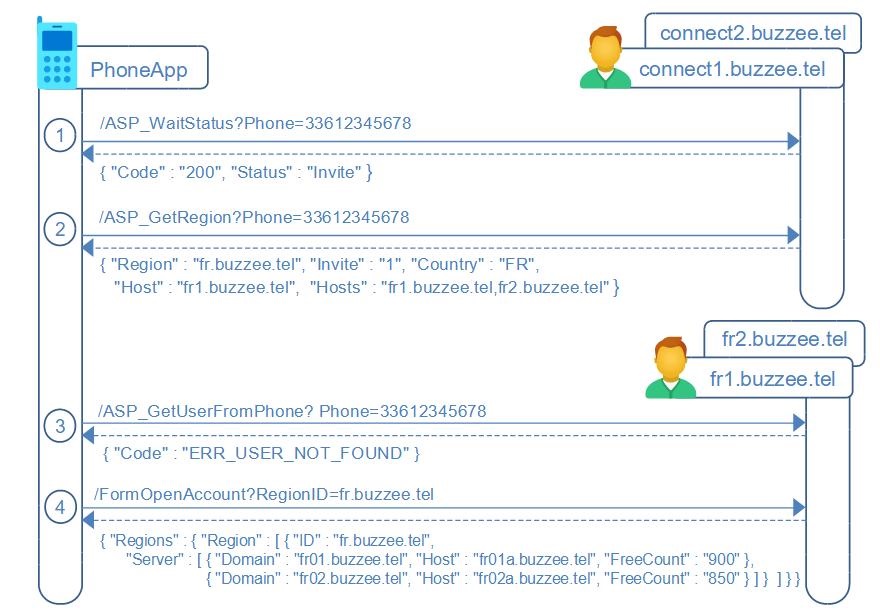
OpenAccount Workflow
Once the waiting user has been invited to proceed to open account,
the registration of a new user from the PhoneApp follows these steps:
1. Query /ASP_WaitStatus on global connect servers (connect1.buzzee.tel) to check if the phone number of the user is invited to proceed to open an account. It should return Status=Invite.
2. Next, query /ASP_GetRegion on connect1.buzzee.tel to get to which region is assigned this phone number (based on the international prefix).
3. Query /ASP_GetUserFromPhone on fr1.buzzee.tel to check response code error ERR_USER_NOT_FOUND
4. Request /FormOpenAccount on fr1.buzzee.tel to discover the available hosts, ie: RegionID=fr (or fr.buzzee.tel)
It will respond for a specific RegionID with the list of available servers (hosts) with their capacity, the section PARAMS suggests the host with highest available accounts (Free)
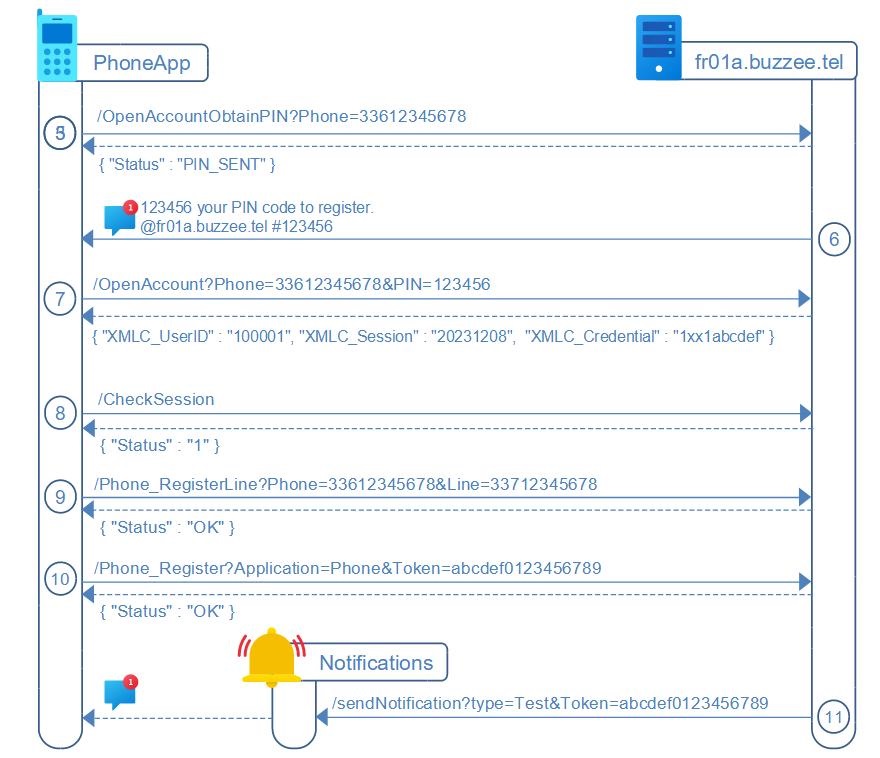
5. Invoke the candidate hosting server (fr01a.buzzee.tel) OpenAccountObtainPIN with Phone and CPSN_EMAIL to check availability
6. the host fr01a.buzzee.tel will send an SMS
Intercept the SMS containing the PIN code on the device
7. Invoke OpenAccount with Phone, CPSN_EMAIL and PIN code received by SMS
the response will contain the Credential of the user newly created, PhoneApp can query /CheckSession to verify the Credential
8. To check the validity of the Credential, invoke action CheckSession with the Credential obtained in response of OpenAccount.
9. PhoneApp may register a secondary line (eSIM) used for MakeCall, by first, requesting a PIN code by SMS through Phone_RegisterLineObtainPIN, then submitting the PIN code received to Phone_RegisterLine
10. Finally PhoneApp will invoke Phone_Register to store on Delos instance the device registration token that will be used to identify the device for push notifications for FCM (FireBase Cloud Messaging)
11. a test notification will be sent which can be intercepted by PhoneApp in order to verify that device registration token is valid.
/ASP_GetUserFromPhone
After getting the hosts of regional connect servers from the top-level global connect server at /ASP_GetRegion,
the client application needs to check that the phone number is not yet registered on the regional connect server associated : fr1.buzzee.tel (fr1, fr2, ..., whichever first server respond).
https://fr1.buzzee.tel/JSON/ASP_GetUserFromPhone?Phone=33612345678&XMLC_Culture=fr
Note: Prefer to check on fr1.buzzee.tel then fr2.buzzee.tel, rather than invoking https://fr.buzzee.tel/ since it may return a 301 Redirect.
If there is a user already registered, the regional connect instance will respond with following response:
{ "Domain": "fr01.buzzee.tel", "Host": "fr01a.buzzee.tel",
  "XMLC_UserID": "100008", "XMLC_ScopeID": "100007" }
The table below describes the different fields:
| Fields | Description |
|---|---|
| Domain | Domain where the user is registered. This is the cluster of Delos instance (made of multiple hosts). |
| Host | Primary host where the data of the user are stored. This is the primary endpoint URL to use to invoke the instance. |
| XMLC_UserID | UserID for this user phone number declared at the Host. XMLC_UserID is unique for a host but a similar UserID may exists on a different host. |
| XMLC_ScopeID | Scope of the user at the host. This is the Database ID, the TenantID, it may also be called SandboxID. A scope may contain multiple users from the same organization. A host may contains hundreds of scopes (independant databases). |
If the user is not registered with this phone number the regional connect instance will respond with 404 Not Found:
{"Code": "ERR_USER_NOT_FOUND", "Message": "TXMLInstruction.Process - Operation=Assert Name=CheckCPSN_ID"}
PhoneApp can proceed to the next step of the registration process: /FormOpenAccount
Note: during rampup phase, /ASP_GetUserFromPhone should be used to obtain ERR_USER_NOT_FOUND, and proceed to /ASP_WaitObtainPIN to register the future user on waiting list at the top-level global connect servers.
The server may return errors
| Errors | Description |
|---|---|
| ERR_BLANK_PHONE | Parameter Phone is blank. |
| ERR_INVALID_PHONE | Invalid phone number. Probably including invalid characters or invalid length (shorter than PSTN local phone number and shorter than the international format for the region). |
| ERR_INVALID_PSTN_LEADING | Phone parameter detected as local phone number based on the length, but the phone value does not start with the proper leading digit. 1612345678 does not start with '0' for local number in France |
| ERR_INVALID_PHONE_LENGTH | Invalid length for the international phone number. Too long: 331612345678 Too short: 3361234567 |
| ERR_INTL_PHONE_NOT_SUPPORTED | International phone number not supported in this region. For instance, 34612345678 will be rejected for region=FR. |
| ERR_USER_NOT_FOUND | User does not exists. During the registration process, the client application should proceed to following stage. |
| ERR_MAX_DAILY_ATTEMPTS_PER_IP | Max daily attempts from the same IP |
| ERR_MAX_DAILY_ATTEMPTS_PER_PHONE | Max daily attempts for the same phone number |
| ERR_MAX_DAILY_ATTEMPTS_PER_EMAIL | Max daily attempts for the same email address |
/FormOpenAccount
PhoneApp will query the instance fr1.buzzee.tel to retrieve the list of Regions,
then querying again the same endpoint with a RegionID will list hosts ready to accept registration of new users.
The first request to obtain the list of regions:
https://fr1.buzzee.tel/JSON/FormOpenAccount?Phone=33612345678&XMLC_Language=FRANCAIS
| Parameters | Description |
|---|---|
| Phone | Required. It will be used during rampup phase based on invitation. |
| XMLC_Language | Required. It will be used during rampup phase based on invitation. Possible values: ENGLISH, FRANCAIS, DEUTSCH, ESPANOL, ITALIANO. |
The instance will respond with the list of Regions (the document displayed here is only partial, the actual document may contain multiple fields and datasets)
{ "Regions": { "Region": [
    { "ID": "fr.buzzee.tel", "Name": "France BuzzeeTel" },
    { "ID": "be.buzzee.tel", "Name": "Belgique BuzzeeTel" },
    { "ID": "ch.buzzee.tel", "Name": "Suisse BuzzeeTel" } ] }
}
The PhoneApp client application may pick the proper Region based on the location of the user,
then it may query now fr1.buzzee.tel to obtain the list of available hosts for this RegionID:
https://fr1.buzzee.tel/JSON/FormOpenAccount?Phone=33612345678&RegionID=fr.buzzee.tel
| Parameters | Description |
|---|---|
| Phone | Required. It will be used during rampup phase based on invitation validated. |
| RegionID | Extract the Region with preferred servers for this region. |
The instance will respond with the list of hosts for this region (the document displayed here is only partial, the actual document may contain multiple fields and datasets)
{ "Regions": { "Region": [
    { "ID": "fr.buzzee.tel", "Name": "France BuzzeeTel", "Server" : [
      { "Domain": "fr01.buzzee.tel", "Host": "fr01a.buzzee.tel",
        "URL": "https://fr01a.buzzee.tel/Delos/",
        "MaxAccounts": "100", "FreeCount": "99", "Current": "1" },
      { "Domain": "fra02.buzzee.tel", "Host": "fra02.buzzee.tel",
        "URL": "https://fra02.buzzee.tel/Delos/",
        "MaxAccounts": "100", "FreeCount": "85", "Current": "15" }
      ] }
   ] },
  "PARAMS": { "RegionID": "fr.buzzee.tel", "ASP_Host": "fr01a.buzzee.tel",
              "FreeCount": "14", "CheckInvite": "1" }
}
New as of 2024-12-02: The PARAMS record contains the following fields
| Fields | Description |
|---|---|
| RegionID | The RegionID selected as parameter to the request to /FormOpenAccount |
| ASP_Host | The preferred host for this region selected by the regional server. The app should redirect the user to open account on this host. |
| FreeCount | The number of accounts available on the preferred ASP_Host. |
| CheckInvite | New as of 2025-01-03. When CheckInvite=1, the FreeCount is only valid for contact registered in the waiting list with Status=Inivite. There is no longer any open accounts available on any ASP_Host. This requires the PhoneApp to query the global connect server to obtain the Status=Invite for the contact before routing to continue processing to ASP_Host. If the contact is not yet registered in the waiting list on the global connect server, the PhoneApp need to route to the workflow of /ASP_WaitRegister. (AS_WaitEmailPIN,...) |
Before 2024-12-02: The client application needs to first select the Region, then lookup in the array of Server for this region, to select the host with maximum FreeCount, in order to balance the registration of new users across the pool of servers.
The Server record contains the following fields
| Fields | Description |
|---|---|
| Domain | Domain of the server. This is the cluster of Delos instance (made of multiple hosts). |
| Host | Primary host of the Domain. |
| URL | This is the primary endpoint URL to use to invoke this instance. In case of automation it requires to replace the end of the URL containing "/Delos/" with "/JSON/" to receive a JSON response. |
| MaxAccounts | The maximum number of user accounts this server can handle. |
| FreeCount | The number of available user accounts at this server. |
| Current | The current number of active user accounts on this server. Note: this information may not be delivered in future versions. |
At this stage the client application will select the least loaded server to continue the process of registration and obtain a PIN code for validation.
/OpenAccountObtainPIN
To validate the Phone number of the user, a PIN code will be sent to the device through SMS.
This PIN code will need to be collected by the PhoneApp or by the user to validate the action OpenAccount.
the HTTP request will be POST on the selected Host of the Region, in this example: fr01a.buzzee.tel
http://fr01a.buzzee.tel/JSON/OpenAccountObtainPIN
Phone=33612345678
XMLC_Language=FRANCAIS
SMS_Template=LOGIN_PINCODE_ANDROID
SMS_AppID=Hash123456
CountryCode=FR
XMLC_SkipNextAction=1
| Fields | Description |
|---|---|
| Phone | Mobile phone number of the user. SMS containinig the PIN code will be sent to this number. If optional parameter CPSN_EMAIL is not setup, this phone number will be used to identify the user. |
| XMLC_Language | Optional. You may define the language used for the SMS to be sent. Possible values: ENGLISH, FRANCAIS, DEUTSCH, ESPANOL, ITALIANO. |
| SMS_Template | Optional. You may request to use a pre-defined template to send the content of the SMS with the PIN code. Example: LOGIN_PINCODE_ANDROID will send the follwoing SMS content: "Your PIN code is 123456" LOGIN_PINCODE_APPLE will send the follwoing SMS content: "Your PIN code is 123456" |
| SMS_AppID | Optional. For Android application, you may set value to "Phone_AndroidHashString" |
| CPSN_EMAIL | Optional. Existing email of the user. This email will be used as a user name for the user to login on the server. In the future this email may also serve as a recovery email. If not set, the phone number will be used to identify the user. |
| CountryCode | Optional. Used to invoke the global server to locate in which waiting list is registered this contact. If not provided, the parameter Phone will be used to determine from the prefix the CountryCode. Example: FR (DatabaseID will be 10033) |
| XMLC_SkipNextAction | Skip the pipeline of the WebApp by returning after updting the preferences. |
Delos instance will return in case of success a simple response:
{ "Status": "PIN_SENT" }
In case of error, expect a 500 Internal Server Error response:
{ "Code": "ERR_SEND_SMS" }
The server may return errors
| Errors | Description |
|---|---|
| ERR_ASP_INSUFFICIENT_FREECOUNT | Insufficient available resource to create a new account at this host The client application needs to select a different host from the top region |
| ERR_BLANK_PHONE | Parameter phone number is blank. |
| ERR_INVALID_PHONE | Invalid phone number. Maybe wrong format. |
| ERR_SEND_SMS | Cannot invoke the SMS provider to send SMS |
| ERR_SEND_PIN | The SMS could not be sent due to error in phone number format or insufficient credits |
| ERR_MAX_DAILY_ATTEMPTS_PER_IP | Max daily attempts from the same IP |
| ERR_MAX_DAILY_ATTEMPTS_PER_PHONE | Max daily attempts for the same phone number |
| ERR_MAX_DAILY_ATTEMPTS_PER_EMAIL | Max daily attempts for the same email address |
| ERR_ASP_USER_EXISTS | An existing user is already registered with the same email address |
| ERR_PHONE_ALREADY_EXISTS | An existing user is already registered with the same phone number |
| ERR_STATUS_NOT_INVITE | This registration has not yet been approved. User may be invited to retry at a later time. |
/OpenAccount
Once the PIN code has been received, and collected by the mobile app on the phone,
it is possible to invoke the action which will create the account for the user on the selected server of the region.
The HTTP request will use POST multipart/form-data since there are few fields to submit:
http://fr01a.buzzee.tel/JSON/OpenAccount?
ASP_Host=fr01a.buzzee.tel
Phone=33612345678
PIN=123456
SkipCLOC_ROOT_PPRJ=1
SkipCPSN_ROOT_PPRJ=1
SkipPopulateFDB=1
SkipMessenger=1
| Params | Description |
|---|---|
| ASP_Host | Host which should match the server hostname |
| Phone | The phone number of the user, the same phone number used to obtain the PIN code |
| PIN | The PIN code received by SMS to validate the phone number of the user. Made of 6 digits. |
| XMLC_Language | You need to define the preferred language for the user. Possibly extracted from the settings of the device. Possible values: ENGLISH, FRANCAIS, DEUTSCH, ESPANOL, ITALIANO. |
| CPSN_EMAIL | Optional. Existing email of the user. If this value is setup it will be used as a user name for the user to login on the server. In the future this email may also serve as a recovery email. |
| CountryCode | Optional. Used to invoke the global server to locate in which waiting list is registered this contact. If not provided, the parameter Phone will be used to determine from the prefix the CountryCode. Example: FR (DatabaseID will be 10033) |
| CPSN_FIRST_NAME | Optional. First name of the user. |
| CPSN_LAST_NAME | Optional. Last name of the user. If not set, the last name will be initialized from the phone number |
| SkipMessenger | Optional. PhoneApp requires only a simplified account. This parameter should be setup as SkipMessenger=1 |
| SkipCLOC_ROOT_PPRJ | Optional. PhoneApp requires only a simplified account. This parameter should be setup as SkipCLOC_ROOT_PPRJ=1 |
| SkipCPSN_ROOT_PPRJ | Optional. PhoneApp requires only a simplified account. This parameter should be setup as SkipCPSN_ROOT_PPRJ=1 |
| SkipPopulateFDB | Optional. PhoneApp requires only a simplified account. This parameter should be setup as SkipPopulateFDB=1 |
Delos instance will create the user and register the user also on the connect.buzzee.tel cluster.
Delos instance will setup a credential dedicated for the JSON client :
{ "XMLC_UserID": "1000001", "XMLC_Session": "20231208", "XMLC_Credential": "1xx1abcdef"}
The following fields in the response are:
| Fields | Description |
|---|---|
| XMLC_UserID | User ID on this server |
| XMLC_Session | Session for this JSON client |
| XMLC_Credential | Credential encoding both XMLC_UserID and XMLC_Session |
But the server may return errors:
| Errors | Description |
|---|---|
| ERR_ASP_INSUFFICIENT_FREECOUNT | Insufficient available resource to create a new account at this host The client application needs to select a different host from the top region |
| ERR_INVALID_PHONE | Invalid phone number. Maybe wrong format. |
| ERR_ASP_USER_EXISTS | An existing user is already registered with the same email address |
| ERR_PHONE_ALREADY_EXISTS | An existing user is already registered with the same phone number |
| ERR_PIN_MISMATCH | PIN code submitted does not match the PIN code sent by SMS |
Once the account of the user has been completed, the mobile phone application can perform a validation by query the host server to check the session with the newly obtained credential,
and store on Delos instance the device registration token that will be used for the notifications.
/CheckSession
After initial OpenAccount, PhoneApp may check validity of credential against Delos instance with following HTTP GET request
https://fr01a.buzzee.tel/JSON/1xxx1abcdef/CheckSession
Delos instance will respond in case of success with the Status 1, meaning the credential encoded is valid:
{ "Status" : "1" }
in case of invalid credential Delos instance will return HTTP Status 401 Unauthorized with JSON response:
{"Code": "ERR_LOGIN_FAILED", "Message": "User not found"}
/Phone_RegisterLineObtainPIN
There is an optional step to register a secondary LineID (eSIM 33712345678) for the user phone number,
this secondary eSIM will be used to perform a /Phone_MakeCall,
This process requires 2 steps, first, request a PIN code, then submit the PIN code received by SMS to /Phone_RegisterLine
Note: in case the Line to register is the same as the Phone, skip directly to /Phone_RegisterLine
http://fr01a.buzzee.tel/JSON/1xxx1abcdef/Phone_RegisterLineObtainPIN?Phone=33712345678
| Fields | Description |
|---|---|
| Phone | Mobile phone number of the user. |
| Line | LineID associated with the phone number to originate the MakeCall action, this is the secondary eSIM, SMS containing the PIN code will be sent to this number. |
| XMLC_Language | Optional. You may define the language used for the SMS to be sent. Possible values: ENGLISH, FRANCAIS, DEUTSCH, ESPANOL, ITALIANO. |
| SMS_Template | Optional. You may request to use a pre-defined template to send the content of the SMS with the PIN code. Example: LOGIN_PINCODE_ANDROID will send the follwoing SMS content: "Your PIN code is 123456" LOGIN_PINCODE_APPLE will send the follwoing SMS content: "Your PIN code is 123456" |
| SMS_AppID | Optional. For Android application, you may set value to "Phone_AndroidHashString" |
Delos instance will return in case of success a simple response:
{ "Status": "PIN_SENT" }
In case of error, expect a 500 Internal Server Error response:
{ "Code": "ERR_SEND_SMS" }
The server may return errors
| Errors | Description |
|---|---|
| ERR_INVALID_PHONE | Invalid phone number. Maybe wrong format. |
| ERR_PHONE_MISMATCH | Phone registered for this user mismatch with the parameter Phone provided. |
| ERR_SEND_SMS | Cannot invoke the SMS provider to send SMS |
| ERR_SEND_PIN | The SMS could not be sent due to error in phone number format or insufficient credits |
| ERR_MAX_DAILY_ATTEMPTS_PER_IP | Max daily attempts from the same IP |
| ERR_MAX_DAILY_ATTEMPTS_PER_PHONE | Max daily attempts for the same phone number |
| ERR_MAX_DAILY_ATTEMPTS_PER_EMAIL | Max daily attempts for the same email address |
/Phone_RegisterLine
To complete the registration of a secondary line associated with the Phone number of the user, submit to Phone_RegisterLine the PIN code recevied from Phone_RegisterLineObtainPIN (optional in case Phone and Line are the same number)
https://fr01a.buzzee.tel/JSON/1xxx1abcdef/Phone_RegisterLine?Phone=33612345678&Line=33712345678&PIN=123456
| Fields | Description |
|---|---|
| Phone | Phone number of the user |
| Line | LineID associated with the phone number to originate the MakeCall action, this is the secondary eSIM |
| PIN | PIN code received by SMS. Made of 6 digits. Note: if Phone and Line are the same number, the PIN code is not used. |
Delos instance will respond with Status OK:
{ "Status" : "OK" }
/Phone_Register
After initial OpenAccount process, PhoneApp will request the user to accept notifications,
will collect the FireBase device registration token, and store this token on Delos instance with a HTTP GET request (or POST depending the length of the device registration token)
https://fr01a.buzzee.tel/JSON/1xxx1abcdef/Phone_Register?Application=Phone&Token=abcdef0123456789
| Fields | Description |
|---|---|
| Token | The device registration token as obtained by the FireBase SDK on the mobile application. |
| Application | Optional. The Device Registration Token is unique per Application. Values: "Phone" in the case of mobile application "PhoneApp", "Record" in the case of the mobile application "R2T" |
Delos instance will respond with Status OK:
{ "Status" : "OK" }
This device registration token will be sent to PhoneNotifications server to be relayed to FCM (FireBase Cloud Messaging)
/sendNotification [type=test] (Delos -> PhoneNotifications)
To verify the validity of the device registration token a test notification will be sent from Delos instance upon Phone_Register call
Delos instance sends a HTTP POST multipart/form-data request to the Notifications gateway server, with the type parameter as "test":
http://phoneappnotifications.buzzee.tel/sendNotification
XMLC_UserID=1000001
XMLC_Credential=1xx1abcdef
Domain=fr01.buzzee.tel
Host=fr01a.buzzee.tel
type=test
Application=Phone
Token=abcdef0123456789
| Fields | Description |
|---|---|
| XMLC_UserID | Delos internal user ID |
| XMLC_Credential | Credential for the user, it can be used to invoke Delos instance from the PhoneNotifications server in order to invalidate the device registration token of the user http://fr01a.buzzee.tel/JSON/1xx1abcdef/Phone_Register?Application=Phone&Token=... |
| Domain | Domain of the user. Domain + XMLC_UserID is used to lookup the connected PhoneApp at PhoneNotifications server |
| Host | Host of the Delos instance where is located the user of the message. This is the host to be used for the URL to invoke Delos instance. |
| type | The value "test" will be intercepted by the PhoneApp in order to check the validity of the chain of actions to receive notifications from Delos instance. in order to have a unique endPoint URL for PhoneNotifications server, the action /sendNotification requires an additional parameter: type=test |
| Application | The target application for this notification. Values: "Phone" in the case of mobile application "PhoneApp", "Record" in the case of the mobile application "R2T" |
| Token | This is the device registration token which has been stored using /Phone_Register?Application=Phone&Token=abcdef0123456789 |
Note: If the contact associated with the call recording has been setup to always skip transcript (CPSN_TRANSCRIPT=0),
then Delos will not send a notification to PhoneNotifications server.
Login into existing account
The connection of an existing account from the PhoneApp follows these steps:
1. Query connect1.buzzee.tel (connect2, ...) to lookup regional connect server (fr1.buzzee.tel, fr2.buzzee.tel) associated to the international prefix of the user phone number
2. Query fr1.buzzee.tel (fr2, ...) to lookup user from phone number ASP_GetUserFromPhone
The regional connect instance will provide URL of the hosting server and UserID
3. Invoke the hosting server (fr01a.buzzee.tel) LoginObtainPIN with Phone and XMLC_UserID to obtain a new PIN code to submit for login
4. the host fr01a.buzzee.tel will send an SMS
Intercept the SMS containing the PIN code on the device
5. Invoke Login with XMLC_UserID and PIN code received by SMS
This will return Credential (and XMLC_Session) for the user, PhoneApp can query /CheckSession to verify the Credential
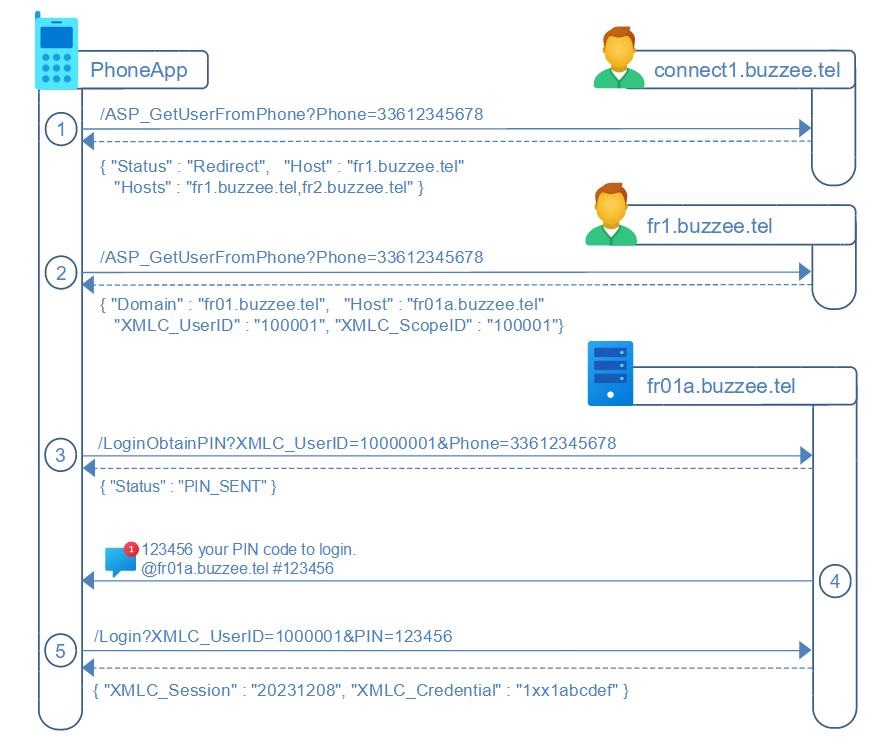
/LoginObtainPIN
After looking up /ASP_GetUserFromPhone against the connect server, PhoneApp can request a PIN code by SMS on the hosting server managing the user (XMLC_UserID).
the HTTP request will be GET on the hosting server, in this example: fr01a.buzzee.tel
http://fr01a.buzzee.tel/JSON/LoginObtainPIN?XMLC_UserID=1000001&Phone=33612345678
| Fields | Description |
|---|---|
| Phone | Mobile phone number of the user. SMS containinig the PIN code will be sent to this number. |
| XMLC_Language | Optional. You may define the language used for the SMS to be sent. Possible values: ENGLISH, FRANCAIS, DEUTSCH, ESPANOL, ITALIANO. |
| SMS_Template | Optional. You may request to use a pre-defined template to send the content of the SMS with the PIN code. Example: LOGIN_PINCODE_ANDROID will send the follwoing SMS content: "Your PIN code is 123456" LOGIN_PINCODE_APPLE will send the follwoing SMS content: "Your PIN code is 123456" |
Delos instance will return in case of success a simple response:
{ "Status": "PIN_SENT" }
In case of error, expect a 500 Internal Server Error response:
{ "Code": "ERR_SEND_SMS" }
The server may return errors
| Errors | Description |
|---|---|
| ERR_INVALID_PHONE | Invalid phone number. Maybe wrong format. |
| ERR_PHONE_MISMATCH | Phone registered for this user mismatch with the parameter Phone provided. |
| ERR_SEND_SMS | Cannot invoke the SMS provider to send SMS |
| ERR_SEND_PIN | The SMS could not be sent due to error in phone number format or insufficient credits |
| ERR_MAX_DAILY_ATTEMPTS_PER_IP | Max daily attempts from the same IP |
| ERR_MAX_DAILY_ATTEMPTS_PER_PHONE | Max daily attempts for the same phone number |
| ERR_MAX_DAILY_ATTEMPTS_PER_EMAIL | Max daily attempts for the same email address |
/Login
PhoneApp is in charge to intercept the PIN code received by SMS.
The format of SMS is "123456 your PIN code to login.\n@fr01a.buzzee.tel #123456"
where @fr01a.buzzee.tel is the host
and #123456 is the PIN code (123456)
To login and obtain the credential, PhoneApp will send a HTTP request GET on the hosting server, in this example: fr01a.buzzee.tel
http://fr01a.buzzee.tel/JSON/Login?XMLC_UserID=1000001&PIN=1234
| Fields | Description |
|---|---|
| XMLC_UserID | UserID obtained by looking up connect server. |
| PIN | PIN code received by SMS. Made of 6 digits. |
Delos instance will return in case of success the XMLC_Credential and the XMLC_Session
{ "XMLC_Session": "4400000005", "XMLC_Credential": "1xxx1abcdef"}
This server may raise an error which is formatted as follow:
{ "Code" : "ERR_LOGIN_FAILED", "Message": "TWebAccount.Login_BeforeXMLGram" }
The following table summarizes the different error codes:
| Errors | Description |
|---|---|
| ERR_PIN_MISMATCH | PIN code submitted does not match the PIN code sent by SMS |
| ERR_LOGIN_FAILED | The PIN code provided cannot be validated. |
Once the XMLC_Credential is obtained, PhoneApp can check the validity of the credential by invoking /CheckSession
https://fr01a.buzzee.tel/JSON/1xxx1abcdef/CheckSession
Delos instance will respond in case of success with the Status 1, meaning the credential is valid:
{ "Status" : "1" }
Customizing preferences
The preferences are setup initialy during /OpenAccount but may need to be customized by the user.
/User_Culture
PhoneApp may query the preferences of the user by sending a GET request on the hosting server, in this example: fr01a.buzzee.tel
http://fr01a.buzzee.tel/JSON/1xxx1abcdef/User_Culture
Delos instance will return a JSON document.
{ "Culture": {
  "Name": "en", "Locale": "en",
  "DecimalSeparator": ".", "ThousandSeparator": "\u0000",
  "CurrencyDecimals": "2", "CurrencyString": "$",
  "DateSeparator": "/", "TimeSeparator": ":", "TimeAM": "AM", "TimePM": "PM",
  "ShortDate": "m/d/yyyy", "LongDate": "dddd, mmmm d, yyyy",
  "ShortTime": "hh:nn", "LongTime": "hh:nn:ss",
  "ShortDateTime": "m/d/yyyy hh:nn", "LongDateTime": "dddd, mmmm d, yyyy hh:nn",
  "DynamicDate": "mmm d", "DynamicShortDate": "m/d/yy" }
}
/UpdatePreferences
PhoneApp will send a POST a HTTP request on the hosting server, in this example: fr01a.buzzee.tel
http://fr01a.buzzee.tel/JSON/1xxx1abcdef/UpdatePreferences
Profile.XMLC_Language=FRANCAIS
Profile.XMLC_Culture=fr
XMLC_SkipNextAction=1
| Fields | Description |
|---|---|
| Profile.XMLC_Language | Language used for references values such months, days. Possibly extracted from the settings of the device. Possible values: ENGLISH, FRANCAIS, DEUTSCH, ESPANOL, ITALIANO. |
| Profile.XMLC_Culture | Culture for data formattings. Possibly extracted from the settings of the device, OR in accordance to XMLC_Language Possible values: en, fr, de, es, it. |
| XMLC_SkipNextAction | Skip the pipeline of the WebApp by returning after updting the preferences. |
Delos instance may return an unknown JSON document with a HTTP status code 200 OK.
{ }
/Phone_UpdatePreferences
PhoneApp will send a POST request on the hosting server, in this example: fr01a.buzzee.tel
http://fr01a.buzzee.tel/JSON/1xxx1abcdef/Phone_UpdatePreferences
Phone=33612345678
TranscribeCall=1
TranscribeVoicemail=1
| Fields | Description |
|---|---|
| Phone | Phone line to apply the preferences TranscribeCall and TranscribeVoicemail. Actually it is the same number as the user. But in the future when the user may have multiple phone mumber registered behind the same account, these preferences apply only to this Phone number parameter. Example: 33612345678 |
| TranscribeCall | Preferences for this phone number to handle automatically recording calls and transcribing calls. 1 = enable record and transcription for all calls by default 0 = disable record and transcription for all calls blank ('') = on-demand record and transcription per call |
| TranscribeVoicemail | Preferences for this phone number to transcribe automatically voicemails. 1 or blank('') = enable transcription for all voicemails 0 = disable transcription for all voicemails |
Delos returns the following JSON document with a HTTP status code 200 OK
{ "Status": "OK" }
/Phone_UpdateFilter (PhoneApp -> Delos)
Once call fowarding has been setup, the PBX can filter some of the incoming calls to redirect to voicemail, and may start the transcription.
PhoneApp will update the list of phone numbers to filter by posting HTTP request on the hosting server with the Filter:
http://fr01a.buzzee.tel/JSON/1xxx1abcdef/Phone_UpdateFilter
Filter=0162,0163,0270,0271,0377,0378,0424,0425,0568,0569,0948,0949
| Fields | Description |
|---|---|
| Filter | Al ist of phone number or prefix of phone number to filter separated with comma Example: 0162,0163,... |
Delos instance will return a JSON response with a HTTP status code 200 OK.
{ "Status": "OK" }
The following table summarizes the different error codes:
| Errors | Description |
|---|---|
| ERR_USER_CCOM_NOT_FOUND | Phone is not registered for this user. |
/Phone_GetFilter (S2T -> Delos)
Deprecated in favor of /Phone_CallEvent Event=Incoming -> Action: Hangup or Voicemail.
When an incoming call arrives at the PBX (once call fowarding has been setup),
PBX S2T server should invoke Delos to retrieve the list of filtered numbers the user has registered.
The PBX will redirect to voicemail, and may start the transcription.
S2T will query with a GET HTTP request on the hosting server:
http://fr01a.buzzee.tel/JSON/Phone_GetFilter?XMLC_UserID=100008&Phone=33612345678
| Fields | Description |
|---|---|
| XMLC_UserID | XMLC_UserID field retrieved from ASP_GetUserFromPhone with the Phone number of the user. |
| Phone | Phone number of the user (the destination of the incoming call). Example: 33612345678 |
Delos instance will return a JSON response formatted as follow:
{ "Filter": "0162,0163,0270,0271,0377,0378,0424,0425,0568,0569,0948,0949" }
The following table summarizes the different error codes:
| Errors | Description |
|---|---|
| ERR_CPSN_NOT_FOUND | Contact not found for this phone number |
| ERR_CPSN_IS_NOT_USER | Phone number is not associated to the user |
Call Forwarding Workflow
In order to intercept incoming phone calls in PhoneApp, and being able to record conversations,
the user need to setup call forwarding of the main SIM number.
The worflow to setup call forwarding from PhoneApp is described below:
1. PhoneApp queries /Phone_ObtainCallForwarding on fr01a.buzzee.tel to obtain which PSTN line the main SIM phone number need to be setup for call forwarding.
2. the Delos instance fr01a.buzzee.tel will invoke the PBX (S2T) using action /ObtainCallForwarding and return the Line number to use for call forwarding
3. The PhoneApp will invite the user to setup the call forwarding on his phone, for the main phone number to redirect all calls to the PSTN Line number provided in previous step
4. Once the user has completed previous step, in order to check if the setup of call forwarding is active, PhoneApp will initiate the process of verification by invoking /Phone_VerifyCallForwarding on fr01a.buzzee.tel
5. Delos instance will forward this request to PBX S2T by invoking action /VerifyCallForwarding
6. The PBX S2T will originate a MakeCall on the trunk to the main phone number of the user (as provided in the request)
7. The Telco should reach the call forwarding number programmed (Status=OK) or the mobile device of the user (Status=Failed)
8. the PBX intercept the call from the network on the redirected line 33987654321 knowing the diversion is from the user phone number 33612345678 and initiated from a specific phone number located on this very same PBX, then the PBX S2T will invoke the CallbackURL /Phone_VerifyCallForwardingCB by setting the Status=OK. Delos will respond to PhoneApp waiting on the original request Phone_VerifyCallForwarding.
BUT, if the call is being answered by the user phone, it will play a voice message telling the user that the setup has failed and need to retry, it means the PBX S2T did not intercept the call on the Line 33987654321 and will invoke the CallbackURL with Status=Failed.
Delos will respond to PhoneApp waiting up to a specific Timeout from the original request to Phone_VerifyCallForwarding.
PhoneApp will receive the response "Status": "Failed" and will iterate over to step #3 with details on how to proceed, such as selecting properly the main SIM for calls.
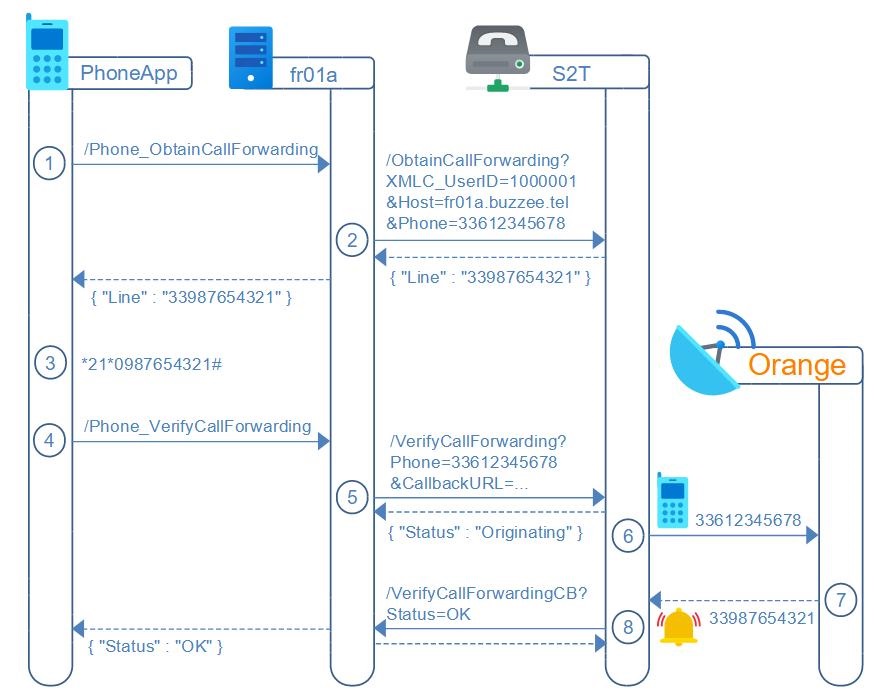
/Phone_ObtainCallForwarding (PhoneApp -> Delos)
PhoneApp will request Delos instance to obtain which PSTN line the main SIM phone number need to be setup for call forwarding.
Important: The call forwarding will be setup from the mobile device initiated by the user. This operation CANNOT BE performed by Delos instance or PBX.
http://fr01a.buzzee.tel/JSON/1xxx1abcdef/Phone_ObtainCallForwarding?Phone=33612345678
| Fields | Description |
|---|---|
| Phone | The phone number which will be setup for call forwarding. |
Delos instance will forward the request to the PBX S2T (SpeechToText), which will return the Line to use for setting call fowarding, and Delos will finally return in the response the Line parameter:
{ "Line": "33987654321" }
/ObtainCallForwarding (Delos -> PBX S2T)
Delos will request PBX S2T to obtain to which PSTN line the user will need to configure call forwarding.
Important: The call forwarding will be setup from the mobile device initiated by the user. This operation CANNOT BE performed by PBX.
http://s2t.buzzee.tel/ObtainCallForwarding?Phone=33612345678
&XMLC_UserID=1000001&Domain=fr01.buzzee.tel&Host=fr01a.buzzee.tel
| Fields | Description |
|---|---|
| Phone | The phone number which will be setup for call forwarding. |
| XMLC_UserID | Delos internal user ID |
| Domain | Domain of the user. |
| Host | Host of the Delos instance where is located the user of the message. |
Note: The PBX may use the parameters XMLC_UserID, Domain and/or Host to partition the pool of call forwarding to different Lines.
The PBX S2T (SpeechToText) will respond with the Line to use for setting call fowarding, and Delos will forward this response to the PhoneApp:
{ "Line": "33987654321" }
/Phone_VerifyCallForwarding (PhoneApp -> Delos)
Once the user has completed the setup of the call forwarding of his main phone number 33612345678 to the redirected Line 33987654321, (*21*0987654321#)
PhoneApp will offer to the user the possiblity to verify that call fowarding is active for his number by invoking /Phone_VerifyCallForwarding on Delos instance.
http://fr01a.buzzee.tel/JSON/1xxx1abcdef/Phone_VerifyCallForwarding?Phone=33612345678&Timeout=5&Http2UseDispatchThread=1
| Fields | Description |
|---|---|
| Phone | The phone number to verify that call forwarding is enabled. |
| Http2UseDispatchThread | Optional. When value is set to "1" the request will be processed in a separate thread on the server. Other HTTP requests sent from the same client connection can be performed in parallel. This parameter is used when a request takes a long time to obtain a response. |
| Timeout | Optional. Default if blank is 5 seconds. The phone call to the mobile of the user will be operated asynchronously by the PBX, Delos will wait for the signal from the PBX up to this timeout, before returning Status=Failed. |
Delos instance will forward the request to the PBX S2T (SpeechToText), which will originate a MakeCall to the Phone number being setup. If the PBX intercept the call on its Line 33987654321, then it will respond OK:
{ "Status": "OK" }
If the PBX does not intercept the call on the Line 33987654321, then it will respond Failed:
{ "Status": "Failed" }
The PBX will play a voice message telling the user call forwarding is not active, and setup need to be retried from step #3.
/VerifyCallForwarding (Delos -> PBX S2T)
Delos forwards the verification request of call forwarding to the PBX S2T POSTing http request to /VerifyCallForwarding with parameter of Phone number and CallbackURL
http://s2t.buzzee.tel/VerifyCallForwarding
Phone=33612345678
XMLC_UserID=1000001
Domain=fr01.buzzee.tel
Host=fr01a.buzzee.tel
CallbackURL=http://fr01a.buzze.tel/JSON/PBX_VerifyCallForwardingCB?XMLC_UserID=100001&RequestNo=2001003
| Fields | Description |
|---|---|
| Phone | The phone number to verify that call forwarding is enabled. |
| XMLC_UserID | Delos internal user ID |
| Domain | Domain of the user. |
| Host | Host of the Delos instance where is located the user of the message. The PBX may use the user informations to log a trace for the intermediate actions using for instance: http://fr01a.buzzee.tel/JSON/Phone_Trace?XMLC_UserID=100001&Message=Ringing on 33612345678 |
| CallbackURL | URL to invoke when completing the phone call, with either Status=OK or Status=Failed Example: http://fr01a.buzzee.tel/JSON/PBX_VerifyCallForwardingCB?XMLC_User_ID=100001 |
| Timeout | Optional. Default if blank is 5 seconds. Timeout before invoking CallbackURL with Status=Failed when the call originated is not intercepted by the PBX. |
The PBX S2T (SpeechToText), will originate a MakeCall to the Phone number of the user and will respond with:
{ "Status": "Originating" }
The PBX will play a voice message telling the user call forwarding is not active, and setup need to be retried from step #3.
/Phone_VerifyCallForwardingCB (PBX S2T -> Delos)
If the PBX intercept the call on its Line 33987654321, then it will invoke CallbackURL with Status=OK
http://fr01a.buzze.tel/JSON/PBX_VerifyCallForwardingCB?XMLC_User_ID=100001&Status=OK
Delos instance will respond with HTTP status 200.
If the PBX does not intercept the call on the Line 33987654321, then it will CallbackURL with Status=Failed
http://fr01a.buzze.tel/JSON/PBX_VerifyCallForwardingCB?XMLC_User_ID=100001&Status=Failed
The PBX will play a voice message telling the user call forwarding is not active, and setup need to be retried from step #3.
Verify Call Forwarding Disabled Worflow
In order to verify call forwarding is disabled, the user will follow from PhoneApp the following workflow:
1. PhoneApp will invite the user to dial the number #21# to cancel call forwarding on his phone, for the main phone number
2. PhoneApp will help to validate that from now on call forwarding is disabled by invoking on fr01a.buzzee.tel action /Phone_VerifyCallFowardingDisabled (despite the naming, it means to verify if call forwarding has been properly cancelled)
3. Delos instance fr01a.buzzee.tel will invoke PBX S2T /VerifyCallFowardingDisabled with necessary parameters such as main phone number of the user
4. The PBX S2T will originate a MakeCall to the main phone number of the user (as provided in the request)
5. The Telco should reach the mobile device of the user Status=OK) or the call forwarding number programmed (Status=Failed)
6. If the PBX intercept the call from the network on the redirected line 33987654321 knowing the diversion is from the user phone number 33612345678, then the PBX S2T will invoke the CallbackURL /Phone_VerifyCallForwardingDisabledCB with Status=Failed, the process to disable call forwarding was not effective and need to be retried from Step #1 in PhoneApp with details on how to proceed, such as selecting properly the main SIM for calls.
NOW, if the call is being answered by the user phone, it will play a voice message telling the user that call forwarding is now disabled, and all calls will endup directly on his phone. Meaning, that the phone call is not intercepted by the PBX on the redirected Line 33987654321, and so the PBX S2T will invoke the CallbackURL /Phone_VerifyCallForwardingDisabledCB with Status=OK
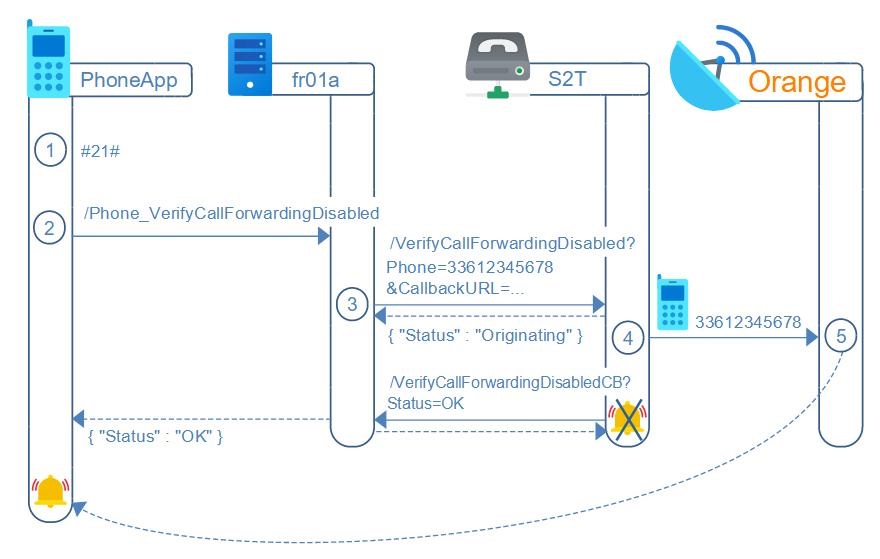
/Phone_VerifyCallForwardingDisabled (PhoneApp -> Delos)
Once the user has disabled call forwarding of his main phone number 33612345678, (#21#)
PhoneApp will offer to the user the possiblity to verify that call fowarding is disabled and restored to initial state by invoking /Phone_VerifyCallForwardingDisabled on Delos instance.
http://fr01a.buzzee.tel/JSON/1xxx1abcdef/Phone_VerifyCallForwardingDisabled?Phone=33612345678&Timeout=5&Http2UseDispatchThread=1
| Fields | Description |
|---|---|
| Phone | The phone number to verify that call forwarding is disabled. |
| Http2UseDispatchThread | Optional. When value is set to "1" the request will be processed in a separate thread on the server. Other HTTP requests sent from the same client connection can be performed in parallel. This parameter is used when a request takes a long time to obtain a response. |
| Timeout | Optional. Default if blank is 5 seconds. The phone call to the mobile of the user will be operated asynchronously by the PBX, Delos will wait for the signal from the PBX up to this timeout, before returning Status=Failed. |
Delos instance will forward the request to the PBX S2T (SpeechToText), which will originate a MakeCall to the Phone number to validate call forwarding is disabled. If the PBX intercept the call on its Line 33987654321, then it will respond Failed:
{ "Status": "Failed" }
If the PBX does not intercept the call on the Line 33987654321, then it will respond OK:
{ "Status": "OK" }
The PBX will play a voice message to the user that tells that from now on call forwarding is properly disabled.
/VerifyCallForwardingDisabled (Delos -> PBX S2T)
Delos will POST the verification request to the PBX S2T using action /VerifyCallForwarding with parameter of hte PhoneNumber
http://s2t.buzzee.tel/VerifyCallForwardingDisabled
Phone=33612345678
XMLC_UserID=1000001
Domain=fr01.buzzee.tel
Host=fr01a.buzzee.tel
CallbackURL=http://fr01a.buzzee.tel/JSON/PBX_VerifyCallForwardingDisabledCB?XMLC_UserID=100001&RequestNo=2001003
| Fields | Description |
|---|---|
| Phone | The phone number to verify that call forwarding is disabled. |
| XMLC_UserID | Delos internal user ID |
| Domain | Domain of the user. |
| Host | Host of the Delos instance where is located the user of the message. The PBX may use the user informations to log a trace for the intermediate actions using for instance: http://fr01a.buzzee.tel/JSON/Phone_Trace?XMLC_UserID=100001&Message=Ringing on 33612345678 |
| CallbackURL | URL to invoke when completing the phone call, with either Status=OK or Status=Failed Example: http://fr01a.buzzee.tel/JSON/PBX_VerifyCallForwardingDisabledCB?XMLC_User_ID=100001 |
| Timeout | Optional. Default if blank is 5 seconds. Timeout before invoking CallbackURL with Status=OK when the call originated is not intercepted by the PBX. |
The PBX S2T (SpeechToText), which will originate a MakeCall to the Phone number of the user and will respond with:
{ "Status": "Originating" }
/Phone_VerifyCallForwardingDisabledCB (PBX S2T -> Delos)
If the PBX intercept the call on its Line 33987654321, then it will invoke CallbackURL with Status=Failed:http://fr01a.buzzee.tel/JSON/PBX_VerifyCallForwardingDisabledCB?XMLC_User_ID=100001&Status=Failed
Delos instance will respond with HTTP status 200.
If the PBX does not intercept the call on the Line 33987654321, then it will CallbackURL with Status=OK
http://fr01a.buzzee.tel/JSON/PBX_VerifyCallForwardingDisabledCB?XMLC_User_ID=100001&Status=OK
Delos instance will respond with HTTP status 200.
Traces and Logs
New as of 2025-01-14 Two API endpoints are available to allow PhoneApp to trace activity and log errors.
It is not necessary to use HTTPS to invoke http://log.buzzee.tel/JSON/ASP_Trace or http://log.buzzee.tel/JSON/ASP_Log
/ASP_Trace
PhoneApp may notify the "Log" server to all kind of activity when downloading the application, starting the application, through all major steps when opening account.
This will be useful to track down where the users may face difficulties.
There is a limit of a maximum of 100 traces per day per IP.
PhoneApp can POST a Message:
http://log.buzzee.tel/JSON/ASP_Trace
Message=Launching the application for the first time
Delos instance will append in the traces of log.buzzee.tel the message and will return a JSON document.
{ "Status": "OK" }
/ASP_Log
PhoneApp may notify the "Log" server when an error occured with all the context necessary to diagnose the cause.
There is a limit of a maximum of 10 log per day per IP.
The application may POST all unknown parameters of its choice:
http://log.buzzee.tel/JSON/ASP_Log
Message=Cannot connect to server connect1.buzzee.tel
CountryCode=FR
Phone=33612345678
Language=FRANCAIS
Delos instance will append in the traces of log.buzzee.tel a complete log of all parameters and will return a JSON document.
{ "Status": "OK" }