Voicemail
Disclaimer
This document is a prelimary version and work-in-progress,
Details discussed in this document will be subject to future modifications.
Setting up voicemail
The user is setting up call forwarding unconditionnaly for his primary phone number to be unique PBX number for all calls.
Every voicemail calls for the user will be routed to the PBX.
Voicemail worflow
The PBX will intercept these voicemail calls and detect the beep on the stream "in", and will truncate the WAV file of the stream "out" of the voicemail to be uploaded to Delos by invoking 3 actions described in the following diagram:
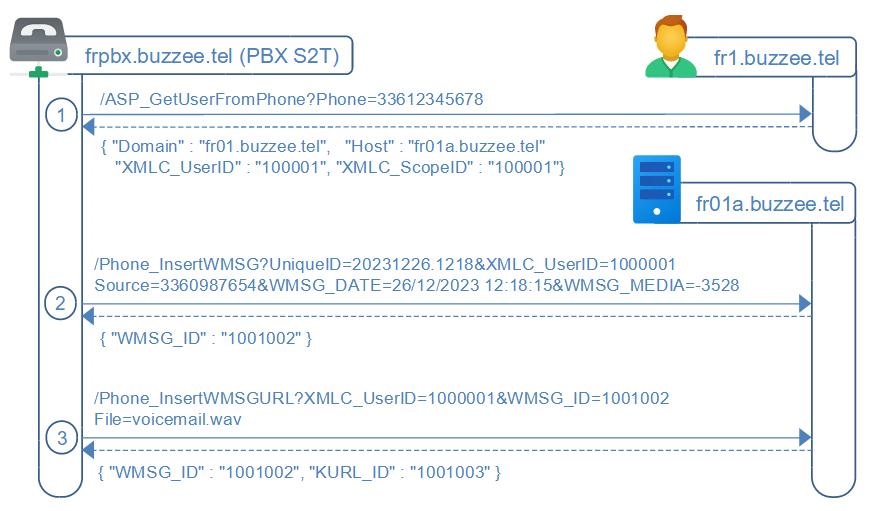
The workflow of voicemail recording is summarized as follow:
0. Every phone call will be recorded by the VoIP Asterisk PBX , and identified with a UniqueID
1. When a voicemail call is terminated, the PBX server will invoke /ASP_GetUserFromPhone on fr1.buzzee.tel to lookup on which server is hosted the user, which is providing as response the Host fr01a.buzzee.tel and the XMLC_UserID
2. The PBX sends a /Phone_InsertWMSG request to the appropriate Delos Server with the UniqueID of the call
Delos will store a WMSG[WMSG_ID] with the information of this call UniqueID
3. The PBX sends a /Phone_InsertWMSGURL request to upload the recorded voicemail file
HTTP Authorization
Communications server to server do not require XMLC_Credential,
authorization is granted by IP ByPass for the restricted and specific services to be invoked per application.
/ASP_GetUserFromPhone (PBX -> Delos)
The PBX server need to lookup the Delos instance hosting the user account database.
This lookup requires query fr1.buzzee.tel with the phone parameter formatted as 33612345678.
https://fr1.buzzee.tel/JSON/ASP_GetUserFromPhone?Phone=33612345678
Note: Prefer to check on fr1.buzzee.tel then fr2.buzzee.tel, rather than invoking https://fr.buzzee.tel/ since it may return a 301 Redirect.
| Params | Description |
|---|---|
| Phone | Phone number of the user to lookup. |
The response contains where is hosted the user with the requested Phone number, as well as the XMLC_UserID to identify the user:
{ "Domain": "fr01.buzzee.tel", "Host": "fr01a.buzzee.tel", "Hosts": "fr01b.buzzee.tel",
"XMLC_UserID": "1000001101001
The table below describes the different fields in the response:
| Fields | Description |
|---|---|
| Domain | Domain where the user is registered. This is the cluster of Delos instance (made of multiple hosts). |
| Host | Primary host where the data of the user are stored. This is the primary endpoint URL to use to invoke the instance. Example: fr01a.buzzee.tel |
| Hosts | Comma separated list of secondary hosts to failover when primary Host is not responding. Example: fr01b.buzzee.tel |
| XMLC_UserID | UserID for this user phone number declared at the Host. XMLC_UserID is unique for a host but a similar UserID may exists on a different host. |
| XMLC_ScopeID | Scope of the user at the host. This is the Database ID, the TenantID, it may also be called SandboxID. A scope may contain multiple users from the same organization. A host may contains hundreds of scopes (independant databases). |
If the user is not registered with this phone number the Connect instance will respond with status 404 Not Found
{"Code": "ERR_USER_NOT_FOUND", "Message": "TXMLInstruction.Process - Operation=Assert Name=CheckCPSN_ID"}
The PBX server can then query Phone_GetCPSN on fr01a.buzzee.tel to obtain the Line to originate a call to the user mobile phone.
/Phone_InsertWMSG (PBX -> Delos)
Once the call has been completed, the PBX will POST the basic infos into Delos by invoking a HTTP POST request with parameters being encoded as application/x-www-form-urlencoded
http://fr01a.buzzee.tel/JSON/Phone_InsertWMSG?
XMLC_UserID=1000001
Source=33609876543
Destination=33612345678
UniqueID=20231226.1218
WMSG_DATE=2023-12-26 12:18:15
WMSG_MEDIA=-3528
| Fields | Description |
|---|---|
| Source | formatted as 33609876543 |
| Destination | formatted as 33612345678 |
| UniqueID | to be stored as WMSG_UNIQUEID which is different from WMSG_ID |
| WMSG_DATE | format is YYYY-MM-DD HH:NN:SS in UTC this is the DateTime of the call being connected. example: 2023-12-26 12:18:15 |
| WMSG_MEDIA | Mandatory. -3528 for WMSGKND_VOICEMAIL |
| EOF | Optional. EOF=1 if the call has been hungup quickly, or if the recording is too short. |
Delos instance will respond with the field WMSG_ID of the newly created message:
{
  "WMSG_ID": "1001002"
}
The major fields in the response are:
| Fields | Description |
|---|---|
| WMSG_ID | The ID of the WMSG to be used to invoke /Phone_InsertWMSGURL |
/Phone_InsertWMSGURL (PBX -> Delos)
To upload the recorded call as a wav file, the HTTP request will use POST multipart/form-data.
http://fr01a.buzzee.tel/JSON/Phone_InsertWMSGURL?
XMLC_UserID=1000001
WMSG_ID=1001002
WMSG_DURATION=75
File=voicemail.wav
| Fields | Description |
|---|---|
| WMSG_ID | retrieved from the response of the previous request Phone_InsertWMSG |
| WMSG_DURATION | Duration of the call recording in seconds example: 75 means 1'15" |
| File | File format should be WAV as PCM not compressed. Filename should include a valid extension: .wav |
| UniqueID | to be stored as WMSG_MESSAGEID which is different from WMSG_ID |
Delos instance will respond with the fields WMSG_ID and KURL_ID of the newly file attached to the the message:
{
  "WMSG_ID": "1001002",
  "KURL_ID": "1001003"
}