PhoneApp
Disclaimer
This document is a prelimary version and work-in-progress,
Details discussed in this document will be subject to future modifications.
Workflow
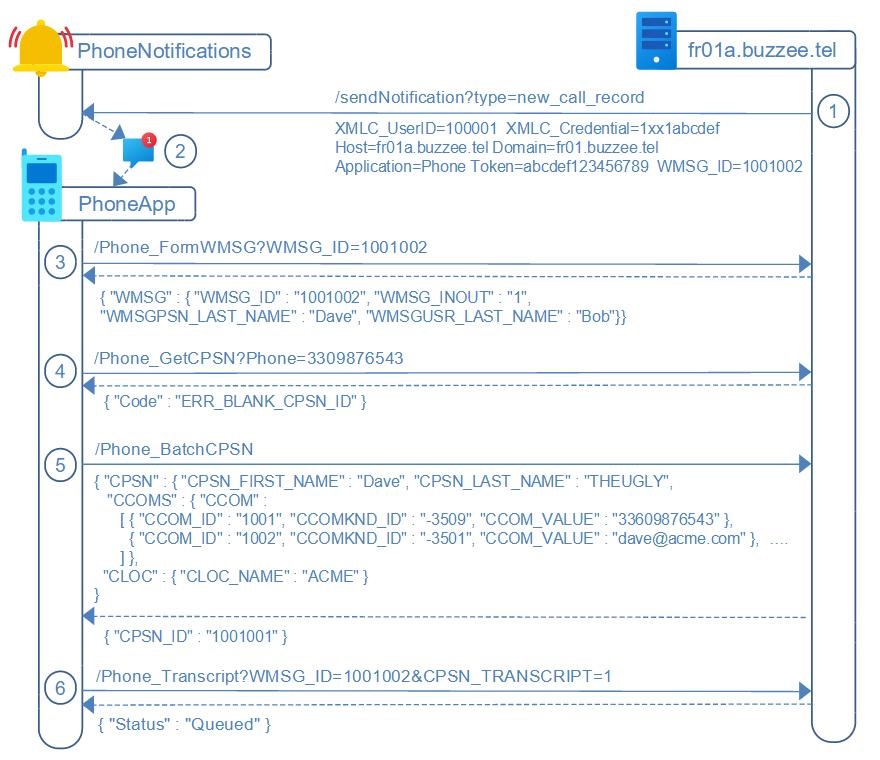
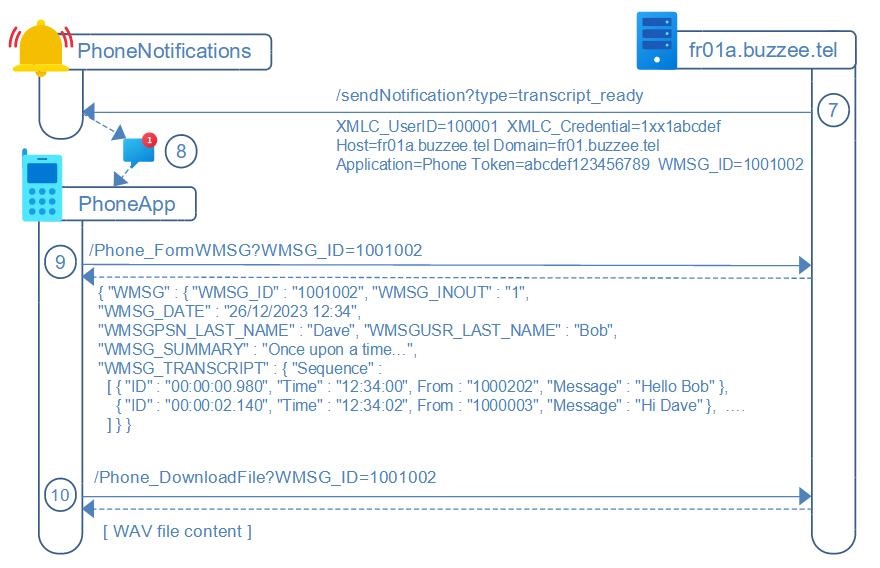
The workflow is summarized as follow once a phone call has been recorded and transcript completed:
1. Delos will send a request to PhoneNotifications server that a new call has been recorded, with optional parameter WMSG_TRANSCRIPT_STATUS=Queued in case the associated contact (CPSN) is marked for automatic transcript foreach call recording
2. The PhoneNotifications server notifies the appropriate PhoneApp
3. PhoneApp MAY request the WMSG on Delos instance to display basic infos about call recording
4. PhoneApp SHOULD request /Phone_GetCPSN from WMSGPSN_PSN to verify that the contact details stored in Delos database are up-to-date
5. In case the contact needs update, PhoneApp will invoke /Phone_BatchCPSN, this action provides important informations to facilitate the process of transcript, such as first name, last name, organization name, address (city).
6. The user of the PhoneApp MAY trigger the transcript of the call by invoking Delos server
7. Once the transcript has been completed, Delos server send a request to the PhoneNotifications server for this WMSG[WMSG_ID]
8. PhoneNotifications relay to the proper PhoneApp
9. PhoneApp invokes Delos server Phone_FormWSMG to retrieve the summary and transcript of the call.
10. PhoneApp may download the recording of the call using Phone_DownloadFile.
At the end of this document, there is the description of Delos acting as a relay for originating a MakeCall between the PhoneApp and the S2T server transmitting the parameters Line, Source, and Destination.
HTTP Authorization and Protocol
Authorization for the communications between Delos and PhoneNotifications is granted by IP bypass for the restricted range of Delos instances.
Authorization between PhoneApp and Delos instance of the user requires XMLC_Credential, a token value encoding XMLC_UserID + XMLC_Session.
And so all HTTP requests to Delos instance from the PhoneApp will be considered in this specification formatted as:
https://fr01a.buzzee.tel/JSON/1xxx1abcdef/Phone_ListWMSG
where 1xxx1abcdef is the XMLC_Credential encoding XMLC_UserID+XMLC_Session
This credential is obtained after initial registration.
/sendNotification [type=new_call_record] (Delos -> PhoneNotifications)
When a new call has been inserted from the S2T server, Delos instance sends a HTTP GET request to the PhoneNotifications server, with the following parameters:
http://phoneappnotifications.buzzee.tel/sendNotification
Content-Type: application/json
Accept: application/json
{
  "key": "sponsorship_request",
  "token": "abcdef0123456789",
  "notification": {
    "title": "New phone call",
    "body": "You have a new message from John Doe"
  },
  "data": {
    "messageId": "100001"
  }
}
Note: in the case of HTTP GET request, the character '&' is a separator between parameters formatted as: FieldName=FieldValue| Fields | Description |
|---|---|
| key | new_call_record to route to the call infos sponsorship_request edit_notes to route to the assistant to append custom notes |
| token | This is the device registration token which has been stored using /Phone_Register?Token=abcdef0123456789 |
| title | The title of the popup notification on the device Example: New phone call |
| body | This is the summary when available |
| messageId | WMSG_ID of the phone call. This ID will be used to request Phone_FormWMSG |
| TranscriptStatus | Optional parameter in case the contact associated with the conversation have been marked with option CPSN_TRANSCRIPT=1 (Transcript Always). Optional value: Queued |
Note: If the contact associated with the call recording has been setup to always skip transcript (CPSN_TRANSCRIPT=0),
then Delos will not send a notification to PhoneNotifications server.
/Phone_FormWMSG (PhoneApp -> Delos)
PhoneApp may retrieve the details of the phone call recording by invoking a HTTP GET request,
at this stage the response will not contain the transcript of the conversation.
https://fr01a.buzzee.tel/JSON/1xxx1abcdef/Phone_FormWMSG?WMSG_ID=1001002
| Fields | Description |
|---|---|
| WMSG_ID | Message ID of the phone call. |
Delos instance will respond with a JSON document corresponding to the message:
{ "WMSG" : {
    "WMSG_ID": "1001002",
    "WMSG_DATETIME" : "2023-12-31 09:00:00",
    "WMSG_DURATION" : "00:10:00",
    "WMSG_INOUT" : "1",
    "WMSG_MEDIA" : "-3515",
    "WMSGUSR_PSN" : "1000002", "WMSGUSR_FIRST_NAME" : "Bob", "WMSGUSR_LAST_NAME" : "THEGREAT",
    "WMSGPSN_PSN" : "1000202", "WMSGPSN_FIRST_NAME" : "Dave", "WMSGPSN_LAST_NAME" : "THEUGLY" }
}
On real Delos servers the JSON document will return a larger document with a lot more fields, but these are the minimalists to be useful in the context of PhoneApp.
| Fields | Description |
|---|---|
| WMSG_ID | Message ID of the phone call. |
| WMSG_DATE | Date of the phone call |
| WMSG_DURATION | Duration of the phone call |
| WMSG_INOUT | 1=Incoming, 2 = Outgoing |
| WMSG_MEDIA | -3515 event of type phone call |
| WMSGUSR_PSN | The CPSN_ID of the user. XMLC_UserID is different from the WMSGUSR_PSN |
| WMSGUSR_FIRST_NAME | First name of the user |
| WMSGUSR_LAST_NAME | Last name of the user |
| WMSGPSN_PSN | The CPSN_ID of the contact. |
| WMSGPSN_FIRST_NAME | First name of the contact |
| WMSGPSN_LAST_NAME | Last name of the contact |
| KURL_AUDIO_DELETED | Optional. This field may indicate that the audio file has been deleted by /Phone_DeleteAudioFile. Example: KURL_AUDIO_DELETED=1 means that the audio files have been deleted. Otherwise the audio file MAY BE available. (Audio files are purged after a custom period of 3 months). |
To obtain details of the contact PhoneApp may request /Phone_GetCPSN?CPSN_ID=1000202
/Phone_GetCPSN (PhoneApp -> Delos)
The PhoneApp SHOULD lookup contact details from Delos instance to check if informations are up-to-date.
These data facilitate the process of transcript for the recorded call,
PhoneApp sends a HTTP GET request to Delos instance:
https://fr01a.buzzee.tel/JSON/1xxx1abcdef/Phone_GetCPSN?CPSN_ID=1001001
| Fields | Description |
|---|---|
| CPSN_ID | The Contact ID, this is the value WMSGPSN_PSN from the WMSG. |
Delos instance will respond with a JSON document:
{ "CPSN" :
  { "CPSN_ID" : "1000202", "CPSN_VERSION" : "1000042"
    "CPSN_FIRST_NAME" : "Dave", "CPSN_LAST_NAME" : "THEUGLY",
    "CCOMS" : { "CCOM" :
          [ { "CCOM_ID" : "1001", "CCOMKND_ID" : "-3515", "CCOM_VALUE" : "33609876543" },
            { "CCOM_ID" : "1002", "CCOMKND_ID" : "-3501", "CCOM_VALUE" : "dave@acme.com" },  ….
          ] }
  },
  "CLOC" : { "CLOC_ID" : "10000201", "CLOC_VERSION" : "1000041", "CLOC_NAME" : "ACME" }
}
The major fields are:
| Fields | Description |
|---|---|
| CPSN_LAST_NAME | Last name of the contact |
| CPSN_FIRST_NAME | First name of the contact |
| CLOC_NAME | Name of the organization |
| CLOC_CITY | City of the organization/contact |
The following table summarizes the different error codes:
| Errors | Description |
|---|---|
| ERR_BLANK_CPSN_ID | The parameter CPSN_ID is missing |
/Phone_BatchCPSN (PhoneApp -> Delos)
If the PhoneApp detects contact informations are not up-to-date between local version and Delos database,
PhoneApp will POST a request to Delos instance with the content of the body as a JSON document:
https://fr01a.buzzee.tel/JSON/1xxx1abcdef/Phone_BatchCPSN
{ "CPSN" :
  { "CPSN_ID" : "1000202", "CPSN_VERSION" : "1000042"
    "CPSN_FIRST_NAME" : "Dave", "CPSN_LAST_NAME" : "THEUGLY",
    "CCOMS" : { "CCOM" :
          [ { "CCOM_ID" : "1001", "CCOMKND_ID" : "-3515", "CCOM_VALUE" : "33609876543" },
            { "CCOM_ID" : "1002", "CCOMKND_ID" : "-3501", "CCOM_VALUE" : "dave@acme.com" },  ….
          ] }
  },
  "CLOC" : { "CLOC_ID" : "10000201", "CLOC_VERSION" : "1000041", "CLOC_NAME" : "ACME" }
}
The major fields are:
| Fields | Description |
|---|---|
| CPSN_ID | The Contact ID, this is the value WMSGPSN_PSN from the WMSG. |
| CPSN_LAST_NAME | Last name of the contact |
| CPSN_FIRST_NAME | First name of the contact |
| CLOC_ID | ID of the organization |
| CLOC_NAME | Name of the organization |
| CLOC_CITY | City of the organization/contact |
The following table summarizes the different error codes:
| Errors | Description |
|---|---|
| ERR_BLANK_CPSN_ID | The parameter CPSN_ID is missing |
/Phone_Transcript (PhoneApp -> Delos)
PhoneApp may trigger the transcript by invoking a HTTP GET request:
https://fr01a.buzzee.tel/JSON/1xxx1abcdef/Phone_Transcript?WMSG_ID=1001002
| Fields | Description |
|---|---|
| WMSG_ID | Message ID of the phone call. |
| CPSN_TRANSCRIPT | Optional. 0=Never. 1=Always. 2=Prompt. |
Delos instance will respond with the Status Queued, meaning the request has been forwarded to S2T server:
{ "Status" : "Queued" }
Note: PhoneApp can pass the parameter CPSN_TRANSCRIPT=1 along the action Phone_Transcript as a hint for Delos instance to store this parameter associated with this contact, in order for future phone call recording to start transcript without prompting the user.
Note: PhoneApp MAY invoke Phone_UpdateCPSN_TRANSCRIPT to store for a contact (CPSN_ID) the behavior on new phone call recording. 0=Never. 1=Always. 2=Prompt.
https://fr01a.buzzee.tel/JSON/1xxx1abcdef/Phone_UpdateCPSN_TRANSCRIPT?CPSN_ID=1000202&CPSN_TRANSCRIPT=0
/sendNotification [type=transcript_ready] (Delos -> PhoneNotifications)
Once the transcript has been completed by S2T server, Delos instance sends a HTTP GET request to the PhoneNotifications server, with the following parameters:
http://phoneappnotifications.buzzee.tel/sendNotification?
XMLC_UserID=1000001&
XMLC_Credential=1xx1abcdef&
Host=fr01a.buzzee.tel&
Domain=fr01.buzzee.tel&
type=transcript_ready&
Application=Phone&
Token=abcdef0123456789&
WMSG_ID=1001002
| Fields | Description |
|---|---|
| XMLC_UserID | Delos internal user ID |
| XMLC_Credential | Credential for the user, it can be used to invoke Delos instance from the PhoneNotifications server in order to invalidate the device registration token of the user http://fr01a.buzzee.tel/JSON/1xx1abcdef/Phone_Register?Application=Phone&Token=abcdef0123456789 |
| Host | Host of the Delos instance where is located the user of the message. This is the host to be used for the URL to invoke Delos instance. |
| Domain | Domain of the user XMLC_Domain + XMLC_UserID is used to lookup the connected PhoneApp at PhoneNotifications server |
| type | transcript_ready in order to have a unique endPoint URL for PhoneNotifications server, the action /sendNotification requires an additional parameter: type=transcript_ready |
| Application | The target application for this notification. "Phone" in the case of mobile application "PhoneApp" |
| Token | This is the device registration token which has been stored using /Phone_Register?Application=Phone&Token=abcdef0123456789 |
| WMSG_ID | Message ID of the phone call. This ID will be used to request Phone_FormWMSG |
/Phone_FormWMSG (PhoneApp -> Delos)
At this stage PhoneApp may retrieve the summary and the transcript by invoking a HTTP GET request
https://fr01a.buzzee.tel/JSON/1xxx1abcdef/Phone_FormWMSG?WMSG_ID=1001002
| Fields | Description |
|---|---|
| WMSG_ID | Message ID of the phone call. |
Delos instance will respond with a JSON document corresponding to the message:
{ "WMSG" : {
    "WMSG_ID": "1001002",
    "WMSG_DATE" : "26/12/2023 09:00:00",
    "WMSG_DURATION" : "00:10:00",
    "WMSG_INOUT" : "1",
    "WMSG_MEDIA" : "-3515",
    "WMSG_INFO" : "Once upon a time…",
    "WMSG_SUMMARY" : "Long story short, this field includes an
                      extended description of the transcription",
    "WMSG_TRANSCRIPT" : { "Sequence" :
      [ { "ID" : "00:00:00.980", "Time" : "09:00:00", From : "1000202", "Message" : "Hello Bob" },
        { "ID" : "00:00:02.140", "Time" : "09:00:02", From : "1000003", "Message" : "Hi Dave" },  ….
      ] }
} }
On real Delos servers the JSON document will return a larger document with a lot more fields, but these are the minimalists to be useful in the context of PhoneApp.
| Fields | Description |
|---|---|
| WMSG_INFO | Summary of the conversation. WMSG_INFO can be edited with custom notes. WMSG_INFO is generated based on a simplified prompt "Summarize key points, Be concise." |
| WMSG_SUMMARY | Optional. Extended description of the transcription for long conversations. This is generated using CoT (Chain of Thought) as mutli-stage analysis of the transcription. |
| WMSG_TRANSCRIPT | Dataset containing the multiple "Sequence" of the conversation |
| Sequence | One line per person speaking |
| ID | Elapsed seconds and milliseconds since the begining of the call. This value can be used to identify a "Sequence" |
| Time | Time of the sequence calculated from WMSG_DATE + elapsed time. This value is rounded to the second. |
| From | The CPSN_ID saying this sequence. It can be either the User or the Contact |
| Message | The text of the transcript for this sequence |
/Phone_DownloadFile (PhoneApp -> Delos)
PhoneApp may download the WAV of the recording by sending a HTTP GET request to Delos instance:
http://fr01a.buzzee.tel/JSON/1xxx1abcdef/Phone_DownloadFile?WMSG_ID=1001001&Stream=in&TrackID=1&Start=0&Stop=30
All the parameters of DownloadURL are provided when invoking /TranscribeFile.
| Fields | Description |
|---|---|
| WMSG_ID | The Message ID for the conversation to transcribe. |
| Stream | Optional. This parameter may be blank, 'all', 'in' or 'out'. |
| TrackID | Optional. This parameter is used when splitting a larger conversation with multiple subjects in chunks (tracks). |
| Start/Stop | Optional. These parameters are used to split the WAV file between Start and Stop expressed in seconds. Example: Start=90&Stop=180 means to extract from 1'30" from the beginning up to 3'00" |
The following table summarizes the different error codes:
| Errors | Description |
|---|---|
| ERR_BLANK_WMSG_ID | The parameter WMSG_ID is missing |
| ERR_FILE_NOT_FOUND | There is no file attached to this message. |
/UpdateCPSN_AUDIO_HINT (PhoneApp -> Delos)
To improve transcription, the user may add hints for keywords,
first, the PhoneApp will retrieve the actual CPSN_AUDIO_HINT either using /Phone_GetCPSN or /FormCPSN_AUDIO_HINT
PhoneApp will POST a request to Delos instance with the modified field CPSN_AUDIO_HINT:
https://fr01a.buzzee.tel/JSON/1xxx1abcdef/Phone_BatchCPSN
CPSN_ID=1001002
CPSN_AUDIO_HINT=Buzzee Talk DelosLabs XMLRAD
Delos will respond with Status = OK
{ "Status" : "OK" }
The main fields for this request are:
| Fields | Description |
|---|---|
| CPSN_ID | Either the Contact ID, this is the value WMSGPSN_PSN from the WMSG, or the Contact ID of the user, this is the value WMSGUSR_PSN from the WMSG. |
| CPSN_AUDIO_HINT | Keywords to improve the transcription. The keywords are separated by space and/or CRLF. These keywords are hints for disambiguation for words which are similar by phonetic, but have a specific wording, such as "Buzzee" which may be understood by transcription as "Busy" or "Buzy". |
The following table summarizes the different error codes:
| Errors | Description |
|---|---|
| ERR_BLANK_CPSN_ID | The parameter CPSN_ID is missing |
Workflow when opening PhoneApp
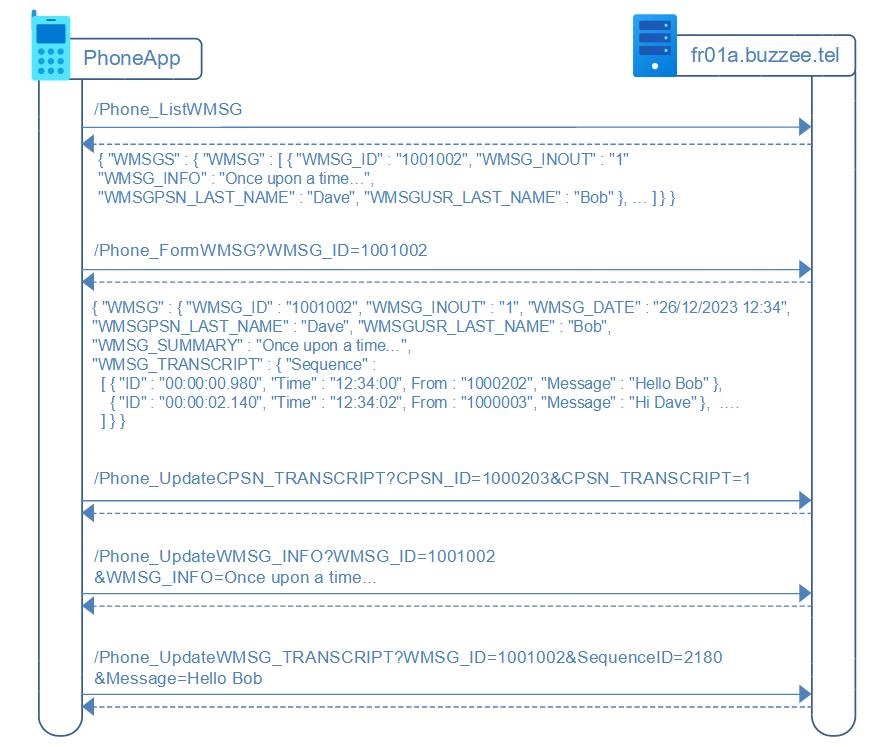
When starting the PhoneApp, it retrieves the list of messages (of type phone recorded) by sending a Phone_ListWMSG request to Delos, and may request some details per phone call by invoking Phone_FormWMSG
/Phone_ListWMSG (PhoneApp -> Delos)
PhoneApp may retrieve the list of recent conversations by invoking as HTTP GET request
https://fr01a.buzzee.tel/JSON/1xxx1abcdef/Phone_ListWMSG?WMSGKND_ID=-3515
| Fields | Description |
|---|---|
| WMSGKND_ID | Optional. By default will filter the Phone messages. WMSGKND_ID: -3515=Phone call, -3504=Recording, -3528=Voicemail, -3506=Conference (ConfCall) To filter on multiple medias use a comma separated formatting. WMSGKND_ID=-3515,-3528 -> Phone call + Voicemails |
| Status | Optional. By default will not filter any transcrition status. Status=Transcripting will filter transcriptions actually in a pending state (actually including both state Queued and Transcription in progress) Status=Queued will filter transcriptions waiting in the queue to being processed. To filter on multiple status, use comma separated formatting. Status=Queued,Transcripting,OK will list pending and completed transcriptions. To list blank status, you need to setup parameter value as Status=, <- including the comma |
| EOF | Optional. By default it is blank, and it will not filter "missed calls" (incoming) and "not answered calls" (outgoing). EOF=1 will list only "missed calls" (incoming) and "not answered calls" (outgoing). EOF=0 will filter out "missed calls" (incoming) and "not answered calls" (outgoing). |
| WMSG_StartingRow | Optional. Fetch a new datapacket starting from the N row. The previous response contains at the level of WMSGS the attribute "@NextStartingRow": "30" By requesting WMSG_StartingRow=30 it will load the next 30 records. When the datapacket reached the end of all records, the attribute @EOF will be set to 1 at level of WMSGS. |
| WMSG_MaxRows | Optional. The number of records to extract per datapacket. When the datapacket reached the end of all records, the attribute @EOF will be set to 1 at level of WMSGS. |
Delos instance respond with a JSON document corresponding to the list of messages:
{ "WMSGS" : { "WMSG" : [
   { "WMSG_ID": "1001002", "WMSG_DATETIME": "2023-12-31 09:20:00", "WMSG_INOUT" : "2",
     "WMSG_INFO" : "Custom summary for confcall #2",
     "WMSG_SUMMARY" : "Once upon a time...",
     "WMSGUSR_PSN" : "1000002", "WMSGUSR_FIRST_NAME" : "Bob", "WMSGUSR_LAST_NAME" : "THEGREAT",
     "WMSGPSN_PSN" : "1000202", "WMSGPSN_FIRST_NAME" : "Dave", "WMSGPSN_LAST_NAME" : "THEUGLY" },
   { "WMSG_ID": "1001004", "WMSG_DATETIME": "2023-12-31 09:00:00", "WMSG_INOUT" : "1",
     "WMSG_INFO" : "Summary ConfCall #1",
     "WMSG_SUMMARY" : "Once upon a time...",
     "WMSGUSR_PSN" : "1000002", "WMSGUSR_FIRST_NAME" : "Bob", "WMSGUSR_LAST_NAME" : "THEGREAT",
     "WMSGPSN_PSN" : "1000202", "WMSGPSN_FIRST_NAME" : "Dave", "WMSGPSN_LAST_NAME" : "THEUGLY" },
   ...
   ] }
}
Actually, JSON document will return a larger document with a lot more fields, but these are the minimalists to be useful in the context of PhoneApp to display the recent calls
/Phone_DeleteAudio (PhoneApp -> Delos)
PhoneApp may delete audio file associated with a recording, (phone call, voicemail, conversation, recording, conference).
All stream files will be removed from disk, stream .all.wav, .in.wav, .out.wav.
Delete audio files by sending a HTTP GET request to Delos instance:
http://fr01a.buzzee.tel/JSON/1xxx1abcdef/Phone_DeleteAudio?WMSG_ID=1001001
| Fields | Description |
|---|---|
| WMSG_ID | The Message ID of the conversation to delete. |
Delos instance will respond with the Status OK:
{ "Status" : "OK" }
Delos will set in DB KURL_AUDIO_DELETED=1 in the record WMSG which will be available for /Phone_FormWMSG to indicate if the audio files have been deleted.
The following table summarizes the different error codes:
| Errors | Description |
|---|---|
| ERR_BLANK_WMSG_ID | The parameter WMSG_ID is missing |
| ERR_FILE_NOT_FOUND | There is no file attached to this message |
/DeleteWMSG (PhoneApp -> Delos)
PhoneApp may delete a WMSG (phone call, voicemail, conversation, recording, conference).
All stream files will be removed from disk, stream .all.wav, .in.wav, .out.wav. and all content of the transcription will be deleted from the database.
Delete a WMSG by sending a HTTP GET request to Delos instance:
http://fr01a.buzzee.tel/JSON/1xxx1abcdef/DeleteWMSG?WMSG_ID=1001001
| Fields | Description |
|---|---|
| WMSG_ID | The Message ID of the conversation to delete. |
Delos instance *may* respond with the Status OK:
{ "Status" : "OK" }
The following table summarizes the different error codes:
| Errors | Description |
|---|---|
| ERR_BLANK_WMSG_ID | The parameter WMSG_ID is missing |
| ERR_FILE_NOT_FOUND | There is no file attached to this message |
/Phone_ListDeletedWMSG (PhoneApp -> Delos)
PhoneApp may retrieve the list of deleted conversations by invoking as HTTP GET request
https://fr01a.buzzee.tel/JSON/1xxx1abcdef/Phone_ListDeletedWMSG?WMSGKND_ID=-3515
| Fields | Description |
|---|---|
| WMSGKND_ID | Optional. By default will filter the Phone messages. WMSGKND_ID: -3515=Phone call, -3504=Recording, -3528=Voicemail, -3506=Conference (ConfCall) To filter on multiple medias use a comma separated formatting. WMSGKND_ID=-3515,-3528 -> Phone call + Voicemails |
| Status | Optional. By default will not filter any transcrition status. Status=Transcripting will filter transcriptions actually in a pending state (actually including both state Queued and Transcription in progress) Status=Queued will filter transcriptions waiting in the queue to being processed. To filter on multiple status, use comma separated formatting. Status=Queued,Transcripting,OK will list pending and completed transcriptions. To list blank status, you need to setup parameter value as Status=, <- including the comma |
| WMSG_StartingRow | Optional. Fetch a new datapacket starting from the N row. The previous response contains at the level of WMSGS the attribute "@NextStartingRow": "30" By requesting WMSG_StartingRow=30 it will load the next 30 records. When the datapacket reached the end of all records, the attribute @EOF will be set to 1 at level of WMSGS. |
| WMSG_MaxRows | Optional. The number of records to extract per datapacket. When the datapacket reached the end of all records, the attribute @EOF will be set to 1 at level of WMSGS. |
Delos instance respond with a JSON document corresponding to the list of messages,
note that deleted WMSG will have a WMSG_DELETED with a date:
{ "WMSGS" : { "WMSG" : [
   { "WMSG_ID": "1001002", "WMSG_DATE": "12/12/2023 09:20:00", "WMSG_INOUT" : "2",
     "WMSG_DELETED": "01/01/2024 11:30:00",
     "WMSG_INFO" : "Custom summary for confcall #2",
     "WMSG_SUMMARY" : "Once upon a time...",
     "WMSGUSR_PSN" : "1000002", "WMSGUSR_FIRST_NAME" : "Bob", "WMSGUSR_LAST_NAME" : "THEGREAT",
     "WMSGPSN_PSN" : "1000202", "WMSGPSN_FIRST_NAME" : "Dave", "WMSGPSN_LAST_NAME" : "THEUGLY" },
   { "WMSG_ID": "1001004", "WMSG_DATE": "12/12/2023 09:00:00", "WMSG_INOUT" : "1",
     "WMSG_DELETED": "01/01/2024 11:00:00",
     "WMSG_INFO" : "Summary ConfCall #1",
     "WMSG_SUMMARY" : "Once upon a time...",
     "WMSGUSR_PSN" : "1000002", "WMSGUSR_FIRST_NAME" : "Bob", "WMSGUSR_LAST_NAME" : "THEGREAT",
     "WMSGPSN_PSN" : "1000202", "WMSGPSN_FIRST_NAME" : "Dave", "WMSGPSN_LAST_NAME" : "THEUGLY" },
   ...
   ] }
}
Actually, JSON document will return a larger document with a lot more fields, but these are the minimalists to be useful in the context of PhoneApp to display the recent calls
/Phone_RestoreAudio (PhoneApp -> Delos)
PhoneApp may restore deleted audio files associated with a recording, (phone call, voicemail, conversation, recording, conference).
All stream files will be restored from trash, stream .all.wav, .in.wav, .out.wav.
Restore deleted audio files by sending a HTTP GET request to Delos instance:
http://fr01a.buzzee.tel/JSON/1xxx1abcdef/Phone_RestoreAudio?WMSG_ID=1001001
| Fields | Description |
|---|---|
| WMSG_ID | The Message ID of the audio files to restore. |
Delos instance will respond with the Status OK:
{ "Status" : "OK" }
The following table summarizes the different error codes:
| Errors | Description |
|---|---|
| ERR_BLANK_WMSG_ID | The parameter WMSG_ID is missing |
| ERR_FILE_NOT_FOUND | There is no file attached to this message |
/RestoreDeletedWMSG (PhoneApp -> Delos)
PhoneApp may restore a deleted WMSG (phone call, voicemail, conversation, recording, conference).
All stream files will be restored from disk, stream .all.wav, .in.wav, .out.wav. and content of the transcription will be restored from the database.
Restore a deleted WMSG by sending a HTTP GET request to Delos instance:
http://fr01a.buzzee.tel/JSON/1xxx1abcdef/RestoreDeletedWMSG?WMSG_ID=1001001
| Fields | Description |
|---|---|
| WMSG_ID | The Message ID of the deleted conversation to restore. |
Delos instance *may* respond with the Status OK:
{ "Status" : "OK" }
The following table summarizes the different error codes:
| Errors | Description |
|---|---|
| ERR_BLANK_WMSG_ID | The parameter WMSG_ID is missing |
| ERR_FILE_NOT_FOUND | There is no file attached to this message |
/Phone_ListCPSNMSG (PhoneApp -> Delos)
PhoneApp may retrieve the list of recent conversations per contact (Dave THEUGLY) by invoking as HTTP GET request with the CPSN_ID as parameter:
https://fr01a.buzzee.tel/JSON/1xxx1abcdef/Phone_ListCPSNMSG?CPSN_ID=1000202&WMSGKND_ID=-3515
| Fields | Description |
|---|---|
| CPSN_ID | The contact ID. You may retrieve the CPSN_ID from the phone number using the service Phone_GetCPSN |
| WMSGKND_ID | Optional. By default will filter the Phone messages. WMSGKND_ID: -3515=Phone call, -3504=Recording, -3528=Voicemail, -3506=Conference (ConfCall) |
| Status | Optional. By default will not filter any transcrition status. Status=Transcripting will filter transcriptions actually in a pending state (actually including both state Queued and Transcription in progress) Status=Queued will filter transcriptions waiting in the queue to being processed. To filter on multiple status, use comma separated formatting. Status=Queued,Transcripting,OK will list pending and completed transcriptions. To list blank status, you need to setup parameter value as Status=, <- including the comma |
| WMSG_StartingRow | Optional. Fetch a new datapacket starting from the N row. The previous response contains at the level of WMSGS the attribute "@NextStartingRow": "30" By requesting WMSG_StartingRow=30 it will load the next 30 records. When the datapacket reached the end of all records, the attribute @EOF will be set to 1 at level of WMSGS. |
| WMSG_MaxRows | Optional. The number of records to extract per datapacket. When the datapacket reached the end of all records, the attribute @EOF will be set to 1 at level of WMSGS. |
Delos instance responds with a JSON document corresponding to the list of messages for this contact:
{ "WMSGS" : { "WMSG" : [
   { "WMSG_ID": "1001002", "WMSG_DATE": "12/12/2023 09:20:00", "WMSG_INOUT" : "2",
     "WMSG_INFO" : "Custom summary for confcall #2",
     "WMSG_SUMMARY" : "Once upon a time...",
     "WMSGUSR_PSN" : "1000002", "WMSGUSR_FIRST_NAME" : "Bob", "WMSGUSR_LAST_NAME" : "THEGREAT",
     "WMSGPSN_PSN" : "1000202", "WMSGPSN_FIRST_NAME" : "Dave", "WMSGPSN_LAST_NAME" : "THEUGLY" },
   { "WMSG_ID": "1001004", "WMSG_DATE": "12/12/2023 09:00:00", "WMSG_INOUT" : "1",
     "WMSG_INFO" : "Summary ConfCall #1",
     "WMSG_SUMMARY" : "Once upon a time...",
     "WMSGUSR_PSN" : "1000002", "WMSGUSR_FIRST_NAME" : "Bob", "WMSGUSR_LAST_NAME" : "THEGREAT",
     "WMSGPSN_PSN" : "1000202", "WMSGPSN_FIRST_NAME" : "Dave", "WMSGPSN_LAST_NAME" : "THEUGLY" },
   ...
   ] }
}
Actually, JSON document will return a larger document with a lot more fields, but these are the minimalists to be useful in the context of PhoneApp to display the recent calls.
/Phone_UpdateWMSG_TRANSCRIPT_STATUS (PhoneApp -> Delos)
PhoneApp can update the status of the transcript (WMSG_TRANSCRIPT_STATUS) by invoking Delos with a POST request:
https://fr01a.buzzee.tel/JSON/1xxx1abcdef/Phone_UpdateWMSG_TRANSCRIPT_STATUS
with the following parameters:
| Fields | Description |
|---|---|
| WMSG_ID | ID of the WMSG to update |
| WMSG_TRANSCRIPT_STATUS | The status to enforce. Example: Preview |
The response will be blank
{}
The following table summarizes the different error codes:
| Errors | Description |
|---|---|
| ERR_BLANK_WMSG_ID | The parameter WMSG_ID is missing |
/Phone_UpdateWMSG_INFO (PhoneApp -> Delos)
PhoneApp can update the summary of the transcript (WMSG_INFO) by invoking Delos with a POST request:
https://fr01a.buzzee.tel/JSON/1xxx1abcdef/Phone_UpdateWMSG_INFO
with the following parameters:
| Fields | Description |
|---|---|
| WMSG_ID | ID of the WMSG to update |
| WMSG_INFO | The content of the summary including as the first line the subject |
The response will include the WMSG_ID
{ "WMSG_ID" : "1001002" }
The following table summarizes the different error codes:
| Errors | Description |
|---|---|
| ERR_BLANK_WMSG_ID | The parameter WMSG_ID is missing |
/Phone_Summarize (PhoneApp -> Delos)
PhoneApp lookup in the local contact manager of the device when the CPSN_LAST_NAME is a phone number,
if the contact exists, PhoneApp may batch the contact infos to Delos,
in order to take advantage of the contact infos for the summarization of a transcription,
PhoneApp may invoke Phone_Summarize to reprocess the summarization taking into account the contact infos newly updated.
https://fr01a.buzzee.tel/JSON/1xxx1abcdef/Phone_Summarize?WMSG_ID=1001003&Preview=1
| Parameters | Description |
|---|---|
| WMSG_ID | ID of the WMSG to reprocess the summarization woth the contact infos |
| Preview | If the WMSG_TRANSCRIPT_STATUS=Preview then the parameter should be set to Preview=1 |
The response will be Status=OK
{ "Status" : "OK" }
The following table summarizes the different error codes:
| Errors | Description |
|---|---|
| ERR_BLANK_WMSG_ID | The parameter WMSG_ID is missing |
| Any HTTP error | returned by the LLM provider while invoking /v1/chat/completions |
/Phone_UpdateWMSG_TRANSCRIPT (PhoneApp -> Delos)
PhoneApp can update a specific sequence of the transcript (WMSG_TRANSCRIPT) by invoking Delos with a POST request:
https://fr01a.buzzee.tel/JSON/1xxx1abcdef/Phone_UpdateWMSG_TRANSCRIPT
with the following parameters:
| Fields | Description |
|---|---|
| WMSG_ID | ID of the WMSG to update |
| SequenceID | The ID of the sequence to update |
| Message | The content of the sequence to update |
The response will include the WMSG_ID
{ "WMSG_ID" : "1001002" }
The following table summarizes the different error codes:
| Errors | Description |
|---|---|
| ERR_BLANK_WMSG_ID | The parameter WMSG_ID is missing |
| ERR_BLANK_SEQUENCEID | The parameter SequenceID is missing |
/Phone_MakeCall
Delos may relay from PhoneApp a request MakeCall with parameters Source and Destination
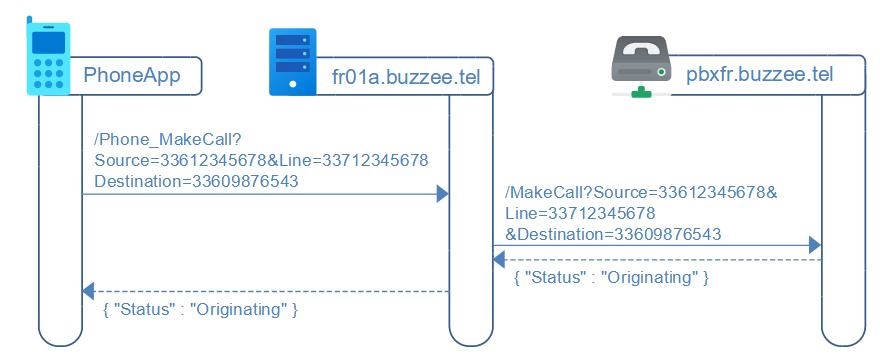
PhoneApp will invoke Delos instance with a HTTP GET request
https://fr01a.buzzee.tel/JSON/1xxx1abcdef/Phone_MakeCall?Source=336122345678&Line=33712345678&Destination=3309876543
Les paramètres à fournir sont les suivants :
| Fields | Description |
|---|---|
| Source | This is the phone number of the user, formatted as 33612345678 |
| Line | This is the line number of the device of the user, also called the secondary eSIM, formatted as 33712345678 |
| Destination | This is the phone number of the contact to call, formatted as 33609876543 |
Delos instance will respond with the Status Originating, meaning the request has been forwarded to S2T server:
{ "Status" : "Originating" }
The VoIP centrex should then make ring the mobile phone of the user and the standard phone utility application will take over.
This endpoint may raise an error which is formatted as follow:
{ "Code" : "ERR_SOURCE_IS_NOT_USER", "Message": "Source is not a user" }
The following table summarizes the different error codes:
| Errors | Description |
|---|---|
| ERR_SOURCE_IS_NOT_USER | Cannot lookup user from Source phone/cell number. |
| ERR_SOURCE_IS_NOT_USER_PHONE | Source phone number is not associated with the authenticated user. |
| ERR_SOURCE_IS_NOT_USER_CELL | Source cell number is not associated with the authenticated user. |
| ERR_DESTINATION_UNAUTHORIZED | This error may be triggered by the PBX when trying to call a destination number which is not authorized. PBX returns Status "405 Method Not Allowed" with content ERR_DESTINATION_UNAUTHORIZED which is forwarded as ErrorCode in the response to the client. |